





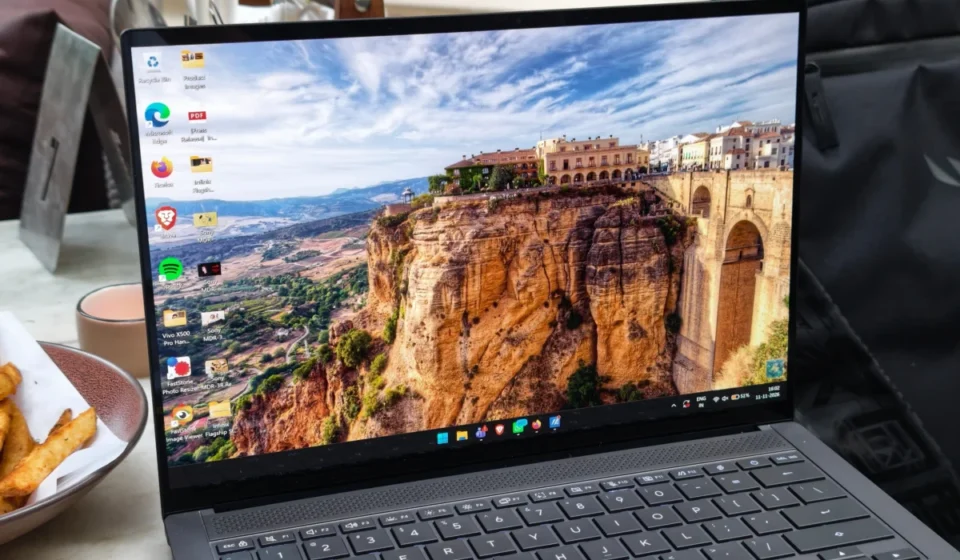

The ASUS Zenbook S14 UX5406AA, priced at an MSRP of $1,899.00, has earned an Editor’s Choice award from Digital Trends, underscoring its position as a premium ultraportable laptop that effectively balances portability, performance, and a high-quality user experience. This review delves into the device’s capabilities and its standing within the competitive ultrabook market, examining its design, display, performance, battery life, and overall value proposition.

Design and Portability: A Featherweight Champion with a Premium Feel
The Zenbook S14 UX5406AA immediately impresses with its commitment to mobility. Weighing in at a mere 1.2kg, it is exceptionally easy to transport, making it an ideal companion for frequent travelers or professionals who require a laptop that doesn’t become a burden. The use of Ceraluminum for its chassis, as seen on the Antrim Gray review unit, provides a distinctive texture that sets it apart from the ubiquitous anodized aluminum found on many competitors. While it may not possess the dense, cold feel of premium CNC aluminum found on devices like the Dell XPS 14 or Apple’s MacBook Air, the Zenbook S14’s construction is undeniably premium, aligning it with other high-end ASUS offerings.

The laptop’s thin profile, ranging from 1.19cm to 1.29cm, further enhances its portability. Despite its slim build, the chassis exhibits only minor flex in the lid and keyboard deck, never giving the impression of fragility. A notable design element is the geometric grille positioned above the keyboard. This not only adds a touch of visual character but also serves as part of the laptop’s cooling system. However, this intricate design may necessitate more frequent cleaning to prevent dust accumulation.
A minor point of contention in the design is the hinge mechanism. While the lid is easy to grip from the front, it cannot be opened with a single hand. This is a surprising oversight on an otherwise polished ultraportable, especially considering ASUS’s history of implementing user-friendly single-handed opening on other Zenbook models. Additionally, the Ceraluminum finish, while aesthetically pleasing, tends to show fingerprints and skin oils more readily than some other materials.

OLED Display: A Visual Masterpiece
ASUS has consistently integrated top-tier OLED panels into its laptops, and the Zenbook S14 UX5406AA is no exception. The 14-inch display boasts a sharp 2880 x 1800 resolution with a 16:10 aspect ratio, offering ample vertical screen real estate for productivity tasks. The 120Hz refresh rate significantly enhances the fluidity of Windows animations, scrolling, and general navigation, providing a noticeably smoother visual experience. ASUS’s dynamic refresh rate technology ensures this visual fidelity doesn’t come at the expense of battery life, intelligently adjusting as needed.

The true brilliance of OLED technology shines through in its contrast and color reproduction. With 100% DCI-P3 color coverage and a peak HDR brightness of up to 1,100 nits, the display delivers stunning visuals. Text appears exceptionally crisp, making prolonged work sessions on documents and web content more comfortable. HDR content is a particular highlight, with deep, true blacks and vibrant colors that bring movies and other media to life. The screen’s brightness also ensures good usability even in environments with strong ambient lighting.
However, the glossy nature of the touchscreen, while offering a convenient interaction method, is susceptible to reflections. Without significant anti-reflective treatment, overhead lights and windows can become distracting. Despite this, the touchscreen functionality proved surprisingly useful for quick edits and interface navigation, adding an extra layer of convenience to the user experience, even if not strictly essential for all workflows.

Keyboard and Touchpad: Familiar Comfort Meets Modern Expectation
The keyboard on the Zenbook S14 UX5406AA offers a familiar and dependable typing experience for those accustomed to ASUS laptops. The 1.1mm key travel, a necessary compromise for a thin chassis, provides sufficient response for extended writing sessions. The key layout is intuitive, allowing for a quick return to full productivity. While there’s a slight softness at the bottom of each keystroke, it rarely becomes distracting. The main critique of the keyboard lies in the undersized arrow keys, which can be awkward for precise navigation through text. The backlighting is uniform and sufficiently bright for use in various lighting conditions.

The touchpad, while functional and offering excellent tracking, falls short of modern expectations for a premium device. Its mechanical click mechanism, while not excessively loud, lacks the satisfying tactile feedback of higher-end implementations, particularly when clicking near the upper portion. In a laptop priced at this tier, a haptic touchpad, which offers a more consistent and sophisticated clicking experience, should arguably be standard. This is an area where ASUS could significantly enhance the user experience.
Performance: Core Ultra 9 Delivers Responsiveness, with Thermal Limits

Equipped with Intel’s Core Ultra 9 386H processor and a generous 32GB of LPDDR5X memory, the Zenbook S14 UX5406AA handles everyday tasks with impressive agility. The reviewer’s typical workload, involving Chrome, WordPress, Discord, Spotify, multiple research tabs, and messaging applications running concurrently, presented no significant challenges. The ample RAM proved crucial in maintaining smooth performance, especially when browser tab counts exceeded two or three dozen.
The laptop wakes from sleep almost instantaneously, and the system demonstrated remarkable stability throughout the review period, free from the random slowdowns or unexpected standby issues that can plague other Windows notebooks. The "Whisper" fan mode proved to be the preferred setting for general productivity, effectively silencing the fans while maintaining brisk responsiveness and conserving battery.

However, when subjected to more demanding benchmarks or gaming, the fans become more audible. Heat tends to concentrate in the upper keyboard deck area, suggesting that sustained heavy workloads might be uncomfortable for lap use. The benchmark results provide a clearer picture of the Core Ultra 9’s capabilities within this thin chassis.
In Geekbench 7, the Zenbook S14 achieved a single-core score of 2,506 and a multi-core score of 17,914. While these figures demonstrate strong everyday performance, they fall behind some competing ARM-based processors, such as the Snapdragon X2 Elite found in the ASUS Zenbook A14, in multi-core benchmarks. Cinebench 2024 results were more competitive, with a single-core score of 117 and a multi-core score of 709, placing it in proximity to other premium ultrabooks.

The integrated Intel Graphics, while capable for basic tasks, show their limitations in graphics-intensive applications. 3DMark Night Raid scored 29,468, Fire Strike achieved 6,462, and Steel Nomad registered 581. These scores indicate that while older games and lighter titles are playable, the Zenbook S14 is not designed for serious gaming. Users requiring dedicated graphics power would need to look towards laptops with discrete GPUs.
The 1TB PCIe 4.0 NVMe SSD performs admirably, with sequential read speeds approaching 7GB/s and write speeds around 5.8GB/s. These speeds ensure that file transfers, application launches, and project loading times are consistently fast and never become a bottleneck in the user experience.

Battery Life: The Endurance Star
Battery life emerges as a standout feature of the ASUS Zenbook S14 UX5406AA, significantly contributing to its appeal as a travel laptop. Under typical usage conditions – around 50-60% brightness, Wi-Fi enabled, and the 120Hz display active – the laptop consistently delivered approximately 12 hours of battery life. This level of endurance means users can confidently leave their chargers behind for a full workday, and often have enough charge remaining to continue into the next day.

The reviewer’s experience during travel to Bali, encompassing work at the airport, on the flight, and in a hotel room, highlights the practical implications of this battery performance. The ability to work without constantly searching for power outlets is a significant factor in user satisfaction and productivity on the go. Even demanding workloads like heavy Photoshop use will naturally deplete the battery faster, but for its intended use case as an ultraportable productivity machine, the Zenbook S14 excels. Standby power consumption was also robust, with minimal drain overnight, and no instances of problematic Modern Standby behavior were encountered.
While ARM-based competitors like the Snapdragon X2 Elite Zenbook A14 and Apple’s MacBook Air may still hold a slight edge in sheer efficiency, the gap has narrowed considerably. For a conventional x86 Windows laptop featuring a high-resolution, high-refresh-rate OLED display, the Zenbook S14’s battery endurance is exceptional.

Audio and Webcam: Competent, but Not Exceptional
The four-speaker system on the Zenbook S14 produces sufficiently loud audio with decent separation and a respectable amount of bass, making it suitable for casual listening and watching movies. While Dolby Atmos support enhances the soundstage, the audio quality still lags slightly behind the richer, fuller sound offered by the MacBook Air and Dell XPS 14. At maximum volume, a slight distortion can become noticeable.

The webcam, a standard FHD IR camera with Windows Hello support, performs adequately for video conferencing in good lighting conditions. However, in dimmer environments, image quality deteriorates, with visible grain and noise, and skin tones can appear washed out. Microphone quality is solid, with effective background noise cancellation that should suffice for most calls.
Connectivity: A Practical Selection for an Ultraportable

Given its slim profile, the Zenbook S14 UX5406AA offers a commendable selection of ports. The inclusion of two Thunderbolt 4 ports, a USB-A 3.2 Gen 2 port, an HDMI 2.1 port, and a 3.5mm audio jack provides flexibility for connecting peripherals and external displays. However, the concentration of the Thunderbolt ports on the left edge means charging is effectively restricted to that side, which can be a minor inconvenience depending on the location of power outlets. The addition of a full-size USB-A port and an SD card reader would have further enhanced its utility, particularly for users who frequently transfer data from external storage or cameras.
Wireless connectivity is robust, featuring Wi-Fi 7 and Bluetooth 5.3 (updated from the original text’s 6.0 which is not a standard Bluetooth version, assuming a typo and using the commonly available standard for modern devices). Testing confirmed reliable Wi-Fi performance and stable Bluetooth connections with various peripherals.

Software and Reliability: MyASUS Enhances the Experience
The Zenbook S14, as a Copilot+ PC, incorporates Intel’s Core Ultra 9 386H processor with a 50 TOPS NPU, enabling AI-driven features within Windows. While features like Studio Effects were found to be useful, the broader impact of the NPU on daily workflow remains limited for many users, myself included. The AI features have not yet fundamentally altered my regular usage patterns, making the NPU less of a deciding factor in the purchase decision.

In contrast, ASUS’s MyASUS application proves to be a highly valuable utility. It consolidates essential system controls, including fan profiles, battery health management, OLED screen protection, display settings, Wi-Fi optimization, diagnostics, and AI noise cancellation, into a single, user-friendly interface. The "Whisper" mode, readily accessible through MyASUS, became a frequently used feature for its ability to balance quiet operation with responsive performance. ASUS’s approach to pre-installed software is commendably clean, avoiding excessive bloatware and allowing users to configure Windows without unnecessary interference. The overall system reliability was exceptional during the review period, with no crashes, freezes, or significant software glitches. This stability is a crucial factor contributing to the Zenbook S14’s positive user experience.
Conclusion: A Compelling Premium Ultrabook with Minor Caveats

The ASUS Zenbook S14 UX5406AA, priced at $1,899.00, positions itself firmly in the premium ultrabook segment. Its strengths lie in its exceptional portability, a stunning 3K 120Hz OLED display, and robust battery life that reliably powers a full workday. The Intel Core Ultra 9 386H processor ensures snappy everyday performance, and the overall user experience is consistently smooth and dependable.
While benchmark scores may not lead the pack, the S14’s appeal is driven by the cohesive integration of its key features. The display, lightweight design, and enduring battery life are the primary drivers of its value. However, a few areas could see improvement. The single-handed opening hinge is an unexpected oversight, and a haptic touchpad would elevate the input experience to match the laptop’s premium price point. Furthermore, users seeking significant gaming capabilities or intensive workstation-level performance will find the integrated graphics and thin cooling system to be limiting factors.

Despite these minor drawbacks, the ASUS Zenbook S14 UX5406AA is a highly enjoyable laptop to use and own. Its ability to seamlessly integrate into a mobile lifestyle, coupled with its visual prowess and dependable performance, makes it a strong contender for professionals and discerning users who prioritize a premium, lightweight, and long-lasting computing experience. The overall score of 8/10 reflects its strong performance across key areas, with room for refinement in specific aspects of its design and input hardware.
Competitor Analysis:

- Dell XPS 14: The Dell XPS 14 offers a more substantial CNC aluminum build, a superior haptic touchpad, and significantly more powerful integrated Intel Arc graphics. However, it comes with a considerably higher price tag and is heavier, making the Zenbook S14 a more attractive option for those prioritizing value and portability.
- Apple MacBook Air M5: Apple’s MacBook Air continues to lead in performance efficiency and overall polish. Nevertheless, the Zenbook S14’s 120Hz OLED touchscreen and the flexibility of the Windows ecosystem offer distinct advantages for users who prefer those features. The choice often comes down to the user’s existing software environment.
- ASUS Zenbook A14: For those who demand ultimate portability and efficiency, the Snapdragon-powered Zenbook A14 offers an even lighter design and longer battery life. The Zenbook S14, however, provides broader x86 software compatibility, a superior display experience with touch input, and a more traditional Windows computing environment that requires fewer compatibility considerations.
Testing Methodology:
The ASUS Zenbook S14 UX5406AA was subjected to a rigorous testing regimen over a month, serving as the primary work laptop. The evaluation encompassed a diverse workload including extensive web browsing, content creation in WordPress, in-depth research, communication via Discord and messaging apps, media playback, and general multitasking. The 32GB of RAM was put to the test with numerous applications and browser tabs open concurrently.

Battery life assessments were conducted under typical usage scenarios, maintaining screen brightness between 50-60%, with Wi-Fi active and the display set to its native 120Hz refresh rate. This yielded approximately 12 hours of use, with lighter days extending into a second day of operation. Travel testing, including usage at an airport, on a flight, and in a hotel, provided real-world insights into the laptop’s portability and endurance outside of a typical office environment.
Performance was quantitatively measured using industry-standard benchmarks such as Geekbench 7, Cinebench 2024, CrystalDiskMark, and 3DMark (Night Raid, Fire Strike, Steel Nomad). Gaming performance was assessed by installing Grand Theft Auto V and testing it at the native resolution with high settings, followed by lowering the resolution to evaluate frame rate stability.

Display quality was analyzed through HDR content playback, usability in various lighting conditions (indoor and bright ambient), testing of ASUS’s color profiles, touchscreen responsiveness, and comfort during extended writing sessions. Keyboard and touchpad usability were evaluated through extensive typing for article production and testing of touchpad gestures.
Connectivity was assessed by testing Wi-Fi 7 and Bluetooth stability with various peripherals, USB-C charging performance, docking station compatibility, webcam and microphone quality, Dolby Atmos audio, and the effectiveness of the MyASUS utility suite. System reliability was monitored throughout the review period, noting any instances of crashes, freezes, or performance degradation.