
IOS 27 Beta 4 Rolls Out with Refined Features and Hints of Future Hardware Innovations

Apple continues its meticulous refinement of iOS 27 with the release of its fourth developer beta, a crucial step in the software’s journey towards its anticipated September launch. While this iteration introduces fewer sweeping changes than its predecessors, it nonetheless bolsters user experience through a series of targeted enhancements and subtly hints at forthcoming hardware developments. This beta update, made available on Monday, July 20, 2026, offers a deeper look into Apple’s ongoing commitment to optimizing its mobile operating system, focusing on user-facing improvements across key applications and system settings.

Enhanced Media Consumption in the TV App
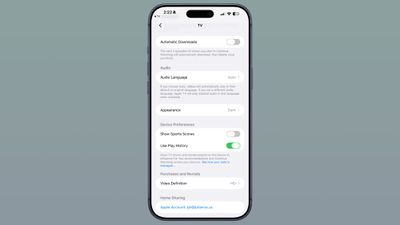
A notable enhancement arrives in the TV app, addressing the viewing habits of its users. Within the app’s settings, a new "Automatic Downloads" toggle has been introduced. When activated, this feature will proactively download the next two episodes of any series the user has started in their "Continue Watching" list. This intelligent pre-caching aims to ensure a seamless viewing experience, minimizing interruptions by having subsequent episodes readily available. Crucially, these automatically downloaded episodes will be intelligently removed from the device once the user has finished watching them, thereby managing storage space efficiently. This move signals Apple’s continued investment in its TV+ ecosystem and its effort to provide a more integrated and user-friendly entertainment platform. The addition of this feature suggests an understanding of binge-watching culture and a desire to cater to users who prefer uninterrupted viewing sessions.
Photos App Gets a Visual Polish with "Zoom to Fill"
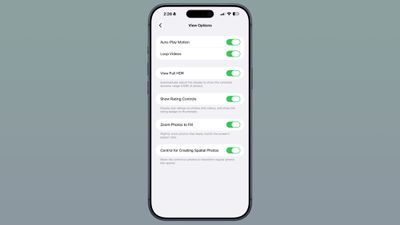
The Photos app also receives a subtle yet impactful visual adjustment in this beta. A new "Zoom Photos to Fill" toggle, located within the Photos section of the Settings app, is designed to enhance the presentation of images. This option automatically applies a slight zoom to photos that closely match the device’s screen aspect ratio. The intention is to provide a more immersive and edge-to-edge viewing experience, eliminating small black bars that might otherwise appear on certain images. This setting is enabled by default, indicating Apple’s belief in its aesthetic appeal and its potential to elevate the visual presentation of user-captured memories. This enhancement aligns with Apple’s broader design philosophy of optimizing visual content for its high-resolution displays.

Wallpaper Feature Removal from Notification Center
In a move that may surprise some, Apple has removed a wallpaper-related feature that was introduced in Beta 3. The functionality, which allowed users to see a cutout of the subject of their wallpaper when swiping within the Notification Center on the Home Screen, has been deactivated. While the exact reasoning for its removal is not officially stated, it is common for Apple to iterate on features during the beta process, refining them or sometimes withdrawing them if they do not meet certain usability or performance benchmarks. This decision highlights the iterative nature of software development, where features are constantly evaluated for their contribution to the overall user experience.
Siri’s Evolving Voice and Interface
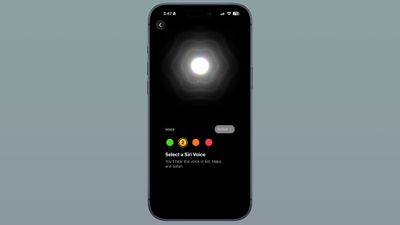
Significant refinements are also evident in the Siri Voice selection interface. On devices that do not support custom voice customization, the interface has adopted the appearance of the custom voice selection, offering a wider array of voices and accents. For devices that do support custom Siri selections, Apple is hinting at the imminent arrival of more voice options, with the company stating that these are "coming soon." This expansion of Siri’s vocal repertoire and customization options underscores Apple’s ongoing efforts to make its virtual assistant more personal and adaptable to individual user preferences.
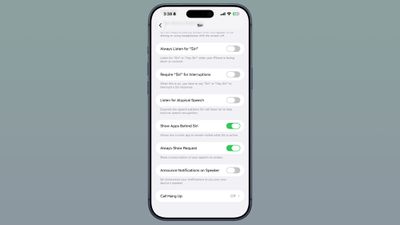
Furthermore, the Siri settings have seen adjustments in the beta. A new option allows users to control the length of previews displayed within the Siri app, with choices ranging from up to five lines to no preview at all. This granular control over information display caters to users who prefer brevity or more detailed information. In the Accessibility settings, a new "Always Show Request" toggle has been added, which will display a real-time transcription of user voice commands to Siri on the screen. This feature is particularly beneficial for users who are hard of hearing or who prefer visual confirmation of their requests.
The "Siri Search or Ask" interface, accessed by swiping down on the Home Screen, now features an introductory splash screen. This screen serves to explain the functionality of this powerful search and query tool, potentially aiding newer users in understanding its capabilities. The limited availability of the custom Siri voice to specific high-end iPhone models, such as the iPhone 17 Pro, iPhone 17 Pro Max, and iPhone Air, indicates a tiered rollout strategy for advanced AI features, likely tied to the processing power and neural engine capabilities of these devices.
Advanced Video Recording with ProRes Log Format
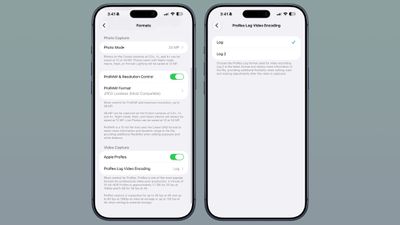
For content creators and videographers, iOS 27 Beta 4 introduces expanded capabilities within the Camera app. When Apple ProRes is enabled, users now have the option to select a ProRes log format. This includes "Log" and the newly introduced "Log 2" encoding. The "Log 2" format is particularly noteworthy as it is designed to retain even more image data within the video file. This increased flexibility in post-production allows for greater latitude in color grading and image adjustments after the video has been captured, providing professional-level control over the final visual output. This feature positions the iPhone as an increasingly viable tool for serious mobile filmmaking.
Granular Control Over Wi-Fi Connectivity
Network management sees an improvement with a new option related to Wi-Fi Assist, now referred to as "Connectivity Assist" in some contexts. Users can now enable or disable this feature on a per-Wi-Fi network basis, irrespective of the master toggle’s status. This allows for more nuanced control over how the device manages its internet connection, ensuring that users can fine-tune their network preferences for specific environments or connections. This level of customization can help optimize data usage and connection stability across various Wi-Fi networks.
AirPods Control Center Enhancements
The integration of AirPods with iOS 27 has also been refined. The appearance of AirPods options within the Control Center has been updated, including an expansion of choices for "Adaptive mode." This suggests a continued effort to provide users with more immediate and intuitive control over their audio accessories directly from the system’s main interface. The enhanced Adaptive mode likely offers more sophisticated ways to manage noise cancellation and transparency settings, catering to a wider range of listening scenarios.
Hints of Dual-Battery iPhone Architecture
Perhaps the most intriguing development within iOS 27 Beta 4 comes from under-the-hood code. References to a "dual-battery iPhone" have been discovered, with strings of code such as "The batteries in this iPhone are performing as expected." This suggests that Apple is actively developing or testing iPhones that incorporate two batteries. Such an architecture is often associated with the need for increased power demands, potentially for next-generation foldable devices or future iPhone Ultra models that require more substantial power reserves to operate complex displays and components. This could be a significant step towards addressing battery life concerns in more power-intensive future iPhone designs, possibly hinting at the long-rumored foldable iPhone Ultra.
Timeline and Context of iOS 27 Development
The release of iOS 27 Beta 4 follows a structured development cycle initiated at Apple’s Worldwide Developer Conference (WWDC) in June 2026. Following the initial keynote and the release of the first developer beta, Apple has consistently provided bi-weekly updates, with Beta 2 arriving on June 22, 2026. This cadence suggests a steady progression towards the public launch, allowing developers ample time to integrate new features and test their applications. The subsequent betas, including this latest release, focus on bug fixing, performance optimization, and the introduction of smaller feature refinements, ensuring a stable and feature-rich final product for consumers. The ongoing beta testing phase is critical for identifying and rectifying any unforeseen issues before the widespread availability of iOS 27, which is traditionally in September.
Broader Implications and User Impact
The cumulative effect of these updates in iOS 27 Beta 4 points towards a user experience that is becoming increasingly refined, personalized, and capable. The enhancements to the TV app and Photos app reflect Apple’s commitment to improving media consumption and presentation. The continued evolution of Siri, with its expanded voice options and improved interface, signifies a significant push towards more natural and intuitive human-computer interaction, especially with the advent of generative AI capabilities being integrated. The inclusion of professional-grade video features like ProRes Log format further solidifies the iPhone’s position as a powerful creative tool.
The subtle hints of dual-battery technology in the beta code are particularly significant, potentially signaling a major shift in iPhone hardware design. If implemented, this could pave the way for devices with longer battery life or entirely new form factors, such as foldable iPhones, that require more sophisticated power management solutions. The granular control offered in Wi-Fi and AirPods settings demonstrates Apple’s attention to detail in optimizing the user’s day-to-day interaction with their devices and accessories.
As Apple progresses through its beta program, the focus remains on delivering a robust and innovative operating system. The forthcoming public release of iOS 27 is expected to be a significant update, building upon the solid foundation of previous versions while introducing key advancements that will shape the mobile experience for millions of users worldwide. The iterative process, evident in the refinement of features and the careful introduction of new ones, underscores Apple’s dedication to delivering high-quality software that meets the evolving needs and expectations of its user base.