Action Notch: Transforming the Smartphone Notch from Nuisance to Powerhouse Productivity Tool

The modern smartphone landscape is defined by sleek designs and expansive displays, yet a persistent feature—the front-facing camera cutout, commonly known as the notch or punch-hole—has long been a point of contention for users and a design challenge for manufacturers. While its primary purpose is to house essential components like cameras and sensors, this small interruption in the screen often goes underutilized, perceived by many as an unavoidable aesthetic compromise. However, a burgeoning category of utility applications is emerging to reclaim this digital real estate, with Action Notch standing out as a prime example of software innovation breathing new life into this overlooked design element. This free Android application transforms the passive camera cutout into an active, customizable control surface, allowing users to execute a wide array of commands through intuitive tap and swipe gestures, thereby significantly enhancing device interaction and user efficiency.
The journey of the smartphone notch began in earnest with the iPhone X in 2017, although essential sensors and cameras had occupied portions of smartphone bezels for years. The notch was a design compromise, necessitated by the desire for an edge-to-edge display while still accommodating critical hardware for features like Face ID and the front camera. While initially controversial, prompting debates about screen immersion and aesthetic appeal, the design quickly propagated across the Android ecosystem, evolving into smaller "teardrop" notches and then "punch-hole" cutouts. Manufacturers invested heavily in display technologies to minimize their visual impact, often employing software tricks to "hide" them or integrating them into dynamic notification systems, such as Apple’s recent "Dynamic Island" concept. Yet, for many Android devices, the punch-hole remained a static, unexploited area. It is precisely this dormant potential that applications like Action Notch seek to unlock, turning a mere design necessity into a functional element of the user interface.
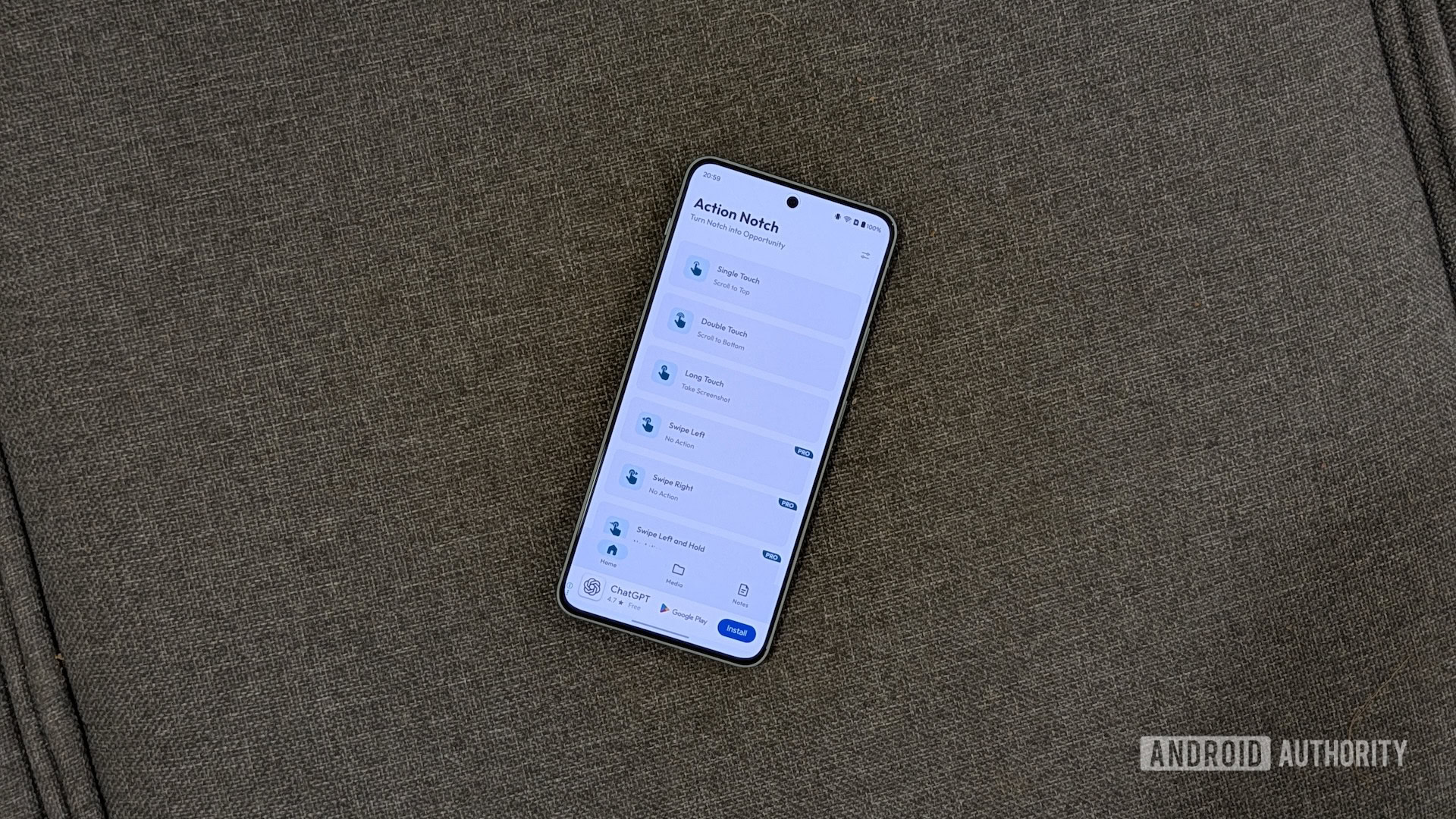
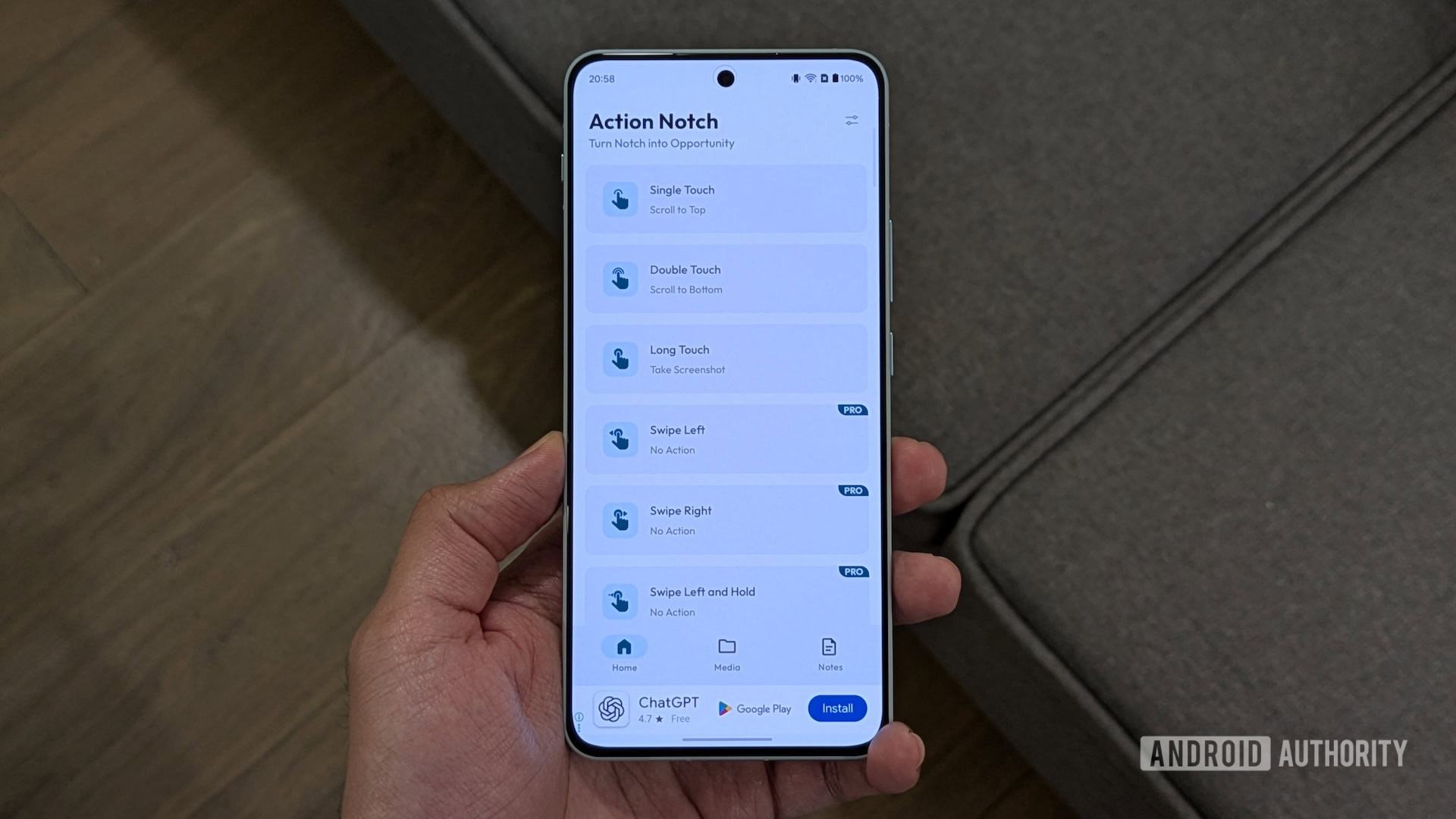
Action Notch positions itself as a critical utility for Android users aiming to maximize their device’s capabilities. At its core, the application redefines the camera cutout as a virtual button, responsive to various gestures. This innovative approach allows users to map common or complex actions to simple interactions with the notch area. For instance, a single tap on the camera cutout can be configured to capture a screenshot, a task traditionally requiring a combination of physical button presses that can often feel cumbersome or require awkward finger contortions. The app’s strength lies in its versatility, supporting multiple gesture types, including single-tap, double-tap, and long-press, ensuring that users are not limited to a singular command. This multi-gesture capability significantly expands the range of quick actions available at their fingertips.
Beyond basic device controls, Action Notch boasts an impressive library of over 50 supported actions. These range from straightforward utilities like toggling the flashlight or adjusting media playback, to more sophisticated integrations with automation platforms such as Tasker or MacroDroid. For power users, the ability to trigger custom-designed automated tasks directly from the notch opens up a new dimension of efficiency, allowing for complex routines to be initiated with a simple gesture. This broad spectrum of actions caters to a diverse user base, from those seeking minor conveniences to advanced users looking to streamline their workflow significantly.
The application further extends its utility through a professional version, which unlocks additional gestures and introduces a powerful feature known as rule-based actions. This advanced functionality allows a single gesture to perform different actions depending on the context, such as the active application. For example, a user could configure a single tap on the notch to take a screenshot when using a web browser, but to toggle the flashlight when on the home screen. This contextual intelligence minimizes the need for users to remember multiple gesture-action mappings, making the interaction more intuitive and adaptable to varying usage scenarios. Such dynamic capabilities highlight Action Notch’s commitment to delivering a highly personalized and efficient user experience.
The practical implications of Action Notch are perhaps best illustrated through common user workflows. Many Android users, particularly those accustomed to features on other mobile operating systems, often seek ways to enhance navigation and interaction. One frequently cited example is the "Scroll to Top" functionality, a prevalent feature in some ecosystems that allows users to quickly return to the beginning of a page by tapping the status bar. Action Notch replicates this convenience on Android devices through its "Scroll to Top" gesture. By mapping this to a single touch on the notch, users can effortlessly navigate long articles, social media feeds, or extensive document lists, regardless of the application they are using. This eliminates the need for endless scrolling, saving valuable time and reducing digital fatigue.
Complementing "Scroll to Top" is the "Scroll to Bottom" action, which Action Notch users often assign to a double-tap gesture. This allows for rapid navigation to the end of chat conversations, forum threads, or web pages, proving invaluable for quickly accessing footers, comment sections, or the latest messages in an ongoing discussion. For individuals who frequently engage in communication apps or browse content-heavy platforms like Reddit, this dual scrolling functionality significantly streamlines content consumption and interaction.
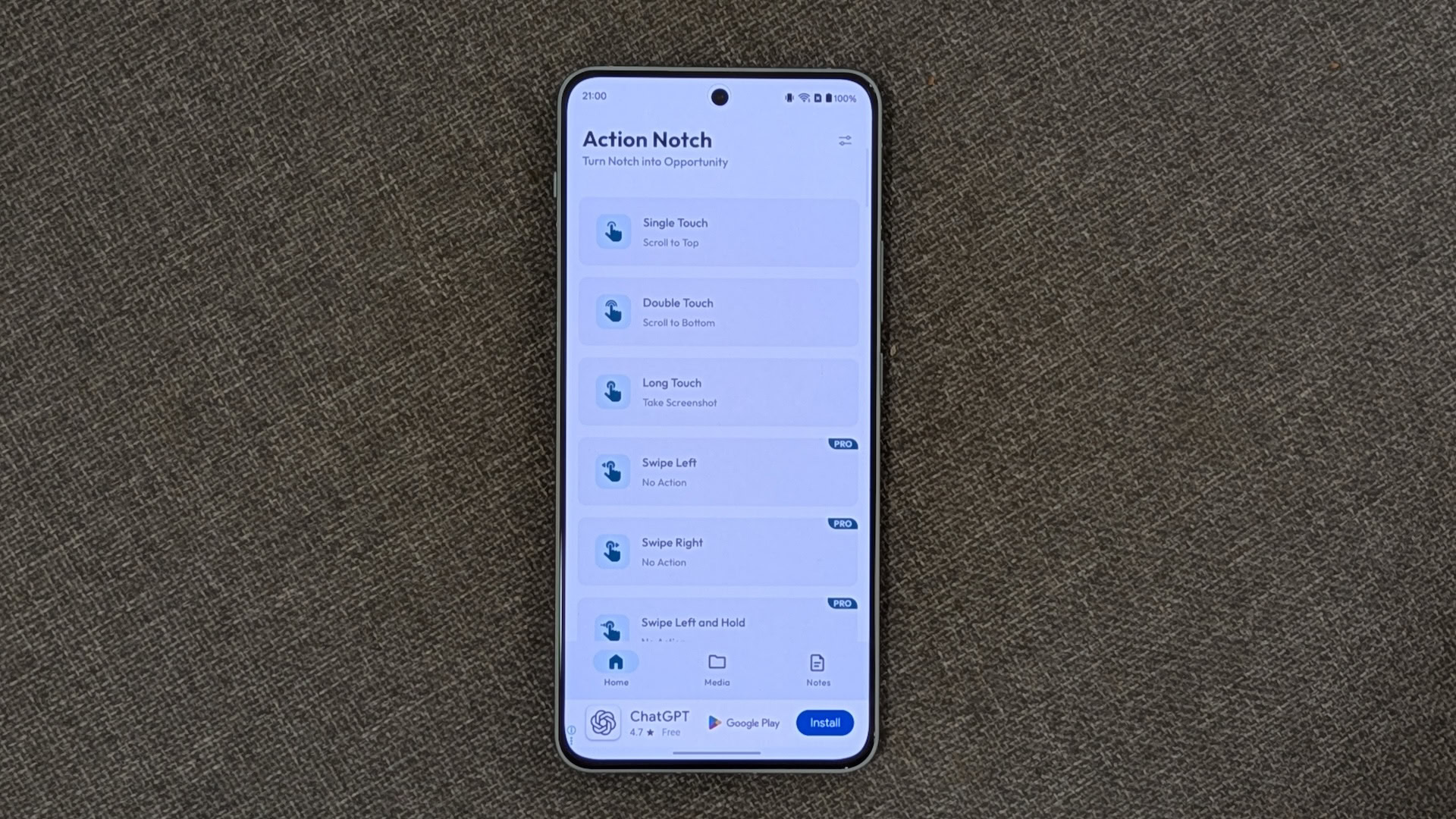
Another highly valued feature, especially for professionals and content creators, is the ability to take screenshots with a long-touch gesture. The traditional method of simultaneously pressing power and volume buttons can be awkward and prone to errors, particularly when attempting to capture multiple screenshots in quick succession. By assigning this action to a long-press on the notch, Action Notch simplifies the process, making screenshot capture a fluid and intuitive action. This small but significant improvement can dramatically boost productivity for users who frequently document information or share visual content from their devices.
Beyond these core uses, Action Notch offers a range of other beneficial actions. "In-App Shortcuts" provides quick access to specific functions within applications, such as initiating a Drive scan, performing a song search in the Google app, or opening a direct WhatsApp chat. The "Run Automation" feature, as previously mentioned, empowers users to trigger custom scripts from automation apps like MacroDroid, allowing for complex, multi-step actions to be condensed into a single notch gesture. These features collectively contribute to a highly customized and efficient smartphone experience, allowing users to tailor their device’s behavior to their specific needs and habits.
Setting up Action Notch is designed to be a straightforward process, facilitating rapid integration into a user’s daily routine. After downloading the application from the Google Play Store, users are guided through a series of on-screen instructions to grant necessary permissions, primarily related to accessibility services, which allow the app to monitor screen touches and execute actions. Once permissions are granted, users are presented with an intuitive interface where they can assign actions to various gestures. For example, configuring the single-touch gesture to toggle the flashlight involves navigating to the "Device Controls" section within the app and selecting "Toggle Flashlight" from the available options. This user-friendly setup ensures that even less tech-savvy individuals can quickly harness the app’s power.
Action Notch also provides extensive customization options to fine-tune its behavior. Users can decide whether the gesture recognition should be limited to the precise notch area or extend to the entire status bar, offering flexibility based on personal preference and device design. The application allows for customization of the notch’s virtual position on the screen, catering to devices with varying camera cutout placements. Additional settings include enabling or disabling haptic feedback for gestures, managing battery optimization to ensure consistent background operation, and more. Accessing these settings through the app’s interface provides a comprehensive suite of tools for tailoring the Action Notch experience.
Crucially, the app includes intelligent safeguards to prevent accidental triggers. Options such like "Disable on Call" and "Disable on Lock Screen" are highly recommended for activation. Disabling the app during calls prevents inadvertent actions that could disrupt communication, while disabling it on the lock screen ensures that gestures are only recognized when the device is actively in use, enhancing security and preventing unintended commands. Furthermore, Action Notch features a "blacklist" function, allowing users to specify applications within which the notch gestures should be inactive. This is particularly useful for gaming apps, where top-of-screen interactions might interfere with gameplay, or in apps like Kindle, which feature top-bar menus that could conflict with notch gestures. By blacklisting these applications, users can ensure a seamless experience without unwanted interruptions.
While Action Notch presents a compelling case for enhancing Android productivity, it is not without its considerations. The free version of the application, while robust in its core offerings, is supported by advertisements. While advertising is a common and often necessary model for sustaining free software development and covering operational costs, the frequency and intrusiveness of full-screen ads within Action Notch have been noted by users as a significant drawback. These interruptions can hinder the user interface navigation and make the initial configuration process less fluid. This trade-off between functionality and ad experience is a constant challenge for free utility apps, and while understandable from a developer’s perspective, it can detract from the overall user experience.
Beyond advertisements, applications that run continuously in the background, monitoring screen interactions, inherently raise questions about battery consumption and privacy. While developers typically optimize such apps for minimal impact, continuous listening for gestures can contribute to battery drain, particularly on older devices or those with less efficient power management. Furthermore, the necessity for extensive accessibility permissions to function effectively means that Action Notch, like many similar utility apps, requires a degree of trust from its users regarding data handling and privacy. Reputable developers typically address these concerns through clear privacy policies and by ensuring that data processing occurs locally on the device, without transmitting sensitive information.
Despite these minor criticisms, Action Notch continues to be highly regarded within the Android community for its innovative approach to device interaction. It represents a broader trend in smartphone software development: moving beyond predefined functionalities to empower users with unprecedented levels of customization. As smartphone hardware designs stabilize, the emphasis shifts to software solutions that extract maximum value from existing components. Action Notch exemplifies this philosophy by transforming a passive, often-criticized design element into a dynamic control hub. Its continued popularity underscores a strong user demand for tools that enhance efficiency and personalization, solidifying its position as an indispensable utility for many Android power users. Its ability to turn a perceived aesthetic flaw into a significant productivity asset highlights the ongoing potential for software innovation to redefine our interaction with everyday technology.