Google Gemini Live Undergoes Significant UI Revamp, Consolidating Inputs for Enhanced User Experience

Google’s relentless pursuit of refinement in its user interfaces, particularly for its burgeoning artificial intelligence offerings, continues with significant updates to the Gemini Live overlay. This latest iteration, uncovered through an analysis of the Google app for Android version 17.8.59.sa.arm64, indicates a strategic move towards a more streamlined and intuitive user experience for Gemini’s real-time, multimodal interaction capabilities. The changes, while not yet publicly rolled out, suggest Google is actively addressing visual clutter and enhancing accessibility for a wider range of input methods within its flagship AI assistant.
The Evolving Landscape of AI Interfaces and Google’s Approach
The development of artificial intelligence has moved rapidly from text-based prompts to complex multimodal interactions, necessitating equally sophisticated yet simple user interfaces. Google, a pioneer in AI research and application, has consistently iterated on its product UIs to keep pace with technological advancements and evolving user expectations. This philosophy is particularly evident in Gemini, Google’s advanced multimodal AI, which integrates various data types—text, images, audio, and video—to provide comprehensive responses. The "Live" feature within Gemini is designed to facilitate real-time interactions, allowing users to engage with the AI using live camera feeds, screen sharing, voice, and keyboard input. However, as capabilities expand, the challenge lies in presenting these powerful tools without overwhelming the user.
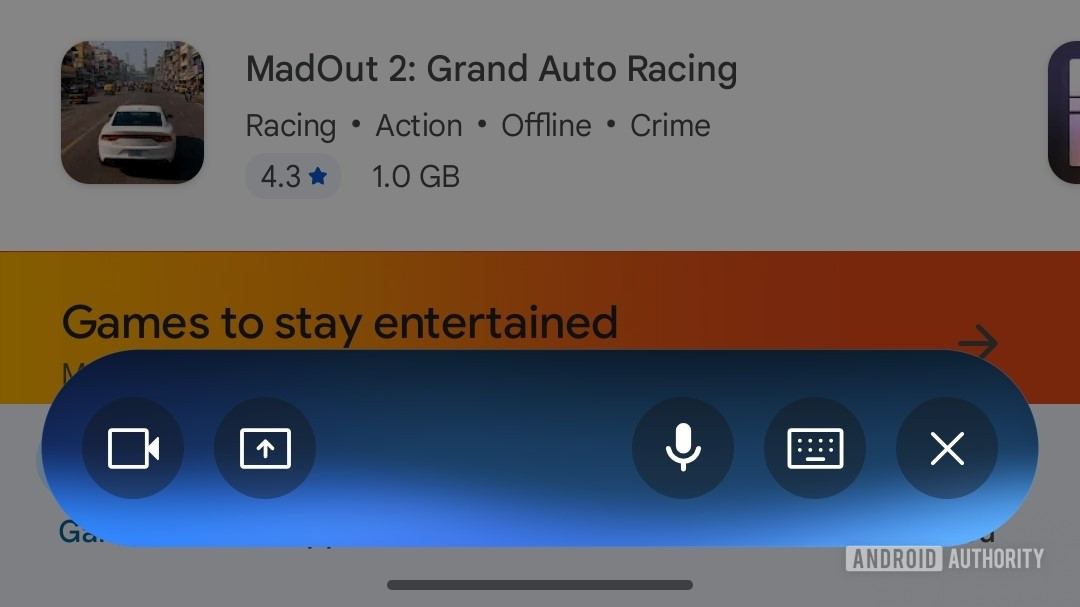
Prior iterations of the Gemini Live overlay, which began rolling out earlier this year, featured a distinct, somewhat busy interface. It presented separate, prominent buttons for each input method: voice, keyboard, screen sharing, and camera input. While comprehensive, this layout could potentially contribute to a visually crowded experience, especially on smaller mobile screens, requiring users to navigate multiple distinct options for different interaction modalities. This design, though functional, hinted at Google’s ongoing exploration into optimizing the user journey within such a dynamic AI environment.

Detailed Examination of the Upcoming UI Changes
The newly discovered updates reveal a deliberate effort to consolidate and simplify the Gemini Live overlay. Three primary modifications stand out, signaling a more thoughtful integration of input options:
-
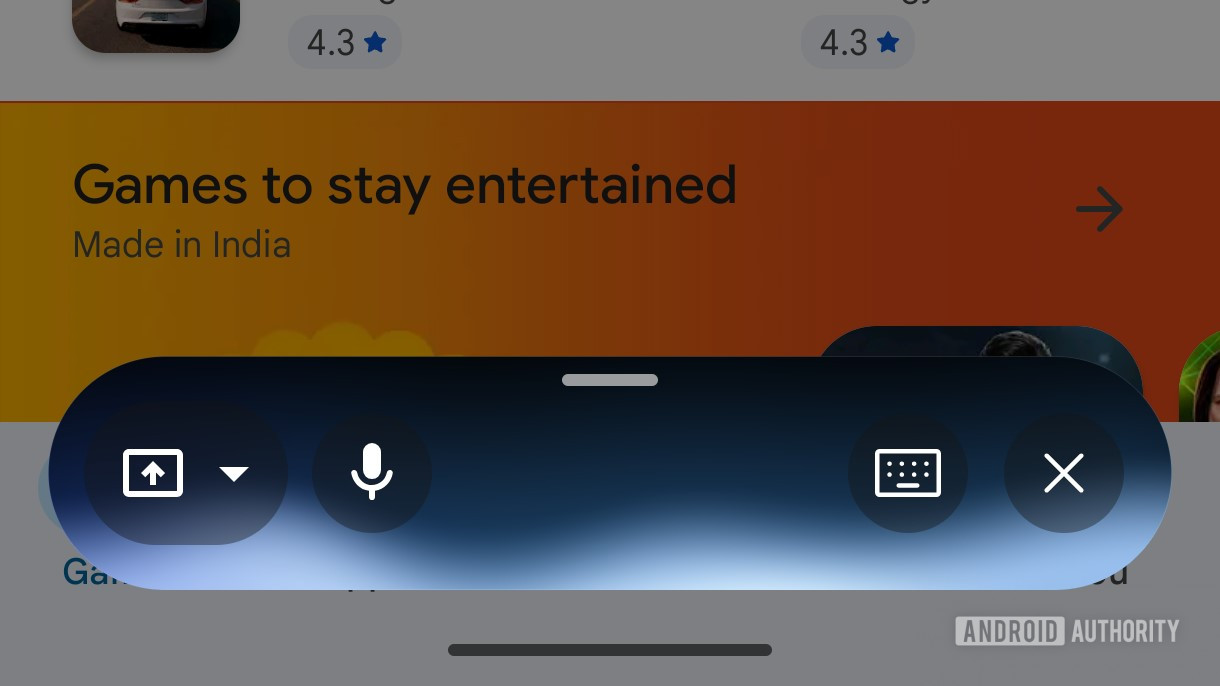
Consolidation of Camera and Screen Sharing: Perhaps the most impactful change is the merging of the formerly separate camera input and screen sharing buttons into a single, unified icon. Tapping this new button now triggers a small, contextual card, prompting the user to select between "Camera" or "Screen Share." This design choice effectively reduces the number of immediate interaction points on the overlay, thereby decluttering the interface and potentially improving user focus. By grouping these visually-oriented input methods, Google aims to streamline the process for users who might switch between showing their environment and sharing their device screen with Gemini for assistance. This approach aligns with common UI/UX principles of grouping related functionalities to enhance usability and reduce cognitive load.
-
Repositioning of Voice Input: The voice input button, a cornerstone of conversational AI, has been repositioned to the far left of the overlay. This shift suggests an attempt to create a more balanced visual hierarchy and potentially a more natural flow for common interactions. Voice commands are frequently used for initial queries or quick follow-ups, and its prominent yet slightly offset placement might serve to distinguish it from the more visually-intensive camera/screen sharing functions, offering a clear path for verbal interaction.
-
Introduction of a Full-Screen Handle: A subtle yet significant addition is a new handle located at the top of the floating overlay. Users can drag this handle upwards to expand the Gemini Live interface into a full-screen mode. This feature is crucial for scenarios requiring deeper immersion or more extensive interaction with Gemini, such as reviewing detailed multimodal outputs, engaging in extended conversations, or utilizing the AI for complex tasks that benefit from a larger display area. It provides flexibility, allowing users to quickly switch between a compact, overlaid experience and a more expansive, dedicated AI workspace without fully exiting the current context.
Beyond the main overlay, a further UI tweak has been identified within the standard Gemini input box. The distinct circular border around the voice-input microphone icon has been removed, creating a cleaner, more minimalist appearance. Concurrently, a colored accent has been introduced around the "Live" button within this same input box. This subtle visual cue likely serves to highlight the Live functionality, drawing user attention to the real-time interaction capabilities without adding visual weight, consistent with modern flat design principles.
Background and Strategic Context: Google’s AI Journey
Google’s commitment to AI has been a cornerstone of its strategy for over a decade, evolving from Google Search algorithms to the development of sophisticated neural networks. The journey to Gemini has been marked by significant milestones, including the launch of Google Assistant, the development of LaMDA (Language Model for Dialogue Applications), and the introduction of Bard, which eventually evolved into Gemini.
Gemini itself was unveiled in December 2023 as Google’s most capable and flexible AI model, designed to understand and operate across different modalities. Its launch underscored Google’s ambition to lead the generative AI race, competing directly with offerings like OpenAI’s GPT models and Microsoft’s Copilot. The "Live" feature, in particular, represents a crucial differentiator, enabling Gemini to process and respond to real-world information captured through a device’s camera or screen, offering dynamic, contextual assistance. This capability transcends traditional text-based AI, moving towards a truly ambient and proactive intelligence.
The continuous refinement of Gemini’s UI, therefore, is not merely an aesthetic exercise but a strategic imperative. As Google pours billions into AI research and development, ensuring that these powerful capabilities are accessible and enjoyable for end-users is paramount for widespread adoption and competitive advantage. The global AI market is projected to grow exponentially, with market intelligence firms estimating it to reach trillions of dollars in the coming decade. User experience will be a key determinant of success in this rapidly expanding landscape.
Implications for User Experience and Future Interactions
These forthcoming UI changes are poised to significantly enhance the user experience of Gemini Live in several ways:
- Reduced Cognitive Load: By consolidating input options and decluttering the interface, Google aims to reduce the mental effort required for users to navigate and interact with Gemini. A cleaner UI means less searching for the right button and more focus on the task at hand.
- Streamlined Workflows: Grouping related functions, such as camera and screen sharing, creates more intuitive workflows. Users can now consider visual input as a single category, choosing the specific modality when prompted, which is a more logical progression.
- Improved Accessibility and Discoverability: A simplified layout can make the powerful features of Gemini Live more approachable for new users, lowering the barrier to entry for complex AI interactions. The subtle highlighting of the "Live" button also aids in feature discoverability.
- Enhanced Focus and Immersion: The ability to expand to a full-screen mode is critical for tasks that require deep engagement, such as detailed problem-solving with visual cues or extended conversational assistance. It allows users to dedicate their entire screen to the AI interaction, minimizing distractions.
- Alignment with Modern UX Principles: These changes reflect a broader trend in mobile app design towards minimalism, contextual menus, and adaptive interfaces that prioritize user intent and efficiency.
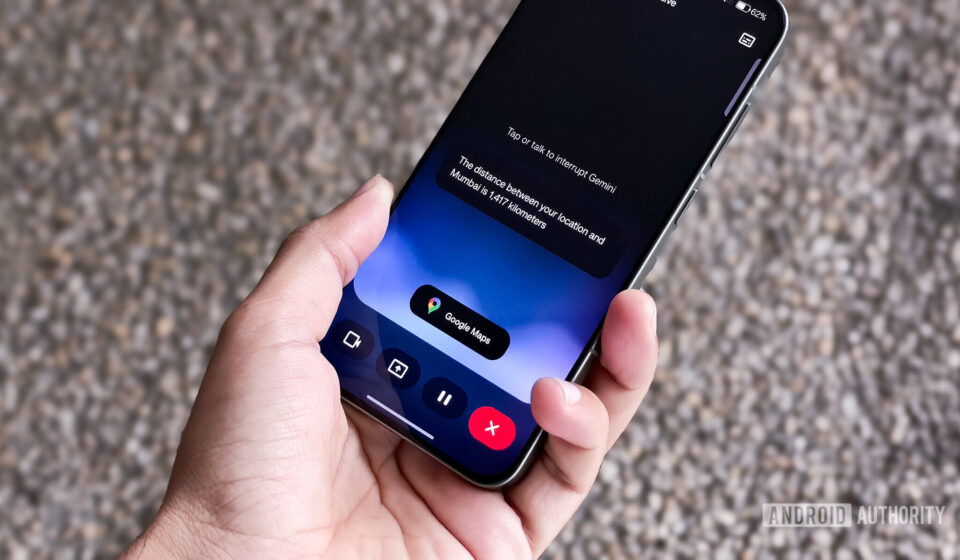
The integration of Gemini Live with services like Google Maps, as hinted by the image title "Google Gemini Live Maps extension," presents a particularly exciting implication. Imagine pointing your phone camera at a restaurant facade and asking Gemini for reviews, or sharing your screen to get real-time navigation assistance with overlays of local points of interest. These UI refinements lay the groundwork for such seamless, context-aware interactions, where Gemini can become an even more indispensable companion for daily life, bridging the digital and physical worlds.
The Iterative Nature of UI Development in Tech
It is important to underscore that UI development, particularly for complex and rapidly evolving platforms like AI, is an inherently iterative process. Google, known for its extensive A/B testing and user feedback loops, continually refines its products based on real-world usage data and emerging technological possibilities. These changes, uncovered via an APK teardown, represent work-in-progress code and may undergo further modifications before a public release. Such teardowns offer a valuable glimpse into the potential future direction of a product but do not guarantee that all identified features or designs will ultimately be rolled out to end-users.

However, the consistent theme of these updates—simplification, consolidation, and enhanced flexibility—strongly suggests Google’s long-term vision for Gemini. The company is not just building a powerful AI; it is meticulously crafting the pathways through which users will interact with that intelligence, ensuring that power is met with unparalleled ease of use. This ongoing commitment to UI refinement is crucial for Google to maintain its competitive edge in the fiercely contested AI landscape, promising a future where interactions with artificial intelligence are as natural and intuitive as human conversation.