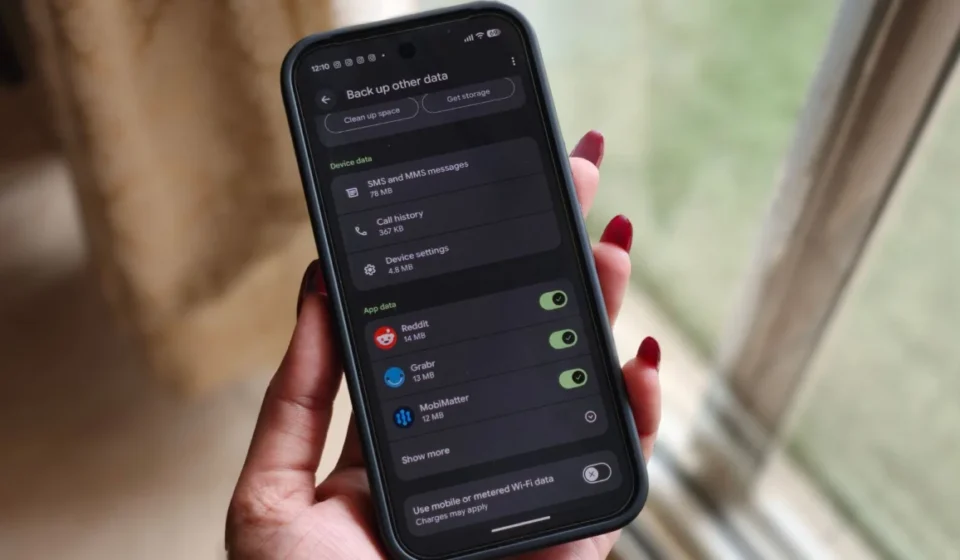
Google Rolls Out Dedicated Documents Backup to Android Phones via Google Play Services Stable Release, Enhancing Cloud Data Management for Millions.

In a significant advancement for Android users and a testament to Google’s ongoing commitment to robust cloud data management, the long-anticipated dedicated backup option for local documents, previously known as ‘Downloads,’ is now officially rolling out. This new feature, integrated into Google Play Services version 26.26 (stable), marks a pivotal moment in how Android devices handle the safeguarding of critical user files, moving beyond mere application data and multimedia to encompass a broader spectrum of personal and professional documents. After nearly a year of development, beta testing, and gradual appearances, the functionality has finally reached a stable release, promising enhanced peace of mind for potentially billions of Android users worldwide.
The rollout signifies a crucial step in standardizing and simplifying the backup process for a wide array of file types often stored directly on a smartphone’s internal storage, particularly within the ‘Downloads’ folder. For Pixel phone owners, and soon for a vast majority of Android devices, the new "Documents" backup option is accessible through a straightforward navigation path: Settings > Accounts and backup > Google Backup. Within this menu, users will now find "Documents" nestled strategically between "Photos & videos" and "Other device data," indicating its elevated status as a core backup category within Google’s cloud ecosystem.
The Mechanics of Document Backup and Storage Implications
Upon locating the new option, users will observe that the "Back up documents" toggle is initially set to off by default. This design choice ensures that users consciously opt into backing up these files, thereby managing their Google Drive storage space proactively. Enabling the toggle immediately presents users with an overview of their available Google Drive storage. This crucial integration means that all documents backed up via this new feature will count towards the user’s allocated Google Drive storage quota. Google provides convenient options directly from this page to either clear up existing space within Drive or to purchase additional storage, encouraging seamless management of cloud resources.
Once activated, the backup process initiates, and a new organizational structure appears within the user’s Google Drive. Specifically, a folder titled "Android backups" will be created in the "My Drive" section. Inside this main folder, another sub-folder, clearly named after the user’s specific phone model, will house the backed-up documents. This hierarchical arrangement ensures clarity and ease of access, allowing users to quickly identify and retrieve files associated with a particular device, especially if they manage backups from multiple Android phones.
The range of document types supported by this new backup mechanism is commendably broad, reflecting the diverse nature of files users typically store on their devices. Initial testing and user reports confirm support for common productivity formats such as .DOC (Microsoft Word documents), .PPT (Microsoft PowerPoint presentations), .PDF (Portable Document Format), and .XLS (Microsoft Excel spreadsheets). Beyond these ubiquitous formats, the feature also accommodates .ZIP files, which are frequently used for archiving and compressing multiple files, and, notably, .APK files. The inclusion of .APK files, which are Android application package files often downloaded directly from the web or other sources, highlights Google’s recognition of the varied content that resides in a user’s ‘Downloads’ folder, providing a comprehensive solution for local file preservation. This broad compatibility underscores the utility of the feature, ensuring that nearly all essential non-media files can be safely stored in the cloud.
Crucial Caveats: Understanding Backup vs. Sync
While the new Documents backup feature offers significant advantages, it is imperative for users to understand its operational nuances, particularly the distinction between a backup and a real-time synchronization service. Google explicitly reminds users that turning off the Documents backup option will not automatically remove the previously backed-up contents from Google Drive. This design ensures data retention, preventing accidental deletion of cloud-stored files if a user decides to disable the backup feature on their device. Users must manually delete files from Google Drive if they wish to remove them.
Furthermore, a critical aspect to note is the absence of automatic sync for files. This means that any changes made to a document on the local device after it has been backed up will not be automatically reflected in the version stored in Google Drive, and vice-versa. The feature operates as a snapshot backup, providing a point-in-time copy of the files. For users requiring real-time collaboration and version control, dedicated cloud storage and productivity apps like Google Docs, Microsoft 365, or Dropbox offer more suitable solutions. Nevertheless, for the primary purpose of safeguarding important documents against device loss, damage, or factory resets, and providing immediate access to these files from any internet-connected device, this backup option serves its purpose exceptionally well. It ensures that even without physical access to their phone, users can retrieve their vital documents, a scenario that holds immense value in today’s mobile-first world.
A Detailed Timeline of Development and Rollout
The journey of this "Documents" backup feature from conception to stable release has been a protracted one, spanning nearly a year and involving multiple stages of development, testing, and phased deployment. The initial whispers and concrete evidence of Google working on a dedicated "Documents" (then often referred to as "Downloads") backup option first emerged way back in August of last year. This early discovery, often gleaned from code changes and developer previews, signaled Google’s intent to expand its backup capabilities beyond existing categories.
Following these initial findings, Google officially acknowledged and confirmed the existence of the feature in February as part of a Google Play system update. This public confirmation provided the first official indication that the feature was indeed in active development and slated for a future release. Such official announcements typically precede broader testing phases and signify that the feature has matured beyond experimental stages.
The subsequent phase saw the feature making its way into the hands of a select group of users. Earlier this month, the new backup category began appearing for users enrolled in the Google Play Services beta program. Beta rollouts are crucial for identifying bugs, gathering user feedback, and refining the user experience in a real-world environment before a wider stable release. This iterative process is standard practice for major software updates from companies like Google, ensuring stability and compatibility across the vast and fragmented Android ecosystem.
Finally, after these rigorous stages of development and testing, the feature has now arrived in a stable version. The current rollout is occurring as part of Google Play Services version 26.26, making it available to a much broader audience of Android users globally. The gradual nature of Google’s rollouts, often tied to Play Services updates, allows the company to monitor performance and address any unforeseen issues as the feature propagates across millions of devices, ensuring a smooth transition for the user base. This meticulous chronology underscores the complexity and dedication involved in bringing a new core system feature to the Android platform.
Filling a Critical Gap in Android Backup Ecosystem
For years, Android’s built-in backup solutions have offered varying degrees of coverage. Google Photos provides excellent cloud backup for images and videos, WhatsApp handles its chat history, and Google’s general Android backup covers app data, call history, SMS messages, and device settings. However, a glaring omission has been a dedicated, robust, and user-friendly way to back up miscellaneous but often critical documents stored directly on the device’s internal storage, particularly those residing in the ‘Downloads’ folder or other user-created directories.
Users previously had to resort to manual methods, such as individually uploading files to Google Drive, emailing them to themselves, or using third-party file management apps with cloud integration. These methods were often cumbersome, inconsistent, and prone to user error, leading to potential data loss. The absence of an integrated solution meant that important PDFs, work-related documents, personal archives, or even locally saved app installers (.APK files) were at higher risk of being lost if a device was damaged, stolen, or reset without proper manual backup.
The introduction of the "Documents" backup feature directly addresses this long-standing gap. By providing an automated, native solution within Google Play Services, Google significantly enhances the overall data redundancy and security for Android users. It transforms what was once a fragmented and manual process into a streamlined, one-time setup that then operates in the background, continuously safeguarding these vital files. This move brings Android’s native backup capabilities closer to the comprehensive solutions offered by desktop operating systems, where document folders are routinely included in cloud backup strategies.
Broader Implications for Users and the Google Ecosystem
The implications of this new feature are multifaceted, extending from individual user convenience to Google’s broader strategic positioning in the cloud services market.
- Enhanced User Convenience and Peace of Mind: The primary benefit for users is the unparalleled convenience. No longer do they need to remember to manually transfer important documents. A lost or damaged phone, which once meant the potential loss of critical local files, now becomes less catastrophic. Users can simply restore their documents to a new device or access them via Google Drive on any platform. This significantly reduces anxiety associated with device management and promotes a more relaxed digital lifestyle.
- Improved Data Security and Redundancy: For many, a smartphone is their primary computing device. Protecting the data on it is paramount. This feature adds another layer of redundancy, ensuring that essential documents are not solely reliant on the physical integrity of the device. In an era where cybersecurity threats and hardware failures are constant concerns, robust backup solutions are more critical than ever.
- Seamless Cross-Device Access: Once documents are in Google Drive, they become accessible from any device with an internet connection—be it a tablet, a computer, or another smartphone. This facilitates a more fluid workflow, allowing users to start working on a document on their phone and seamlessly pick up where they left off on a laptop, leveraging Google Drive’s ubiquitous access.
- Reinforcing Google’s Cloud Ecosystem: This move further integrates users into Google’s extensive cloud ecosystem. By making Google Drive the default repository for these backups, Google encourages greater reliance on its cloud storage services. For users who exceed the free 15GB tier (shared across Gmail, Google Photos, and Drive), this feature could become a significant driver for subscriptions to Google One, Google’s premium cloud storage and benefits service. This aligns with Google’s broader strategy of making its services indispensable to the daily digital lives of its users.
- Standardization Across Android: As a Google Play Services feature, this backup option is poised to become a standard across the vast majority of Android devices, regardless of manufacturer. This universal availability ensures a consistent and reliable backup experience, reducing fragmentation in a critical area of user data management.
- Potential for Future Enhancements: The introduction of a dedicated "Documents" category opens the door for potential future enhancements. While currently a snapshot backup, Google could, in theory, explore more sophisticated syncing capabilities or deeper integration with productivity suites down the line, though this would likely come with additional storage and processing considerations.
Google’s Commitment to Comprehensive Data Management
This rollout underscores Google’s evolving commitment to providing a comprehensive and integrated data management solution for its Android platform. As smartphones become increasingly central to both personal and professional lives, the distinction between "app data" and "user documents" blurs. Recognizing that important files don’t always originate from or reside within specific applications that have their own cloud sync, Google is now ensuring that local files are afforded the same level of protection and accessibility as photos, videos, and app data.
With Android commanding a significant majority of the global smartphone market share, estimated to be over 70%, features like this have an enormous impact. Hundreds of millions, if not billions, of users stand to benefit from this enhancement, making their digital lives more secure and manageable. As digital content continues to proliferate on personal devices, the importance of robust, user-friendly backup mechanisms cannot be overstated. Google’s "Documents" backup is not just another feature; it’s a foundational improvement that bolsters the integrity and accessibility of user data across the Android ecosystem, cementing Google Drive as the central hub for Android data resilience.
Looking Ahead: User Adoption and Further Refinements
The success of this feature will now largely depend on user awareness and adoption. Since the toggle is off by default, Google will need to ensure that users are adequately informed about its existence and benefits. In-app notifications, system prompts, and educational materials will be crucial to encourage widespread activation.
While the current implementation is a welcome addition, users might eventually seek further refinements. For instance, the ability to selectively choose sub-folders within "Downloads" or other local directories for backup, rather than a broad "Documents" category, could offer finer control. Furthermore, some users might hope for an option for real-time syncing of changes, although this would significantly alter the feature’s current scope and storage implications.
For now, the stable rollout of the dedicated "Documents" backup option is a substantial upgrade, addressing a critical need that has persisted for many years. It represents a significant step forward in making Android devices even more reliable repositories for all forms of digital information, providing users with greater control and confidence in the safety of their invaluable data.