Google Pixel Camera 11 Introduces Redesigned Quick Access Controls and New Launch Modes for Enhanced Photographic Precision

With the highly anticipated launch of the Google Pixel 11 series, Google is rolling out a significantly updated Pixel Camera 11 application, bringing a host of refinements and new functionalities designed to empower users with greater control over their photographic output. Among the most notable changes are the redesigned Quick access sliders, which now present a more streamlined and professional interface for fine-tuning image parameters, and a new Launch mode that enhances workflow efficiency. These updates, while promising a more sophisticated user experience, also introduce a new interaction paradigm that may require a brief period of adaptation for even seasoned Pixel users.
A Legacy of Computational Photography Meets Refined Control
Google’s Pixel line has long been lauded for its groundbreaking computational photography capabilities, which have consistently pushed the boundaries of smartphone imaging. From the early days of HDR+ and Portrait Mode to more recent innovations like Night Sight, Astrophotography, and the AI-powered Magic Eraser, Google has cemented its reputation for delivering exceptional photo quality through sophisticated software algorithms rather than solely relying on raw hardware specifications. This approach has democratized professional-grade photography, allowing even novice users to capture stunning images with minimal effort.
However, as the smartphone photography landscape matures, there’s a growing demand from enthusiasts and prosumers for more granular control over camera settings, mirroring the flexibility offered by traditional cameras. The tension between automated simplicity and manual precision has always been a delicate balancing act for smartphone manufacturers. With the Pixel Camera 11, Google appears to be addressing this by introducing a more accessible yet powerful set of manual controls, signaling a strategic evolution in its camera software philosophy. This move suggests an acknowledgement that while AI can perfect many aspects of a photo, the artistic vision often requires direct human intervention. The Pixel 11 series, powered by Google’s latest Tensor processor, is ideally positioned to handle the complex computations required for both advanced AI processing and real-time manual adjustments, offering a harmonious blend of both worlds.
The Redesigned Quick Access Controls: A Deeper Dive
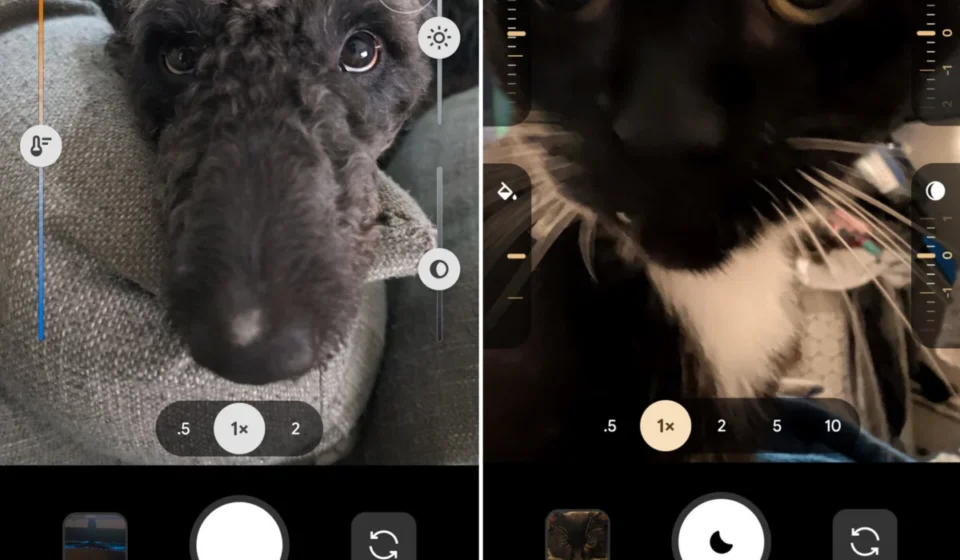
The most prominent visual change in Pixel Camera 11 is the complete overhaul of the Quick access controls. Previously, these controls manifested as larger, more prominent slider bars that would overlay a portion of the viewfinder. While functional, their size and placement could sometimes feel intrusive, particularly for users prioritizing an unobstructed view of their composition. The new design reimagines these controls as cleaner, more compact, dial-like elements, which are aesthetically pleasing and less obtrusive.
These redesigned controls encompass a comprehensive suite of photographic parameters crucial for achieving desired artistic effects and correcting challenging lighting conditions. The available adjustments include:
- Focus: This control allows users to precisely select the point of focus within the frame, crucial for isolating subjects and creating depth of field effects. While auto-focus is highly capable for general use, manual focus provides creative freedom, especially in specialized scenarios such as macro photography or complex scenes with multiple subjects at varying distances.
- Looks: This innovative control likely offers quick access to various aesthetic profiles or filters, enabling users to instantly change the mood or style of their image without delving into post-capture editing. This could range from subtle color grading and tone adjustments to more dramatic artistic interpretations, providing creative flexibility at the point of capture.
- Exposure: A fundamental photographic control, exposure determines the overall brightness of an image. Adjusting it allows photographers to compensate for overly bright or dark scenes, ensuring details are preserved in both highlights and shadows. The new dial-like interface promises more precise, incremental adjustments, giving users finer control over the light captured.
- Shadows: This specific control allows for targeted adjustments to the darker areas of an image. Increasing shadow detail can rescue underexposed regions, revealing hidden textures and information, while decreasing it can add dramatic contrast and mood, enhancing the overall artistic impact.
- White Balance: Essential for accurate color reproduction, white balance corrects color casts caused by different light sources (e.g., warm incandescent light, cool fluorescent light, natural daylight). Manual white balance ensures colors appear natural and true-to-life, preventing unwanted yellow, blue, or green tints that can distort an image’s realism.
- Shutter Speed: A critical control for capturing motion. A faster shutter speed freezes action, ideal for sports photography or fast-moving subjects. A slower shutter speed, conversely, introduces motion blur, often used creatively for artistic effects like light trails, silky water in landscapes, or emphasizing movement in a scene.
- ISO: Represents the camera sensor’s sensitivity to light. Higher ISO values allow for shooting in low-light conditions but can introduce digital noise (graininess), which degrades image quality. Lower ISO values produce cleaner images but require more ambient light. Manual ISO control is vital for balancing light sensitivity with image quality, especially in challenging lighting.
The transition from slider bars to these new dial-like controls is not merely a cosmetic change; it reflects a shift towards a more professional and tactile user experience. Dials often provide a more intuitive feel for incremental adjustments, mimicking the physical controls found on traditional cameras. This could appeal strongly to photographers who prefer a hands-on approach to image capture, granting them a sense of precision and direct interaction with their photographic tools.
The Discoverability Challenge: Hidden by Default
Despite the functional improvements, the implementation of these new Quick access controls comes with a notable caveat: they are hidden by default. Users of the new Pixel 11 series will find that to enable these features, they must navigate through the camera app’s settings menu. Furthermore, even once enabled, the controls do not immediately appear on the screen. Instead, they remain concealed until the user actively taps the viewfinder. Only then do the dial-like controls pop up on either side of the display, ready for adjustment.
This design choice presents a classic user experience dilemma: the balance between a clean, uncluttered interface and feature discoverability. On one hand, keeping the controls off-screen by default ensures that the primary camera interface remains minimalist, allowing users to focus solely on framing their shot without distractions. This aligns with Google’s historical emphasis on simplicity and ease of use, making the camera app less intimidating for casual users. On the other hand, it creates a significant barrier for users who are not already familiar with the feature or who do not actively explore every corner of their device’s settings. A user expecting manual controls might easily overlook them, assuming they are absent from the Pixel Camera 11 interface.
Industry experts and early adopters have already begun to weigh in on this interaction model. While some appreciate the minimalist approach, others, including the team at Android Authority who first confirmed the features, suggest that a simple prompt within the feature’s settings menu – perhaps a brief tutorial or an explanatory note stating that "tapping the viewfinder will reveal controls" – would significantly enhance discoverability and reduce user frustration. This minor addition could bridge the gap between a clean UI and intuitive feature access, ensuring that the power of these new controls is readily available to all users, not just those who actively seek them out. This tension between design elegance and practical utility is a recurring theme in modern software development, and Google’s approach here offers a fresh case study in balancing these priorities.
A New Launch Mode for Streamlined Workflow
Beyond the revamped Quick access controls, Pixel Camera 11 also introduces a practical new "Launch mode." This feature addresses a common pain point for many smartphone users: the need to quickly switch between different camera modes. Traditionally, the camera app defaults to Photo mode upon launch, requiring users to manually swipe or tap to switch to Video or other specialized modes.
The new Launch mode allows users to customize the app’s default startup behavior. Instead of always opening to Photo, users can now set the camera app to launch directly into Video mode or, notably, "Magic Capture" mode. This customization applies not only to the standard app launch but also to the increasingly popular double-tap power button shortcut, which offers instantaneous camera access.
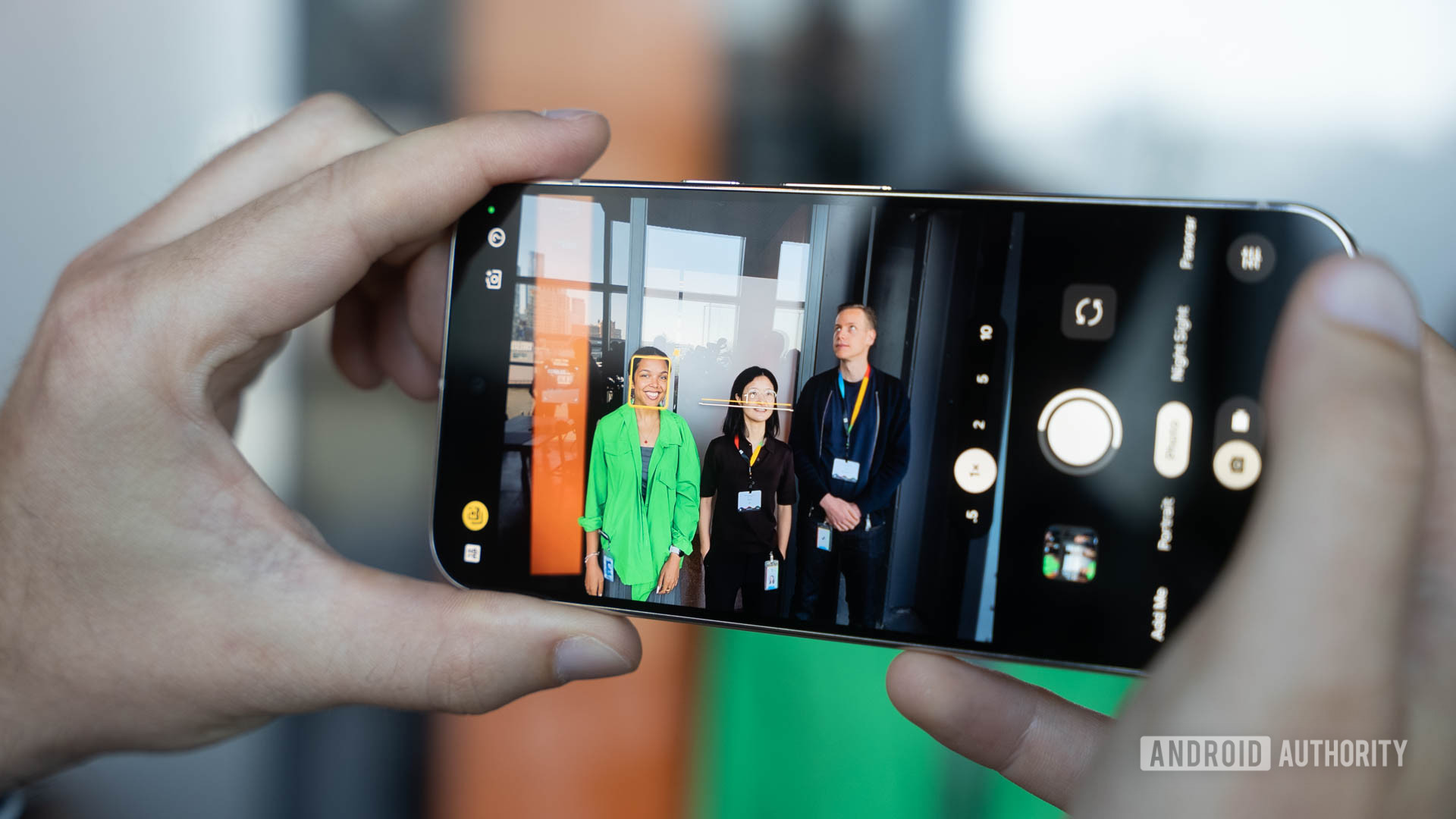
This seemingly minor adjustment can significantly streamline the workflow for specific user groups:
- Videographers and Vloggers: For those who primarily use their Pixel for recording videos, setting Video as the default launch mode eliminates an extra step, allowing them to start recording crucial moments almost instantly. This is particularly valuable in fast-paced environments where seconds matter, preventing missed opportunities.
- Hybrid Content Creators: The "Magic Capture" option suggests a mode designed for users who want to capture both still images and video simultaneously or leverage advanced AI capabilities to create dynamic content. While specific details on "Magic Capture" remain somewhat exclusive to the Pixel 11 series at launch, it likely represents an intelligent burst capture mode that records short video clips alongside high-quality stills, or perhaps a mode that intelligently combines elements from both, offering a richer capture experience for social media or creative projects. This feature could be a game-changer for spontaneous content creation, ensuring no moment is missed in its full dynamic glory.
The ability to tailor the launch experience reflects Google’s growing understanding of diverse user needs and usage patterns. It moves beyond a one-size-fits-all approach, offering personalization that directly impacts productivity and creative output for various user segments.
Chronology of Discovery and Release
The rollout of Pixel Camera 11 is intrinsically linked to the debut of the Pixel 11 series devices. Following their official announcement and availability, tech enthusiasts and reviewers began to explore the new software enhancements. The first public acknowledgement of these specific camera updates came from the tech publication 9to5Google, which reported on the redesigned Quick access controls and the new Launch mode after discovering them in the updated application. This initial report was subsequently corroborated by Android Authority, which independently verified the presence and functionality of these features on their Pixel 11 review units. This rapid confirmation by multiple outlets underscores the significance of these changes for the Pixel camera experience.
These updates build upon previous iterations, such as Pixel Camera 10.4, which featured a more rudimentary Quick access control system. The evolution to version 11 signifies a deliberate step by Google to refine its camera interface, moving from a standalone toggle in settings to a dedicated submenu for greater customization of control placement.
The Pixel 11 Series Context and Broader Implications
The introduction of Pixel Camera 11 and its enhanced features coincides with the launch of the Google Pixel 11 series, the latest flagship devices to showcase Google’s hardware and software prowess. The Pixel 11, following in the footsteps of its predecessors like the Pixel 6, 7, 8, 9, and 10, is expected to further refine the Pixel experience, particularly in areas like AI, photography, and overall performance, thanks to its advanced Tensor chip. This new silicon is crucial for processing the complex algorithms required by the new camera features in real-time.
Historically, Google has often debuted groundbreaking software features on its latest Pixel devices, leveraging the cutting-edge hardware to showcase their full potential. However, a consistent pattern has emerged where many of these "exclusive" features eventually trickle down to older Pixel models through subsequent software updates. This strategy not only rewards existing Pixel users by extending the lifespan of their devices but also enhances the perceived value of older devices within the ecosystem.
It is highly probable that both the redesigned Quick access menu and the new Launch mode will eventually make their way to a broader range of older Pixel devices. This trickle-down effect is a testament to Google’s commitment to its ecosystem and ensures that the benefits of its software innovations are not confined solely to those who purchase the latest hardware. For owners of Pixel 10, Pixel 9, or even Pixel 8 devices, this offers a promising outlook, suggesting that their devices will continue to evolve and gain new capabilities over time. The only potential limitation for older devices would be if certain features require the specific computational power or hardware accelerators present in the Pixel 11’s Tensor chip, though UI changes and basic launch modes are typically less hardware-intensive and more likely to be widely adopted.
Competitive Landscape and Industry Trends
Google’s move to enhance manual controls within its camera app positions the Pixel series more directly against competitors that have long offered sophisticated "Pro" or "Expert RAW" modes. Manufacturers like Samsung, with its extensive Pro Mode and Expert RAW app, and even Apple, which has gradually added more photographic control through features like Photographic Styles and ProRAW, recognize the importance of catering to advanced users.
- Samsung: Known for its highly customizable Pro Mode, offering extensive control over ISO, shutter speed, focus, white balance, and exposure compensation, often with a live histogram for advanced users. Their Expert RAW app further provides multi-frame RAW capture for professional-grade editing.
- Apple: While traditionally favoring simplicity, Apple has introduced features like Photographic Styles for pre-capture adjustments and ProRAW for greater post-processing flexibility, indicating a gradual shift towards more user control within its camera app.
- OnePlus and Xiaomi: These brands often collaborate with established camera manufacturers (e.g., Hasselblad for OnePlus) to enhance their camera apps, including comprehensive manual modes, unique color science profiles, and advanced computational features.
Google’s approach with the Pixel Camera 11 seems to strike a balance: maintaining the core "point-and-shoot" simplicity that Pixels are known for, while making advanced controls more accessible (albeit initially hidden) for those who seek them. This strategy avoids overwhelming the casual user with too many options upfront, yet provides the depth required by more demanding photographers. The integration of "Looks" alongside traditional parameters like ISO and Shutter Speed also highlights Google’s blend of creative presets with technical controls, appealing to a broad spectrum of users from casual snappers to budding enthusiasts.
The Future of Smartphone Photography: AI and User Empowerment
The updates in Pixel Camera 11 are indicative of a larger trend in smartphone photography: the increasingly sophisticated integration of artificial intelligence with user-driven creative control. While AI will continue to automate and enhance image quality in ways previously unimaginable, there is a clear recognition that human creativity and artistic intent remain paramount. Features like the redesigned Quick access controls empower users to express that intent with greater precision, moving beyond mere automatic optimization.
The evolution of smartphone cameras is no longer just about megapixels or lens count; it’s about the seamless interplay between advanced hardware, intelligent software, and intuitive user interfaces. Google, with its Tensor chips and deep expertise in AI, is uniquely positioned to lead this charge. The Pixel Camera 11 app represents not just an incremental update but a significant step towards a future where computational photography and manual controls coexist harmoniously, offering both unparalleled ease of use and profound creative depth. As these features potentially roll out to older devices, the entire Pixel ecosystem stands to benefit, reinforcing Google’s commitment to innovation and user experience in the competitive world of mobile imaging. The continuous refinement of the camera app suggests a long-term vision where every Pixel device, new or old, can evolve to meet the ever-changing demands of photography enthusiasts worldwide.