





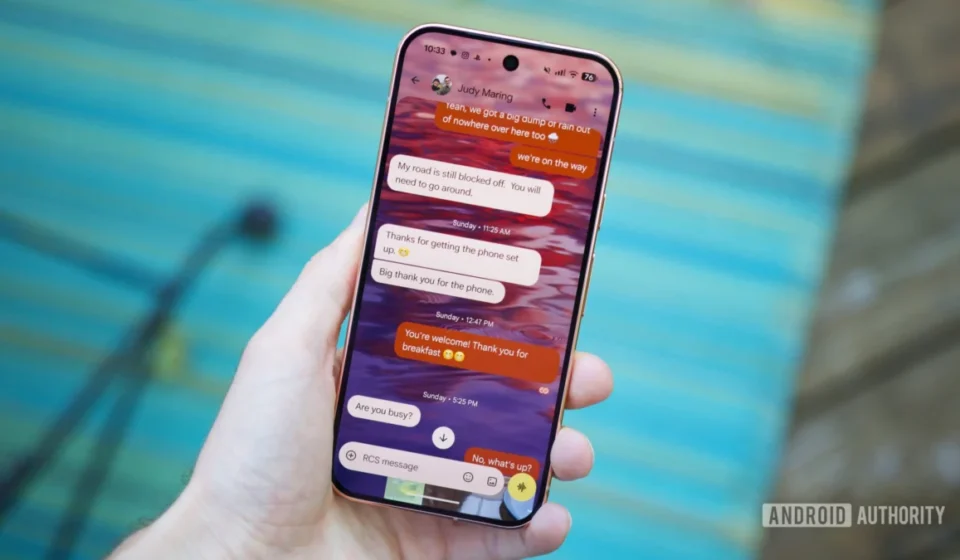
Google Messages Elevates User Experience with Long-Awaited Chat Themes Amidst Major Platform Overhaul

The digital communication landscape witnessed a significant stride in late August 2026, as Google Messages officially rolled out its highly anticipated chat themes feature. This enhancement, allowing users to customize conversations with bespoke colors and wallpapers, marks a pivotal moment in what is being heralded as one of Google Messages’ most transformative years to date. The introduction of chat themes arrives in tandem with a comprehensive user interface redesign, signaling Google’s renewed commitment to establishing its messaging platform as a formidable contender in the fiercely competitive instant messaging arena.
A Strategic Pivot: Google Messages’ Evolution in the Messaging Ecosystem
For years, Google has navigated a complex and often fragmented journey in the messaging sector, launching and subsequently deprecating numerous communication applications. From Google Talk and Hangouts to Allo and Duo, the company’s past efforts struggled to capture a dominant market share or build a cohesive user base. This historical context underscores the strategic importance of Google Messages, which has emerged as the company’s flagship messaging solution, deeply integrated with the Android ecosystem and powered by the modern Rich Communication Services (RCS) standard.
The rollout of chat themes is not merely an aesthetic upgrade; it is a calculated move to enhance user engagement and address a long-standing feature disparity between Google Messages and its primary competitors, most notably Apple’s iMessage, as well as cross-platform giants like WhatsApp and Telegram. These rival applications have offered extensive customization options, including chat backgrounds, color schemes, and sticker packs, for a considerable period. Google Messages’ belated adoption of these features reflects a broader strategy to refine its user experience, making the platform more appealing and Sticky for its vast Android user base. The ongoing "green bubble" debate, symbolizing the perceived inferiority of SMS/RCS messages when communicating with iMessage users, has highlighted the psychological and social pressures influencing messaging app choices. By adding personalization tools, Google aims to elevate the perceived value and sophistication of its platform, potentially softening some of these distinctions.
Chronology of Customization: Catching Up with Industry Standards
The concept of personalizing digital communication interfaces is far from novel. Early internet messaging clients, such as AIM and MSN Messenger in the late 1990s and early 2000s, allowed users to select custom backgrounds, fonts, and emoji sets, fostering a sense of individual expression within their digital interactions. This trend matured with the advent of mobile messaging apps. WhatsApp, launched in 2009, gradually introduced custom chat wallpapers, followed by Telegram, which became renowned for its extensive theme engine, offering users deep control over color palettes, background patterns, and even animated backgrounds. Facebook Messenger also provides robust chat customization, enabling users to change chat colors and assign specific emojis to conversations.
Google Messages, while making significant strides in RCS adoption and interoperability, had historically prioritized foundational functionality over extensive aesthetic customization. The 2026 update, therefore, represents a convergence with established industry norms, filling a noticeable gap in its feature set. This chronology suggests a strategic shift: once the core RCS infrastructure was sufficiently robust and widely adopted (especially following increased pressure on Apple to support RCS), Google could then focus on enhancing the user-facing experience with features that directly impact user satisfaction and retention. The decision to introduce chat themes now indicates a maturation of the platform and a readiness to compete on a more holistic level, beyond just protocol standards.
The 2026 Overhaul: A Holistic Approach to Platform Enhancement
The introduction of chat themes is intrinsically linked to a broader, "massive redesign" of the Google Messages user interface, also slated for 2026. While specific details of the redesign remain under wraps, industry analysts anticipate a significant visual refresh that aligns Google Messages more closely with Google’s Material You design language. This could involve dynamic color schemes that adapt to the user’s wallpaper, redesigned navigation elements, enhanced accessibility features, and potentially more intuitive media sharing functionalities.
The integration of chat themes within this larger redesign suggests a cohesive vision for the platform. Themes are not merely an add-on; they are expected to be an integral part of a more modern, intuitive, and visually appealing user experience. This holistic approach is crucial for Google Messages to not only retain its existing users but also attract new ones who might be seeking a more personalized and engaging communication platform. The redesign and themes together are poised to project an image of a sophisticated, well-maintained application, a stark contrast to some of Google’s earlier, less consistent messaging endeavors.
Deep Dive into Chat Themes: Functionality and Aesthetic Versatility
The new chat themes in Google Messages empower users with considerable creative freedom to personalize their conversations. The customization options extend beyond simple background changes, allowing for a nuanced interplay between wallpapers and color palettes that affect message bubbles, accent elements like the voice memo button, and other UI components.
Users can access these themes through individual chat settings, ensuring that each conversation can have a unique look tailored to the recipient or the nature of the chat. The options broadly fall into three categories:
-
Built-in Wallpaper Library: Google Messages provides a curated selection of wallpapers, categorized for ease of discovery.
- Textures: This category offers subtle yet impactful backgrounds, such as the "Blue texture" wallpaper featuring wavy blue lines. These choices are ideal for users who prefer a calming, non-distracting backdrop that adds sophistication without overwhelming the conversation. Paired with a complementary color theme, such as the third option that harmonizes with blue hues, it creates a seamless and aesthetically pleasing environment.
- Space: For enthusiasts of celestial beauty, the "Space" folder presents breathtaking astronomical imagery. The "Elephant’s Trunk Nebula" and "Rosette Nebula" wallpapers exemplify this. The former, with its deep blues and intricate cosmic dust clouds, evokes a sense of wonder, pairing well with the default wallpaper-matched color option for a cohesive look. The latter, showcasing warmer oranges and yellows, offers a vibrant alternative. When combined with a rich orange color theme (like option six), it creates a visually striking contrast that enhances the nebula’s fiery hues, making messages pop against the cosmic backdrop.
- Sunsets: Capturing the serene beauty of dusk, the "Sunsets" collection provides vibrant and atmospheric options. The yellow/blue sunset wallpaper, with its contrasting warm and cool tones, is a prime example. This dynamic background, featuring a radiant yellow sun against a serene blue sky and water, is perfectly complemented by a contrasting blue message bubble color (option three), creating an energetic yet balanced visual theme.
-
Third-Party Wallpaper Application Integration: The platform’s design allows for seamless integration with external wallpaper applications, significantly expanding the customization possibilities. The popular Backdrops app, for instance, offers a vast library of high-quality, artist-created wallpapers.
- Graphite Grooves: This wallpaper offers a sleek, minimalist aesthetic, ideal for those seeking a professional yet stylized chat environment. Its dark, textured appearance, when paired with a subdued color theme (like the ninth option), lends a "stealthy" and sophisticated feel to conversations, appealing to users who prefer understated elegance.
- Gradient Hills: Featuring a gentle transition from dark blue to purple and pink/orange, this wallpaper introduces a sense of calm and artistic flair. The smooth gradient is beautifully complemented by a warmer color theme, such as the eighth option with its pink message bubbles and tan accents, creating a harmonious and inviting atmosphere.
- Stock Pixel: A nostalgic nod to Google’s own design history, the original Pixel wallpaper provides a clean, iconic backdrop. Its cool, bluish tones make it versatile, pairing effectively with various accent colors. A vibrant green (like the fourth color option) can introduce an unexpected yet refreshing contrast, injecting a touch of playfulness into the classic design.
- Halftone ’86: This wallpaper, with its pixelated, sci-fi space theme and dynamic blue/purple/red color mashup, caters to users desiring a more energetic and retro-futuristic aesthetic. Despite its inherent busyness, its unique visual appeal makes it stand out. The eighth color option, featuring pink chat bubbles, integrates seamlessly with the wallpaper’s vibrant palette, creating an incredibly eye-catching and distinctive theme.
-
Personal Photo Integration: Perhaps the most powerful personalization feature is the ability to use personal photographs as chat backgrounds. This allows users to imbue their conversations with deep personal meaning, transforming a utilitarian interface into a canvas for cherished memories or aesthetic preferences.
- Fall Leaves in Michigan: A seasonal photograph of vibrant autumn foliage, captured during a nature walk, exemplifies this. The rich oranges and yellows of the leaves, reflecting Michigan’s natural beauty, are perfectly matched by a dark orange and yellow chat color theme (option six). This creates an immersive experience that celebrates personal connection to nature and the changing seasons.
- Florence Duomo: A photograph capturing a breathtaking view from the Cathedral of Santa Maria del Fiore in Florence serves as another powerful example. This deeply personal and memorable image, representing travel and shared experiences, transforms the chat background into a visual memento. A simple, elegant color theme (like the first option) allows the beauty of the photograph to remain the central focus, enhancing the emotional resonance of the conversation.
These diverse examples underscore the versatility of Google Messages’ new theme functionality, enabling users to tailor their messaging experience to their individual tastes, moods, and relationships.
User Engagement and the Psychology of Personalization
The strategic inclusion of customization features in Google Messages aligns with broader trends in user engagement and digital product design. Research consistently shows that personalization significantly impacts user satisfaction and retention across digital platforms. Users are more likely to spend extended periods within applications that allow them to express their individuality and tailor the environment to their preferences. A study by Accenture found that 91% of consumers are more likely to shop with brands that provide personalized offers and recommendations, a principle that extends to digital service consumption. While not directly comparable, the underlying psychological need for customization in digital spaces is universal.
For messaging apps, personalization fosters a sense of ownership and intimacy. A custom chat theme can reflect a user’s personality, commemorate a special event, or simply align with their current mood. This emotional connection can deepen user loyalty and differentiate Google Messages in a crowded market where core functionality often converges. Younger demographics, in particular, often prioritize visual customization and expressive tools in their communication platforms, viewing them as extensions of their digital identity. By offering these features, Google Messages aims to resonate more strongly with these crucial user segments.
Broader Implications and Future Outlook
The introduction of chat themes, alongside the impending UI redesign, carries significant implications for Google Messages and the broader messaging landscape:
- Competitive Leveling: This update directly addresses a long-standing feature gap with competitors like iMessage, WhatsApp, and Telegram. By offering comparable customization, Google Messages reduces a key differentiator that might have driven users to alternative platforms. It strengthens Google’s position as a serious contender in the messaging space.
- User Adoption and Retention: A more visually appealing and customizable application is likely to encourage greater adoption of Google Messages as the primary communication tool for Android users. Enhanced personalization can also improve user retention by making the app feel more personal and indispensable.
- RCS Ecosystem Expansion: By making the Google Messages client more attractive, these features indirectly support the broader goal of expanding RCS adoption globally. A more engaging client encourages more users to embrace RCS, which in turn pressures carriers and other platforms (like Apple) to fully support the standard, pushing for a more unified and modern messaging experience across devices.
- Potential for Future Innovations: The groundwork laid by chat themes could pave the way for more advanced customization options. This might include dynamic themes that change based on time of day or location, integration with Android’s system-wide theming capabilities, or even the potential for premium theme packs or collaborations with artists and brands, opening new avenues for ecosystem growth or even subtle monetization.
- Strengthening the Android Brand: A robust, feature-rich messaging app that competes effectively with iMessage is crucial for the overall appeal and perception of the Android ecosystem. It helps counter the narrative that Android lacks a cohesive and premium messaging experience, bolstering the brand’s standing.
In conclusion, the launch of chat themes in Google Messages in late August 2026 is more than a superficial update; it is a strategic maneuver within Google’s overarching plan to solidify its presence in the digital communication realm. As part of a larger platform overhaul, these personalization features are designed to enhance user experience, foster deeper engagement, and address key competitive challenges. By aligning with industry trends and responding to user demand for greater individuality, Google Messages is poised to transform its conversations, becoming a more vibrant, personal, and ultimately, more compelling communication hub for millions of users worldwide. This development underscores Google’s commitment to refining its messaging platform and competing robustly in the ever-evolving landscape of digital interaction.