Google’s Latest Test Build Adds App Lock, Redesigned Tools, and UI Tweaks, Though Any of It Could Still Be Cut

Google has rolled out a fresh Android Canary build, offering a glimpse into potential future features, but emphasizing that these experimental additions are not guaranteed to make it to stable releases. The latest iteration, Canary 2603, is currently available for a range of Pixel devices and introduces several practical enhancements, including an app lock feature, refined chat bubbles, and a redesigned screen recorder. However, the company stresses that this build is primarily intended for developers to test new APIs and functionalities, and users should approach these changes with the understanding that they are subject to modification or complete removal before any public rollout.
This approach underscores Google’s development philosophy for Android, where the Canary channel serves as an early-stage testing ground. Unlike beta programs, which typically represent a more refined stage of development and a higher likelihood of features reaching consumers, Canary builds are more volatile. They are designed to gather feedback on nascent ideas and technical implementations, allowing for significant iteration or abandonment based on early testing and developer input. The implications for end-users are that while these previews offer an exciting look at what might be coming, they should not be considered definitive roadmaps for upcoming Android versions.

Key Innovations in the Latest Canary Build
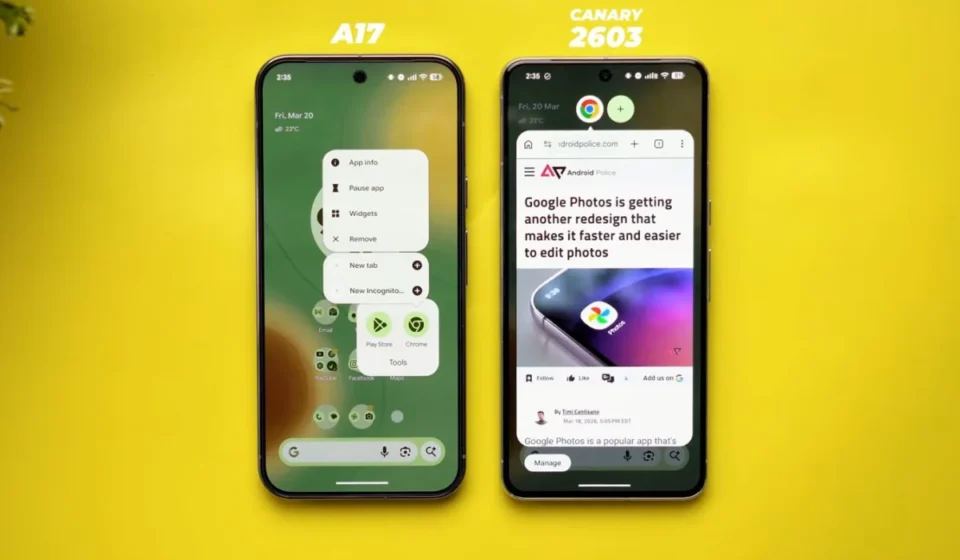
The Android Canary 2603 build showcases several user-facing improvements that, if they progress through the development pipeline, could significantly enhance the Android experience. Among the most notable is the introduction of an integrated app lock feature. This functionality allows users to directly secure individual applications by long-pressing their icons, a move that streamlines privacy controls and eliminates the need to navigate through complex system settings menus to achieve the same result. This mirrors similar features already present in some third-party launchers and device-specific manufacturer skins, suggesting Google is looking to standardize such privacy enhancements at the core Android level.
Further refinement is evident in the implementation of chat bubbles, a feature that has seen various iterations and levels of adoption in previous Android versions. In this Canary build, chat bubbles appear to be more fully activated and integrated, enabling conversations to float as on-screen overlays. This design is intended to facilitate more seamless multitasking, allowing users to maintain active communication without having to constantly switch between applications. The goal is to create a more fluid and intuitive user interface, particularly for messaging and communication apps.
The screen recorder has also undergone a significant redesign. It now features a floating "pill" interface, offering quick access to recording options. Users can choose to record their entire screen or a specific application. Following the recording, the system presents a preview interface that allows for immediate editing, deletion, or sharing of the captured content. This streamlines the process of creating and distributing screen recordings, a feature that has become increasingly important for app tutorials, gameplay sharing, and troubleshooting.

Beyond these headline features, the Canary build also hints at broader UI and UX refinements. The long-press menu, a common interaction point for app shortcuts and options, has been reorganized into a cleaner, more grouped layout. This new design prioritizes essential shortcuts while keeping less frequently used options accessible but out of the immediate view, expanding only when explicitly requested. This focus on decluttering and improving discoverability of system functions is a recurring theme in Google’s design language for Android.
The Experimental Nature of Canary Builds
It is crucial to reiterate that the features showcased in the Android Canary build are experimental. Google uses the Canary channel to explore innovative ideas and gather early feedback from developers. This process inherently involves a degree of uncertainty; a feature that appears polished and functional in a Canary build might be significantly altered, scaled back, or even entirely removed before it reaches a stable release. This is a fundamental aspect of the software development lifecycle, especially for a platform as complex and widely used as Android.
The distinction between Canary and beta releases is significant. While beta builds generally represent a more stable and feature-complete version of an upcoming Android release, offering a strong indication of what consumers can expect, Canary builds are much earlier in the development cycle. Even features that graduate from Canary to beta are not guaranteed to make it to the final stable version. This iterative process allows Google to iterate rapidly, test a wider array of concepts, and ultimately deliver a more robust and refined final product.

Furthermore, Canary builds are not designed for everyday use by the general public. They are prone to bugs, performance issues, and may require manual installation procedures that are beyond the comfort level of most users. Therefore, while these builds offer valuable insights into the future direction of Android, they are best suited for developers and enthusiasts who understand the risks and are willing to engage with an unstable software environment for the purpose of testing and providing feedback.
Anticipated Future Directions and Visual Refinements
Beyond the specific features, the Canary build offers subtle clues about Google’s broader design and functional priorities for future Android versions. The reintroduction of separate toggles for Wi-Fi and mobile data, for instance, suggests a potential reconsideration of earlier design choices that consolidated these settings. This move could be aimed at providing users with more granular and immediate control over their network connectivity.
Visually, an increased use of blur effects in various UI elements points towards an ongoing effort to refine the operating system’s aesthetic. Such visual treatments can contribute to a more modern and sophisticated user interface, potentially enhancing the perceived depth and hierarchy of on-screen information. These subtle visual cues, while not as impactful as new features, contribute to the overall user experience and signal Google’s continuous attention to design evolution.

Despite these promising developments, Google has not yet provided a definitive timeline for which of these features, if any, will be included in the stable release of Android 17. The company remains tight-lipped about specific release dates and feature sets until they are more confident in their implementation and widespread applicability. The next stage for users and industry observers to track will be the progression of these features into beta channels, which typically precedes their eventual public release. This transition marks a significant step, indicating that a feature has moved beyond the experimental phase and is being considered for broader adoption.
Broader Impact and Analysis
The ongoing development and testing of new features through channels like Android Canary are critical for maintaining Android’s position as a leading mobile operating system. By allowing for early exploration of concepts such as enhanced app security and more intuitive multitasking, Google aims to stay ahead of user demands and technological advancements. The app lock feature, in particular, addresses growing user concerns about data privacy and personal information security on mobile devices. As smartphones become increasingly central to daily life, offering robust and accessible privacy controls is paramount.
The evolution of chat bubbles also reflects a larger trend in mobile operating systems towards more integrated and less disruptive communication methods. The ability to manage conversations without leaving the current application can significantly boost productivity and reduce the friction associated with constant context switching. This aligns with Google’s broader vision of creating a more cohesive and user-centric ecosystem across its various products and services.

The redesigned screen recorder, while seemingly a minor utility, speaks to the growing importance of content creation and sharing on mobile platforms. With the rise of social media and the increasing use of video for communication and information dissemination, having a powerful and easy-to-use screen recording tool is becoming a standard expectation for smartphone users. Google’s efforts to simplify and enhance this functionality demonstrate an understanding of these evolving user behaviors.
However, the inherent uncertainty surrounding Canary builds serves as a reminder of the complex and lengthy process of developing and releasing a major operating system update. The journey from an experimental idea to a widely adopted feature involves extensive testing, developer feedback, user experience research, and rigorous quality assurance. While the Canary channel offers an exciting glimpse into the future, it is the subsequent beta phases and eventual stable release that will determine the ultimate fate of these innovations. For consumers, patience and observation of official announcements and beta program updates will be key to understanding what the next generation of Android will truly offer.