Adaptive Theme App Revolutionizes Android’s Dark Mode Switching with Ambient Light Detection

Dark Mode, a cornerstone of modern smartphone interfaces, has become an indispensable feature for millions of Android users globally. Its utility extends beyond mere aesthetic preference, offering tangible benefits such as reduced eye strain, improved battery efficiency on OLED displays, and enhanced readability in low-light environments. However, the current implementation of Dark Mode within stock Android, primarily reliant on rigid schedules or manual toggles, often falls short of providing a truly seamless and contextually aware user experience. This limitation has paved the way for innovative third-party applications, with "Adaptive Theme" emerging as a significant contender, offering a dynamic and intelligent solution by automatically adjusting the interface theme based on ambient light conditions.
The Evolution and Current Limitations of Android’s Dark Mode
The journey of Dark Mode from a niche developer setting to a mainstream user feature has been a gradual but impactful one. Initially, operating systems offered limited customization, with light themes being the default. As screen technology advanced, particularly with the proliferation of OLED panels which can fully turn off individual pixels to display true blacks, the advantages of a dark interface became more apparent. Google officially introduced a system-wide Dark Mode with Android 10 in 2019, responding to widespread user demand and aligning with a broader industry trend. This marked a significant step forward, allowing users to schedule Dark Mode activation, typically from sunset to sunrise, or manually toggle it on and off.
While these options were a welcome addition, they presented inherent inflexibility. A scheduled Dark Mode, for instance, operates on a fixed timetable. If a user enters a brightly lit room during the scheduled "dark" period or steps outdoors into glaring sunlight during the day, the phone’s interface remains stubbornly dark, potentially hindering visibility and user comfort. Conversely, if a user enters a dimly lit cinema or a dark bedroom outside of the scheduled hours, the bright light theme can be jarring and uncomfortable. The alternative – manual switching – demands constant user intervention, disrupting workflow and requiring multiple taps through system settings. This rigidity underscores a fundamental gap in Android’s user interface design: the lack of true environmental adaptability.
Introducing Adaptive Theme: Contextual UI for Android
Adaptive Theme directly addresses this deficiency by introducing a sophisticated layer of intelligence to Dark Mode management. The application leverages the smartphone’s ambient light sensor, a component typically used for automatic screen brightness adjustment, to dynamically switch between light and dark themes. This goes far beyond the static nature of scheduled themes, providing a responsive interface that mirrors the user’s immediate surroundings. Whether transitioning from the harsh glare of outdoor daylight to the subdued lighting of an indoor office, or from a brightly lit room to a darkened evening environment, Adaptive Theme ensures the phone’s interface is always optimally presented.
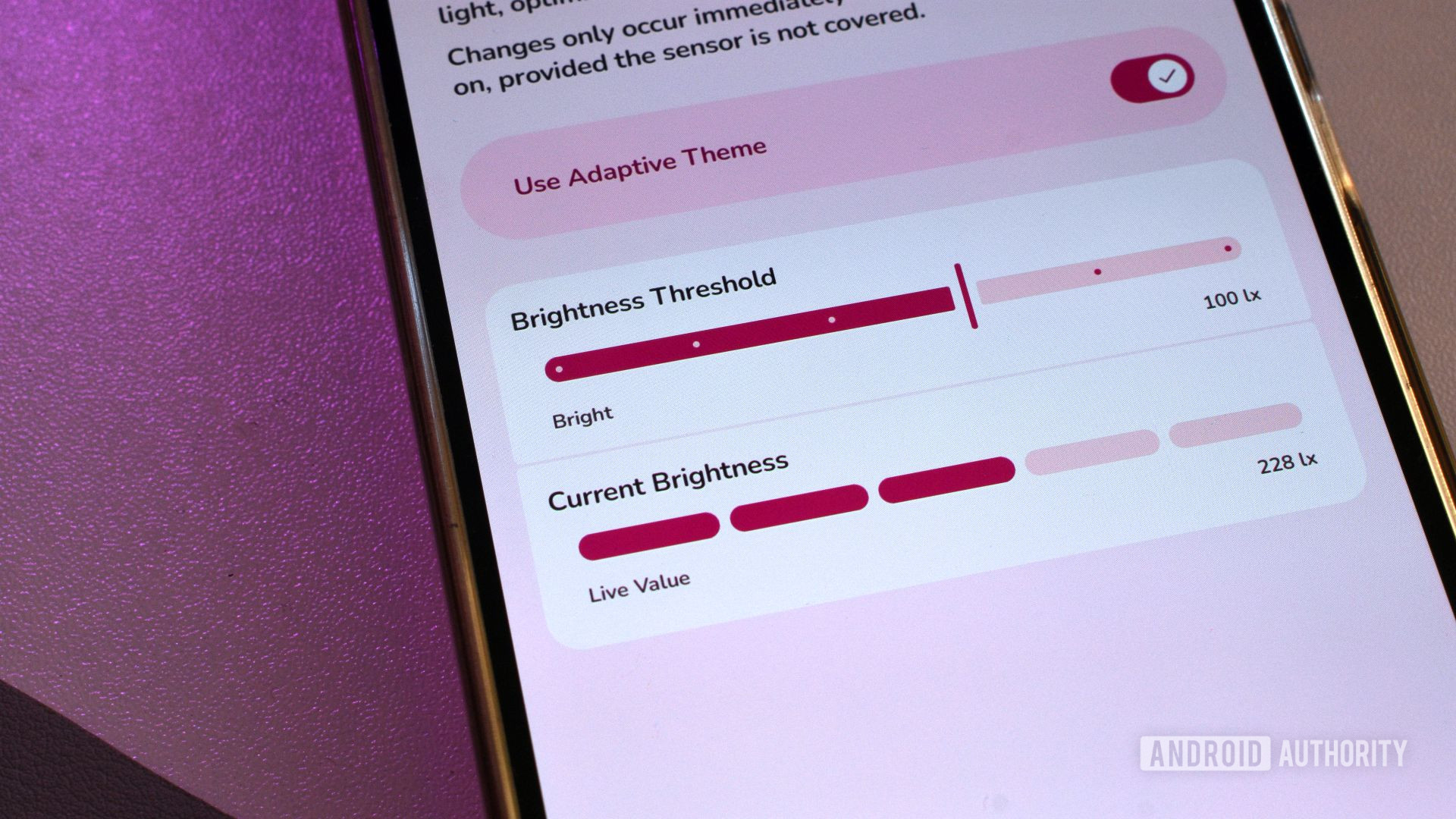
The core principle behind Adaptive Theme is its ability to interpret real-time light data. If the sensor detects a high level of ambient light, indicating a bright environment, the application triggers the light theme. Conversely, upon detecting low light levels, it seamlessly switches to the dark theme. This automated process eliminates the need for manual intervention, allowing users to focus on their tasks without the distraction of an ill-suited interface theme. The primary selling point lies in this effortless, intelligent transition, providing a truly adaptive user experience that enhances comfort and usability throughout the day.
Technical Deep Dive: How Adaptive Theme Works
At the heart of Adaptive Theme’s functionality is the ambient light sensor, a small but critical piece of hardware present in virtually all modern smartphones. This sensor measures the intensity of light in the device’s immediate environment, reporting it in units of lux (lx). Lux is a standardized unit of illuminance, representing luminous flux per unit area. For context, a typical office environment might have illuminance levels of 300-500 lux, while direct sunlight can exceed 100,000 lux, and a dimly lit room might be below 50 lux.
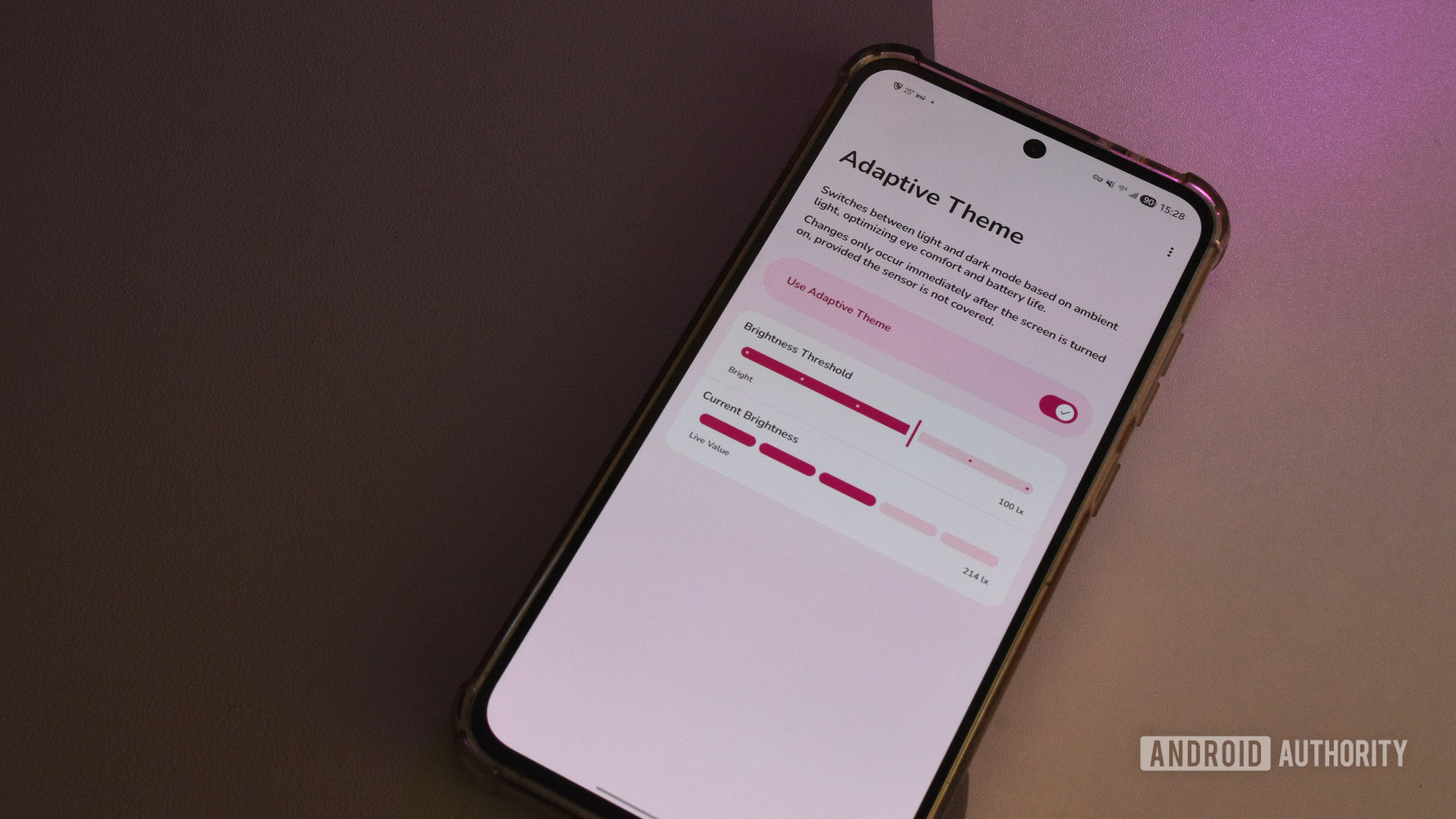
Adaptive Theme presents a user-friendly interface, elegantly designed with Google’s Material You aesthetic principles, allowing for straightforward configuration. The main screen features a master toggle to activate or deactivate the app’s automatic switching. Crucially, it provides two key adjustable parameters: "Brightness Threshold" and "Current Brightness." The "Current Brightness" display offers a real-time readout from the ambient light sensor, allowing users to gauge the light levels in their current environment. This immediate feedback is invaluable for setting the "Brightness Threshold."
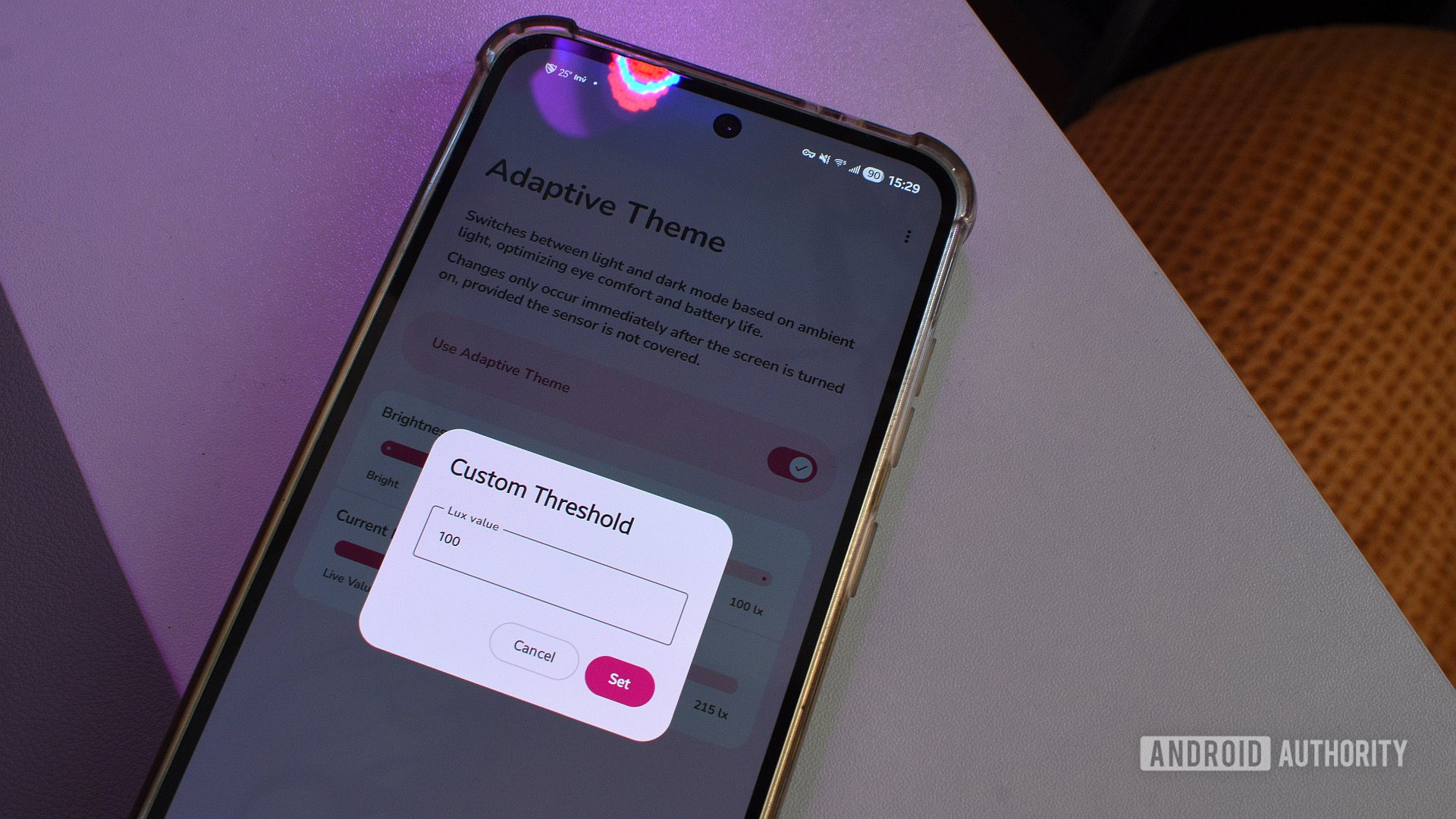
Users can select from a range of predefined brightness levels, offering a quick setup for common scenarios. However, for those seeking precise control, the app allows for the entry of a custom numerical threshold within the 0 to 10,000 lux range. This granular control is essential for tailoring the app’s behavior to individual preferences and specific environments. For instance, a user might find that a crossover point of 300-400 lux provides the ideal balance, ensuring the interface switches to dark mode when the ambient light dips to a level where a bright screen becomes uncomfortable, and to light mode when brightness increases to facilitate better outdoor visibility. This level of customization empowers users to define their "sweet spot," ensuring the theme changes exactly when and where they prefer.
The Shizuku Dependency: A Bridge to Deeper System Integration
While Adaptive Theme offers a remarkably intuitive user experience once configured, its underlying operation requires overcoming a significant hurdle imposed by Android’s robust security architecture. To access and control system-level interface elements like the global theme setting, third-party applications typically need privileged access that is usually restricted to rooted devices. However, Adaptive Theme manages to skirt this limitation through its integration with Shizuku, a sophisticated third-party utility.
Shizuku acts as a bridge, allowing non-root applications to execute system APIs (Application Programming Interfaces) with elevated permissions. It achieves this by creating a secure communication channel between the app and the system server, bypassing the traditional need for root access. The setup procedure for Shizuku, however, can be considerably more complex than installing a typical app. It often involves enabling developer options, USB debugging, and potentially wireless debugging, requiring users to follow a series of steps that might be intimidating for those unfamiliar with advanced Android settings. This dependency, while enabling powerful functionality, introduces a layer of complexity that detracts from the otherwise simple and elegant design of Adaptive Theme. It represents a trade-off: unparalleled functionality versus increased setup difficulty. For many users, the benefits of true adaptive theming outweigh this initial setup effort, but it remains a barrier to broader adoption.
User Experience, Calibration, and Minor Quirks
The journey to an optimally adaptive theme experience with Adaptive Theme often involves a period of trial and error. As noted, finding the perfect brightness threshold is a highly personal endeavor. Setting the threshold too high might cause the theme to switch frequently and unnecessarily, even in moderately lit conditions, leading to a distracting flicker. Conversely, a threshold set too low might prevent the theme from switching to dark mode when genuinely needed, negating the app’s purpose. Users are encouraged to observe their environment and the "Current Brightness" readings over several days, adjusting the threshold incrementally to find the ideal balance that aligns with their comfort and typical usage patterns.
Another notable quirk of Adaptive Theme is its operational limitation: theme changes only occur after the phone has been unlocked. This means that if a user moves from a bright outdoor setting to a dark indoor environment, the theme will not adapt until they actively wake and unlock their device. While a minor inconvenience, this can interrupt the seamless experience, especially for users accustomed to immediate responsiveness from their devices. For many, the expectation is that the theme should adjust before they interact with the phone, providing the appropriate interface upon first glance. This limitation is likely tied to Android’s power management and security protocols, which restrict background processes from making significant system-level changes while the device is locked.
Despite these minor challenges and the initial setup complexity, the overwhelming sentiment from users who successfully integrate Adaptive Theme is one of profound satisfaction. The app, once calibrated, delivers on its promise of a more comfortable and contextually aware smartphone experience, making users wonder why such a feature isn’t a native part of the Android operating system.
The "Missing Feature" Debate: Why Not Stock Android?
The consistent refrain among Adaptive Theme users is a poignant question: "How is this not a stock Android feature?" The absence of an ambient light-based dark mode switch in Android, especially given Google’s emphasis on user experience and Material You’s adaptive design philosophy, is a curious omission. Several factors might contribute to Google’s decision not to integrate such a feature natively:
- Complexity and Consistency: Implementing a truly robust and consistent adaptive theme across the vast and fragmented Android ecosystem presents significant challenges. Different phone manufacturers use varying ambient light sensors with diverse calibration and sensitivity levels. Ensuring reliable performance across hundreds of device models from multiple vendors could be a development and maintenance nightmare for Google.
- Battery Consumption: While the ambient light sensor itself is low-power, constant background monitoring and system-wide theme switching could theoretically have a marginal impact on battery life, especially if not optimized perfectly. Google often prioritizes battery longevity in its core OS features.
- User Control vs. Automation: Google’s design philosophy often balances automation with explicit user control. While an adaptive system is convenient, some users might prefer the predictability of scheduled or manual switching. Integrating a complex adaptive system might require extensive settings and explanations, potentially cluttering the user experience for those who prefer simplicity.
- Privacy Concerns (Perceived): Constant sensor monitoring, even for light levels, could theoretically raise privacy concerns for some users, even if unwarranted, requiring careful explanation and permissions management.
- Existing Alternatives: While not as sophisticated, Android already offers sunset/sunrise scheduling, which covers a significant portion of adaptive needs for many users. Google might perceive the added value of ambient light detection as not justifying the development and maintenance overhead for a core OS feature.
- Focus on Core Features: Google’s development resources are finite. They may prioritize other features deemed more critical or impactful for the broader Android user base, such as security updates, performance improvements, or new AI capabilities.
Despite these potential reasons, the demand for such a feature remains high. The Material You design language, introduced with Android 12, itself emphasizes adaptability, allowing the UI to dynamically re-color based on the user’s wallpaper. An ambient light-based theme switch would be a logical and highly complementary extension of this adaptive philosophy, creating an even more harmonious and responsive interface.
Broader Impact and Future Outlook
The existence and popularity of apps like Adaptive Theme underscore the vital role of the third-party developer ecosystem in filling gaps and pushing the boundaries of what’s possible on Android. These independent developers often innovate rapidly, responding directly to user needs that the platform holder might overlook or deprioritize. Adaptive Theme is a testament to this ingenuity, providing a solution that significantly enhances the daily interaction with an Android device.
Beyond convenience, an adaptive dark mode has implications for user well-being and accessibility. Reduced eye strain, particularly during prolonged use in varying light conditions, contributes to better visual health and comfort. For individuals with light sensitivity, the ability for the interface to automatically soften its brightness and contrast can be a game-changer, making their devices more accessible and usable. Furthermore, by optimizing the interface for the current lighting, the app implicitly promotes better sleep hygiene by reducing exposure to bright blue light during evening hours.
Looking to the future, it is plausible that Google will eventually incorporate a native, ambient light-based theme switching mechanism into Android. As sensor technology becomes more advanced and power-efficient, and as user expectations for truly adaptive interfaces grow, the pressure on Google to integrate such a feature will likely intensify. A native implementation would undoubtedly offer deeper integration with various OS elements, potentially extending to dynamic wallpaper changes, widget adjustments, and even app-specific theme adaptations, creating a truly unified and fluid experience.
Until then, Adaptive Theme stands as a brilliant example of how a dedicated third-party application can elevate the Android experience, transforming a static setting into a dynamic, intuitive, and genuinely adaptive interface. It serves as a powerful reminder of the untapped potential within Android’s open ecosystem and the continuous innovation driven by its vibrant developer community.