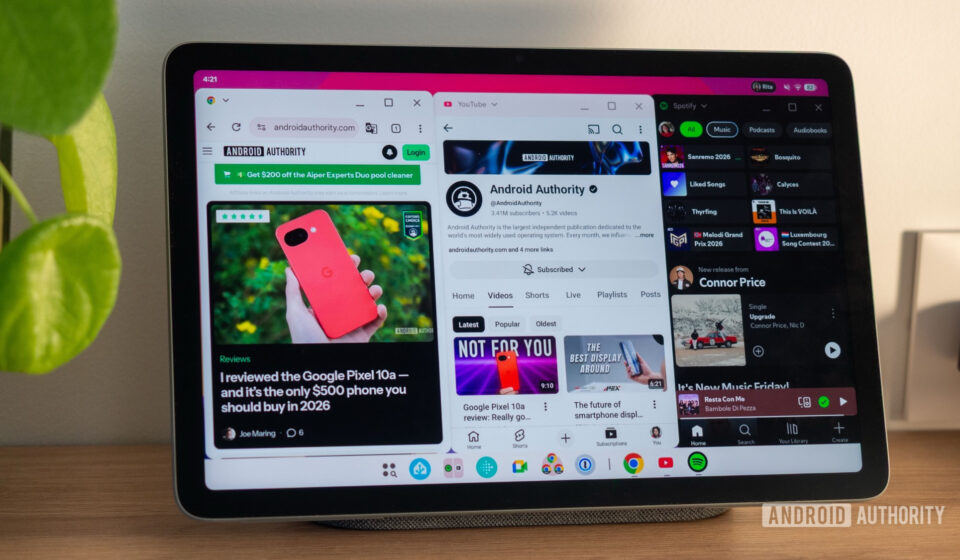
Android’s Desktop Windowing Arrives on Pixel Tablet with Android 16 QPR3, Signaling Google’s Desktop OS Ambitions

Google has officially rolled out its "desktop windowing" feature, bringing advanced multi-window capabilities to tablets, starting with the Pixel Tablet running the stable Android 16 QPR3. This significant update marks a pivotal moment in Google’s long-term vision to evolve Android beyond its mobile roots, positioning it as a robust operating system capable of delivering a desktop-like experience directly on large-screen devices. The move follows years of iterative development and testing, underscoring a strategic push to enhance productivity and versatility on Android tablets, challenging traditional distinctions between mobile and desktop computing.
A Long-Awaited Evolution: Android’s Journey Towards Desktop Functionality
The concept of desktop-like freeform windows in Android is not new. Google first experimented with this functionality as far back as Android Nougat (released in 2016), demonstrating an early recognition of the potential for more flexible multitasking on larger screens. However, the feature remained largely experimental and eventually dwindled in prominence, often relegated to developer options or specific OEM implementations. The recent revival of this ambition is closely tied to Google’s broader strategic goal to transform Android into a more versatile desktop operating system, capable of powering a wider range of devices, including traditional PCs, as hinted by initiatives like "Aluminium OS."
This overarching strategy has already manifested in a dedicated "Desktop Mode," which activates when an Android phone is connected to an external display, offering an experience akin to Samsung’s DeX. The introduction of "desktop windowing" on tablets now extends this desktop paradigm directly to the device’s native screen, eliminating the need for external peripherals to access enhanced multitasking. This internal implementation is crucial for making tablets more self-sufficient productivity hubs.
The development timeline illustrates a methodical approach. After extensive testing under Developer Options, where early adopters and developers provided crucial feedback, the feature has now reached a stable, user-facing state. Its debut on the Pixel Tablet with Android 16 QPR3 establishes a benchmark for future Android tablet experiences. While currently exclusive to the Pixel Tablet, industry observers anticipate that any tablet receiving Android 16 QPR3 or the upcoming Android 17 update will inherit these advanced capabilities, democratizing sophisticated multitasking across the Android tablet ecosystem. This staggered rollout allows Google to fine-tune the experience on its first-party hardware before wider distribution.
Deep Dive into Desktop Windowing: Fluidity and Functional Design
The core of Android’s new desktop windowing lies in its ability to manage multiple applications in resizable, overlapping windows, mimicking the familiar interface of traditional desktop operating systems. The initial impressions from testing indicate a high degree of polish and responsiveness, critical factors for user adoption in productivity environments. Animations and transitions, often a measure of system performance and user experience, are notably smooth and seamless. Resizing application windows, while inherently more precise with a mouse on a traditional desktop, is described as fluid on the touchscreen, albeit with a slight learning curve for finger-based manipulation.
Users can intuitively snap applications to different sides of the screen, resize them to custom dimensions, or toggle between maximized and minimized states. The system also supports the addition of new applications to an existing "desktop" environment and the dynamic adjustment of their sizes and positions. A particularly advanced feature is the ability to create and switch between multiple virtual desktops, allowing users to organize their workspace logically and reduce clutter. This functionality significantly enhances workflow management, enabling users to dedicate specific desktops to different tasks or projects.
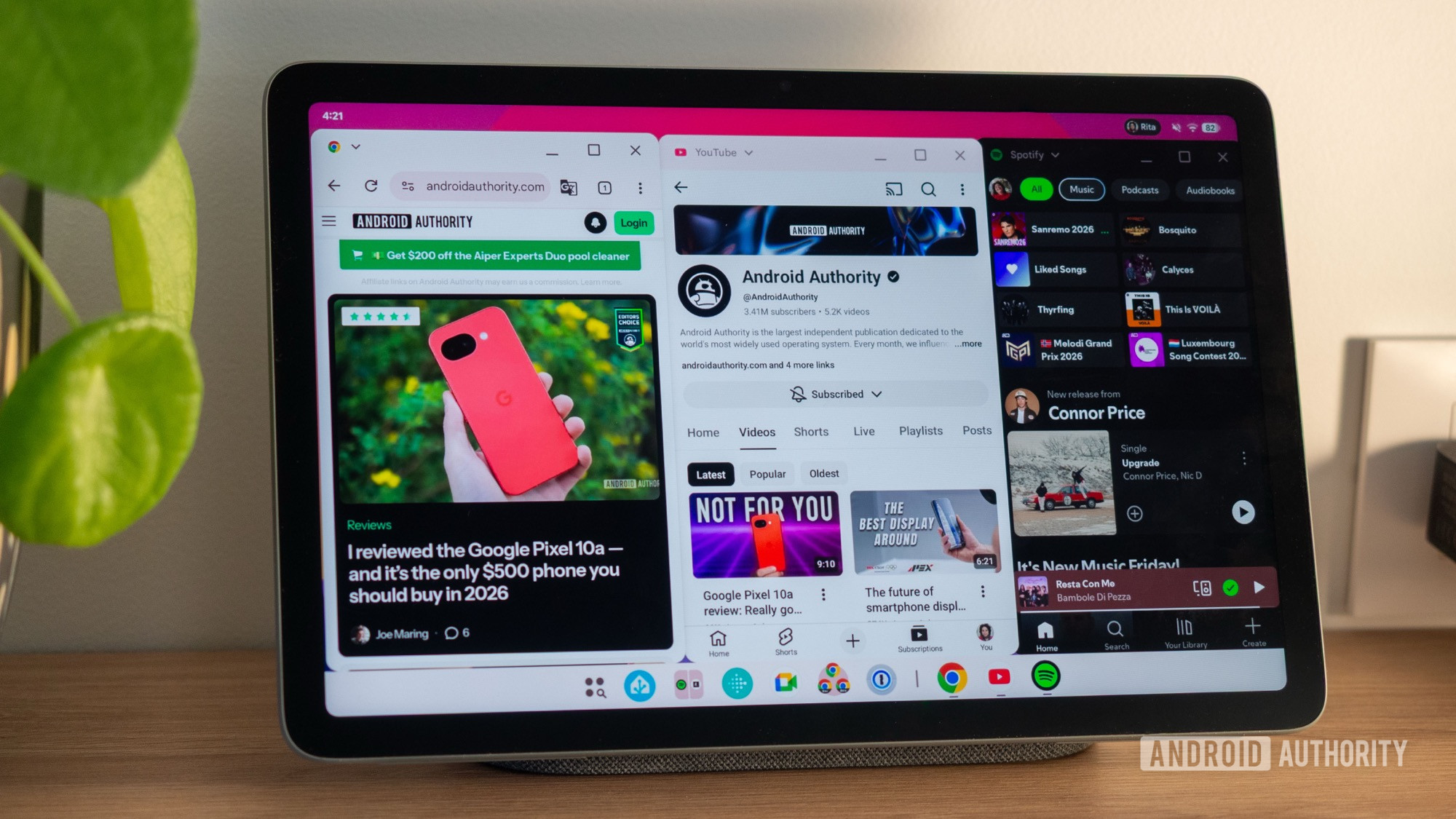
A key element of the new interface is the persistent bottom taskbar. Unlike traditional mobile app switchers, this taskbar displays icons for all currently open applications across all active desktops. This design choice dramatically speeds up app switching, allowing users to tap an icon and instantly bring the corresponding application window to the foreground, regardless of its desktop or current visibility. The system intelligently navigates to the correct desktop and elevates the chosen app, eliminating the need for multi-step navigation through an app switcher.
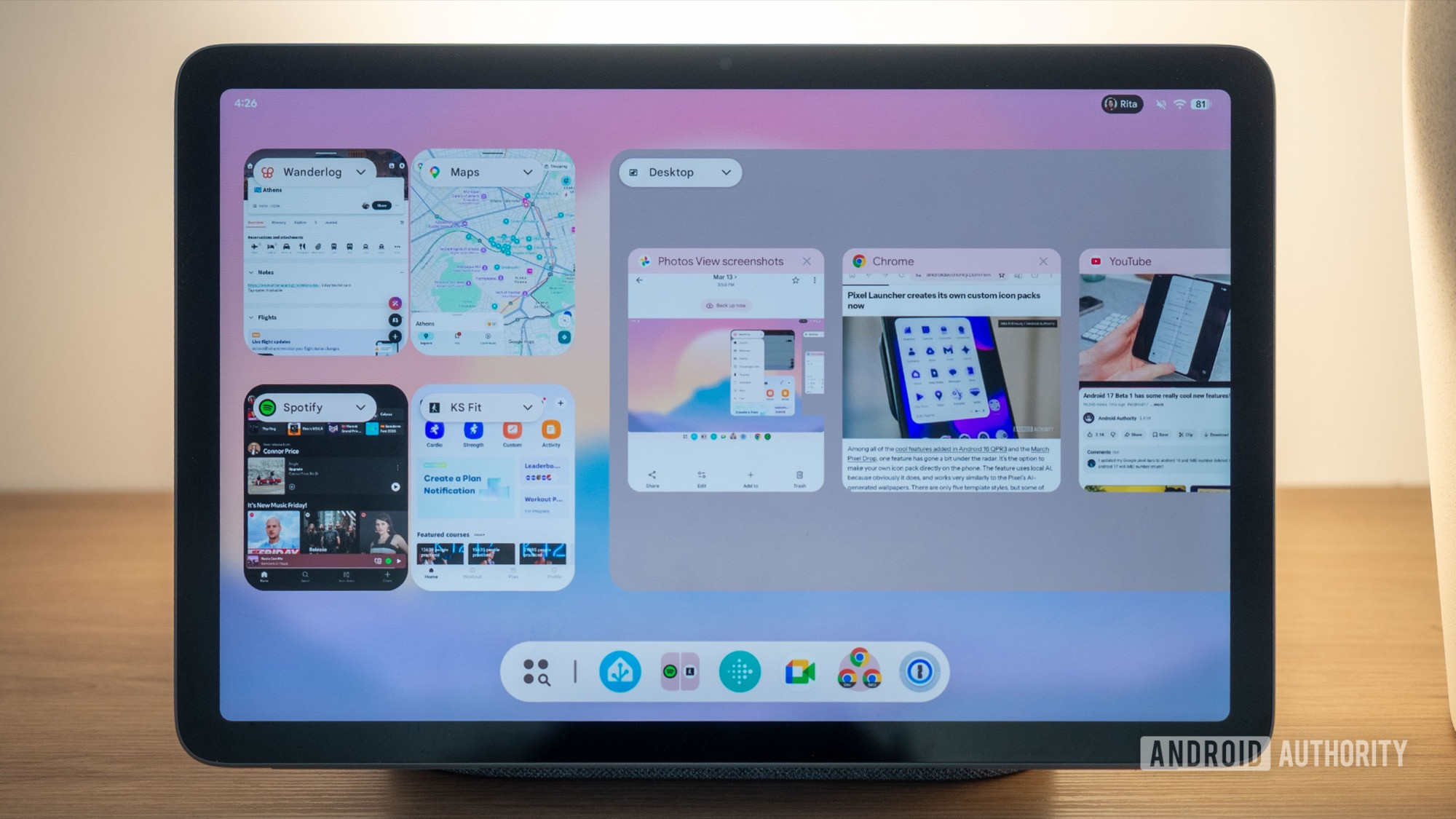
Furthermore, the app switcher itself has been refined. It presents small, perfectly aligned previews of all floating windows, even if they were previously unevenly sized or positioned on the active desktop. This visual consistency aids in quick identification and selection. A notable design consideration is the retention of the ability to simultaneously resize two snapped app windows by dragging the central divider. This ensures that a popular and efficient multitasking method from Android’s older split-screen mode is not lost in the transition to freeform windows.
For users who prefer tap-based interactions over gestures, Google has ensured comprehensive accessibility. Starting a new desktop, adding apps, or managing individual windows (minimize, maximize, close) can all be accomplished through straightforward taps. Contextual menus, accessible via a drop-down next to the app name in window mode or a floating handle in full-screen apps, provide quick shortcuts to revert to split-screen, send an app to a desktop, or restore full-screen view. This comprehensive set of controls aims to cater to diverse user preferences and usage scenarios.
Coexistence and Trade-offs: Blending Old and New Multitasking Paradigms
One of the most strategic decisions in Google’s implementation is the harmonious coexistence of the new desktop windowing with Android’s traditional full-screen and split-screen app modes. This hybrid approach offers users unparalleled flexibility, allowing them to choose the most appropriate multitasking method for their current needs. Users can opt to entirely ignore desktop windowing, stick to the familiar full-screen experience, or embrace the new floating windows, or, most powerfully, mix and match according to the task at hand.
This allows for scenarios where a user might group several frequently used applications within a desktop for rapid switching, while keeping other, less frequently accessed or single-focus applications in their dedicated full-screen modes. The primary benefit of desktop windowing, as observed, is the incredible speed of switching between multiple active applications. The always-visible taskbar acts as a rapid launchpad, circumventing the minor delays and animations associated with the traditional app switcher.
However, the new desktop windowing paradigm is not without its trade-offs, particularly concerning screen real estate. When apps are displayed in desktop mode, they typically include a dedicated top bar for window controls (minimize, maximize, close) and the persistent bottom taskbar. This, combined with an empty bar often present at the top of the screen in desktop mode, consumes valuable vertical space on a tablet’s display. For comparison, traditional full-screen apps and the existing split-screen mode maximize the usable display area, showing more content.
This implies a clear use-case distinction: for single-app focus or side-by-side work with two apps where maximum content visibility is paramount, the traditional full-screen or split-screen modes remain superior. Desktop windowing, conversely, excels when managing three or more applications simultaneously, prioritizing quick access and organizational flexibility over absolute screen space efficiency. Pushing the number of active windows too far, or shrinking individual windows excessively, can lead to an "unusable" experience, highlighting the balance required to leverage the feature effectively. Small, floating windows that obscure underlying content can quickly negate the productivity benefits.
Addressing the Competitive Landscape and Strategic Implications
Google’s refined desktop windowing arrives in a competitive landscape where major players are increasingly focused on convergent experiences. Samsung’s DeX has long offered a robust desktop environment for its premium phones and tablets, providing a benchmark for Android-based desktop solutions. Apple’s iPadOS, with features like Stage Manager, also aims to bridge the gap between tablet and desktop workflows, albeit with a different philosophical approach to window management. Microsoft’s Windows on ARM initiative, while a full desktop OS, underscores the demand for powerful, portable computing.
This rollout on the Pixel Tablet with Android 16 QPR3 signals Google’s intent to not merely compete but to carve out a distinct and compelling niche for Android in the productivity space. By integrating desktop-class multitasking directly into the tablet experience, Google enhances the value proposition of Android tablets, potentially attracting users who require more sophisticated workflow management than traditional mobile interfaces offer. This could also stimulate the market for tablet accessories, such as Bluetooth keyboards and mice, which would further enhance the desktop windowing experience, transforming tablets into pseudo-laptop setups.
From a developer perspective, this advancement necessitates greater attention to app responsiveness and layout adaptability across various window sizes and aspect ratios. Apps that are well-optimized for flexible windowing will thrive, while those rigidly designed for full-screen mobile interfaces may struggle to provide an optimal user experience in desktop mode. Google’s ongoing efforts to provide better tools and guidelines for large-screen app development will be crucial in ensuring a robust and consistent ecosystem.
Remaining Limitations and The Road Ahead
Despite the impressive progress, the desktop windowing feature still exhibits some areas for refinement. Current limitations include the apparent inability to easily move an app between different virtual desktops, a feature common in desktop operating systems. Additionally, when a full-screen app is transitioned to desktop mode, it defaults to the first available desktop, limiting user control over workspace organization. The inability to rearrange desktops further restricts personalization. Challenges with multi-window support for certain applications, such as opening two distinct Chrome browser windows in separate desktops, suggest ongoing development is needed for full browser integration, though beta channels show promising signs.
These identified limitations, while minor in the grand scheme of the feature’s comprehensive implementation, highlight that while Android’s desktop progression is exciting, it has not yet achieved parity with mature desktop operating systems. The distinction between a "tablet" interface and a "desktop-ready" experience remains, with the latter requiring even greater flexibility, deeper integration, and more granular control over window and workspace management.
Looking ahead, the widespread availability of desktop windowing is expected to expand beyond the Pixel Tablet. Future Android iterations, particularly Android 17, are likely to embed these capabilities as a standard feature for all compatible large-screen devices. Google’s continued investment in this area suggests a clear trajectory towards a more unified and powerful Android experience across form factors. As hardware capabilities advance and user expectations for mobile productivity continue to rise, Android’s desktop windowing represents a significant leap forward, transforming tablets from content consumption devices into versatile productivity machines. The journey towards a truly converged Android desktop OS is ongoing, and this latest update is a definitive step in that direction.