





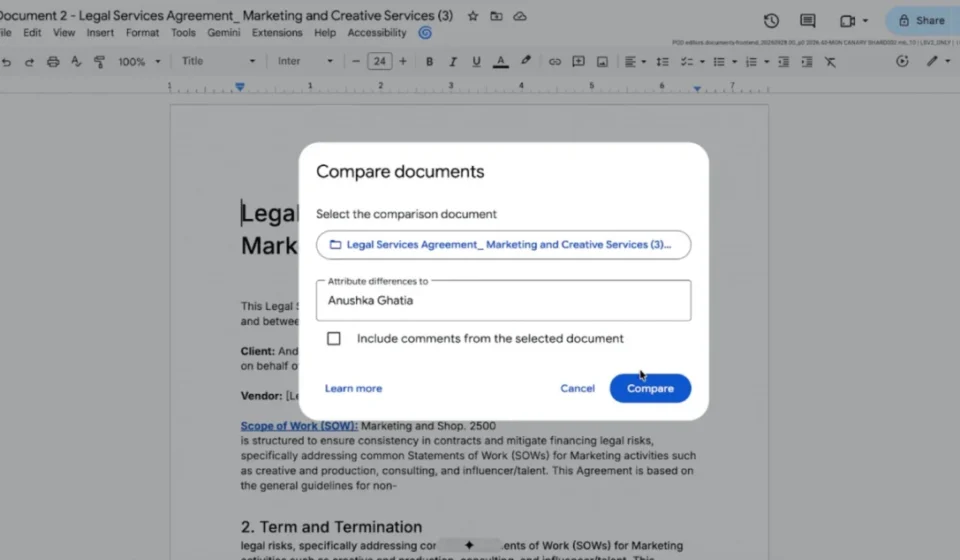

Google Docs has officially enhanced its document comparison capabilities, now allowing users to directly compare Microsoft Word (.docx) files without the cumbersome requirement of prior conversion. This significant update, announced on November 16, streamlines workflows for countless professionals and organizations, particularly those frequently collaborating with external parties or operating within hybrid ecosystems that utilize both Google Workspace and Microsoft Office. The long-awaited feature eliminates a persistent friction point in document review and editing processes, promising greater efficiency and a reduction in digital clutter.
The "Compare documents" function, accessible through the "Tools" menu in Google Docs, has historically been a valuable asset for tracking changes within Google’s native document format. However, its inability to directly process .docx files meant that users receiving amended contracts, legal documents, or collaborative drafts in Microsoft Word format were compelled to first convert these files into a Google Docs-compatible format. This conversion step not only added an extra layer of administrative effort but also risked introducing formatting inconsistencies or the creation of redundant file versions, complicating version control and storage within Google Drive.
Chandu Thota, Google Workspace’s engineering lead, highlighted the practical implications of this update in a social media post on X (formerly Twitter), emphasizing its utility in scenarios like reviewing revised contracts. He shared a brief demonstration video illustrating the seamless comparison process, underscoring the ease with which users can now identify differences between a Word document and a Google Doc. This practical demonstration serves as a clear indicator of the user-centric design philosophy driving this enhancement.

A History of Interoperability Challenges
The journey toward seamless interoperability between Google Docs and Microsoft Word has been a protracted one. While Google Docs has long supported opening and editing .docx files, the precision and fidelity of these conversions have been a subject of ongoing user feedback. Formatting discrepancies, especially in complex documents with intricate layouts, tables, or specific font embedding, have often necessitated manual adjustments post-conversion. The absence of direct comparison for .docx files exacerbated these challenges, particularly in legal and corporate environments where meticulous tracking of every alteration is paramount.
The decision to enable direct .docx comparison marks a significant stride in Google’s commitment to fostering a more inclusive and flexible collaborative environment. This move acknowledges the reality of diverse software ecosystems in modern workplaces and aims to bridge the gap between competing platforms. It’s a strategic enhancement designed to retain and attract users who may have previously hesitated to fully commit to Google Docs due to its limitations in handling native Microsoft Office formats during critical review stages.
Streamlining the Comparison Process

The newly integrated functionality operates with remarkable simplicity. Users can now upload their amended .docx file directly into Google Drive. Subsequently, they open the original Google Doc that needs to be compared. Navigating to "Tools" and selecting "Compare documents," users are presented with an option to choose the .docx file from their Drive. Google Docs then ingeniously generates a new, comparison document that visually highlights all the differences as suggested edits. This means that amendments appear in a format akin to track changes, making it exceptionally easy to review and accept or reject modifications.
A crucial benefit highlighted by Thota is that this process does not alter the original .docx or Google Doc files. This non-destructive approach ensures that the source documents remain intact, providing an added layer of security and peace of mind for users. Furthermore, the system is designed to import comments from the Word document, preserving valuable contextual information and feedback that might otherwise be lost during a conversion process. This feature is particularly valuable for collaborative projects where comments serve as a vital communication channel.
Widespread Availability and Implications
The "Compare documents" feature with direct .docx support is not confined to specific user tiers. Google has made this functionality available to all Google Workspace customers, including those under the Workspace Individual plan, as well as users with personal Google accounts. This broad rollout ensures that the benefits of this enhancement are accessible to a wide spectrum of users, from individual freelancers to large enterprises.

Furthermore, the feature has been deployed across both Google’s Rapid Release and Scheduled Release tracks. This means that users on the more gradual deployment pathway will also experience the benefits without any further delay, underscoring Google’s commitment to a swift and comprehensive rollout of impactful updates. The company has not specified any file size restrictions or other limitations, suggesting a robust and scalable implementation.
The implications of this update are far-reaching. For legal professionals who routinely exchange contracts and other sensitive documents in .docx format, the ability to perform direct comparisons within Google Docs significantly reduces the risk of errors and speeds up the review cycle. Similarly, academic researchers, content creators, and project managers who collaborate with individuals or organizations using Microsoft Word will find their workflows substantially improved.
The reduction in the need for file conversions also contributes to a more organized digital workspace. By minimizing the creation of duplicate or converted files, users can maintain cleaner Google Drive folders, simplifying document management and retrieval. This not only enhances productivity but also potentially reduces storage costs for organizations managing vast archives of documents.
Broader Context: Google’s Interoperability Push

This enhancement is part of a larger, ongoing trend of Google Workspace striving for greater interoperability with competing platforms, particularly Microsoft Office. In recent years, Google has invested heavily in improving the fidelity of its Office file import and export capabilities, recognizing that a significant portion of its user base operates in mixed-software environments. Features like improved charting in Sheets when importing Excel files, enhanced presentation compatibility in Slides, and more robust Word import/export in Docs are all testaments to this strategy.
The direct .docx comparison feature can be seen as a direct response to persistent user feedback and a strategic move to close a perceived gap in its feature set. By removing this barrier, Google aims to solidify Google Docs’ position as a versatile and indispensable tool for document collaboration, regardless of the originating file format. The company’s continued focus on such practical improvements signals a mature understanding of its user base’s diverse needs and a commitment to delivering tangible value through its cloud-based productivity suite.
Users seeking further details on this functionality can refer to the Google Docs Help Center, which provides comprehensive guides on comparing documents and handling Office files. The availability of such detailed resources further empowers users to leverage this new feature to its fullest potential, ensuring a smooth and efficient document comparison experience.
The update is a clear indicator that Google understands the importance of seamless integration in today’s interconnected digital landscape. By directly addressing the need to compare Word files without conversion, Google Docs has taken a significant step forward in its mission to provide a universally accessible and efficient platform for document collaboration and review. This development is poised to be a welcome relief for many, finally putting an end to a long-standing inconvenience.