





Google’s Pixel Phones Poised to Revolutionize Notification Management with AI-Driven Priority Features

Google is reportedly advancing its efforts to combat digital clutter on its Pixel smartphones, with new evidence pointing to the development of sophisticated AI-powered "Priority notifications" and a restructuring of its notification management system. These enhancements, discovered through an in-depth APK teardown, suggest a significant step towards intelligent, on-device organization designed to elevate critical alerts while minimizing distractions from less urgent communications. This move underscores Google’s ongoing commitment to refining user experience and fostering digital well-being in an increasingly connected world.
The Core Revelation: Intelligent Prioritization and Streamlined Organization
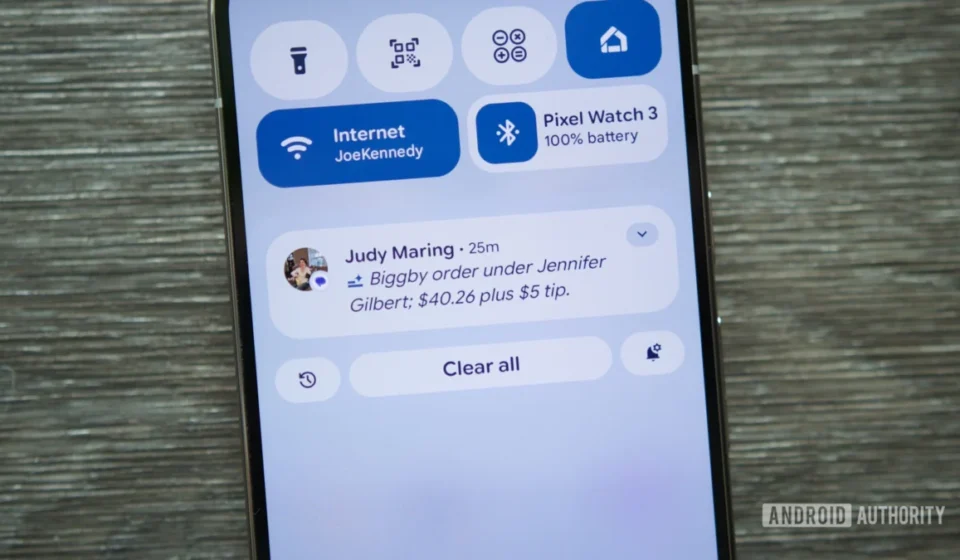
The central finding from recent code analysis indicates that Google is actively working on a feature dubbed "Priority notifications" within its existing Notification organizer framework. This impending functionality aims to automatically identify and prominently display time-sensitive or highly important notifications at the apex of the notification shade. Preliminary insights suggest that these prioritized alerts might also receive distinctive visual treatments, such as a special color, to ensure they immediately capture the user’s attention.
Accompanying this significant addition is a proposed overhaul of the settings interface. The current "Notification Intelligence" section is slated to be replaced by "Notifications organizer," which itself could be rebranded as "Notification bundles." This nomenclature shift suggests a strategic pivot towards clearer, more intuitive categorization and user control over the deluge of daily alerts. While the Notification organizer currently operates as a sub-menu under Notification Intelligence, its elevation to a primary setting, potentially with a new name, indicates a more central role in the overall Android notification ecosystem on Pixel devices.
Understanding the Technical Backbone: On-Device AI for Enhanced Privacy and Performance
Crucially, the implementation of "Priority notifications" is expected to be powered by on-device artificial intelligence. This architectural choice is paramount, as it means the processing and analysis of notification content occur directly on the user’s device, rather than being transmitted to Google’s cloud servers. This on-device processing offers substantial privacy benefits, as sensitive personal data within notifications never leaves the phone. Furthermore, it often results in faster, more responsive performance, as the device doesn’t need to communicate with remote servers for every decision.
This approach mirrors similar intelligent notification systems found in competing mobile operating systems, such as Samsung’s "Prioritize notifications" feature on One UI 8.5 and newer versions, and Apple’s focused notification summaries in iOS. Google’s explicit emphasis on local processing aligns with its broader strategy of embedding powerful AI capabilities directly into its Pixel hardware, leveraging its custom Tensor chips to deliver intelligent features that prioritize user privacy and efficiency. This marks a natural progression from existing on-device AI functionalities, such as smart replies, now extending to proactive notification management.
A Chronology of Google’s Notification Evolution
Google’s journey in notification management has been a continuous evolution, driven by the escalating volume and complexity of digital communication. The problem of "notification overload"—the feeling of being overwhelmed by an endless stream of alerts—is a well-documented challenge in the modern digital landscape. Studies consistently show that excessive notifications can lead to decreased productivity, increased stress levels, and fragmented attention spans. For instance, research from the University of California, Irvine, and Humboldt University in Berlin indicates that constant interruptions from notifications can significantly impact task completion and induce a state of "continuous partial attention." On average, smartphone users receive dozens, if not hundreds, of notifications daily, making intelligent filtering a necessity rather than a luxury.
- Early Android (Pre-Android 5.0 Lollipop): Notifications were relatively basic, primarily serving as simple alerts. Users had limited control over their presentation or prioritization.
- Android 5.0 Lollipop (2014): Introduced "Heads-up" notifications, which briefly appear at the top of the screen without interrupting the current activity, and revamped the notification shade with a more modern design. It also brought "Priority Mode" for silencing non-essential notifications.
- Android 6.0 Marshmallow (2015): Enhanced notification controls, allowing users to block notifications from specific apps more easily.
- Android 7.0 Nougat (2016): Introduced bundled notifications, grouping alerts from the same app, and direct reply functionality, allowing users to respond to messages directly from the notification shade.
- Android 8.0 Oreo (2017): A landmark release for notification management, introducing "Notification Channels." This feature allowed app developers to categorize their notifications (e.g., "promotional offers," "security alerts," "chat messages") and users to individually control the sound, vibration, and visibility settings for each channel. This provided unprecedented granular control. "Notification Dots" also arrived, subtly indicating unread notifications on app icons.
- Android 9 Pie (2018): Introduced "Adaptive Battery" and "App Actions," which used on-device AI to predict user behavior and optimize app usage, indirectly influencing notification delivery by learning which apps users interacted with most. "Manage notifications" button was added for quicker access to settings.
- Android 10 (2019): Further refined notification controls, introducing "Silent" notifications that appear in the shade but don’t make a sound or pop up.
- Android 11 (2020): Emphasized "Conversations," giving chat app notifications a dedicated section at the top of the notification shade, and allowing users to mark specific conversations as "Priority." This existing "Priority Conversations" feature allows users to manually designate important contacts, ensuring their messages stand out.
- Android 12 (2021): Focused on a more visually appealing and responsive notification shade, with a strong emphasis on privacy dashboards and controls.
- Android 13 (2022): Introduced a new runtime permission for notifications, requiring apps to explicitly ask for permission to send notifications, giving users more control upfront.
- Android 14 (2023): Continued to refine user control and privacy, with features like flash notifications and improved notification access.
- Recent Developments (December 2023 – Present): Google introduced "Notification organizer" on Pixel phones as part of "Notifications Intelligence." This feature aimed to reduce notification overload by automatically muting unwanted notifications and grouping low-priority ones into a concise summary. The newly discovered "Priority notifications" feature builds directly upon this foundation, adding an active layer of intelligent prioritization to the existing organizational capabilities.
This comprehensive timeline illustrates a clear trajectory: from basic alerts to highly customizable, AI-driven systems designed to give users unprecedented control and peace of mind.
The Broader Impact: Enhancing Digital Well-being and Productivity
The introduction of "Priority notifications" on Pixel devices has significant implications for user experience, digital well-being, and productivity. By intelligently surfacing critical information, Google aims to minimize the risk of users missing truly important alerts—such as emergency messages, calendar reminders for crucial appointments, or time-sensitive financial alerts—amidst a flood of less urgent updates.
- Reduced Cognitive Load: Users will spend less time sifting through irrelevant notifications, freeing up cognitive resources for focused work or leisure.
- Improved Focus and Productivity: Fewer interruptions from non-essential alerts can lead to longer periods of sustained concentration, boosting productivity in professional and personal tasks.
- Enhanced Digital Well-being: By reducing the constant demand for attention, these features contribute to a healthier relationship with technology, mitigating feelings of stress, anxiety, and being constantly "on call." This aligns perfectly with Google’s broader "Digital Wellbeing" initiative, which provides tools for managing screen time and digital habits.
- Competitive Edge: By offering a highly intelligent and privacy-centric notification management system, Google strengthens the Pixel lineup’s appeal, positioning it as a leader in smart, user-centric smartphone design. This pushes competitors like Apple and Samsung to further innovate in their own notification ecosystems.
Statements and Inferred Motivations from Related Parties
While direct official statements regarding these in-development features are not yet available, Google’s motivations can be logically inferred from its long-standing corporate strategies and public commitments.
- Google’s Mission: Google’s mission includes organizing the world’s information and making it universally accessible and useful. In the context of notifications, this translates to making information relevant and manageable for the user. An overwhelming notification experience runs counter to this mission.
- User Feedback and Research: Google continuously gathers user feedback and conducts extensive research into user behavior and pain points. Notification overload is a persistent complaint, and these features are a direct response to addressing that.
- AI Leadership: Google is a global leader in AI research and development. Integrating advanced on-device AI into core OS functions like notification management showcases its technological prowess and commitment to making AI practical and beneficial for everyday users.
- Privacy Advocacy: With increasing global scrutiny on data privacy, Google’s emphasis on on-device processing for sensitive data like notification content aligns with its efforts to build trust and demonstrate a commitment to user privacy.
- Hardware-Software Synergy: Pixel phones, powered by Google’s custom Tensor chips, are designed to showcase the best of Android and Google AI. Features like "Priority notifications" leverage the unique capabilities of the Tensor chip for efficient on-device machine learning, demonstrating the value proposition of Pixel hardware.
Looking Ahead: The Future of Notification Intelligence
It is crucial to reiterate that these features are currently in an evaluation phase, based on an APK teardown of work-in-progress code. As such, they are subject to change, refinement, or even potential cancellation before a public rollout. Google frequently experiments with new functionalities, and not all make it to the final product. However, the consistent direction of Google’s notification management efforts over the past decade, coupled with the clear benefits these proposed features offer, strongly suggests that a version of "Priority notifications" and a reorganized "Notification bundles" system is highly likely to reach Pixel users in the near future.
Should these features be implemented as envisioned, they represent a significant leap forward in how smartphones interact with users, moving beyond simple alerts to a truly intelligent, personalized, and privacy-conscious communication hub. The ongoing evolution of Android’s notification system on Pixel devices will undoubtedly continue to shape how we manage our digital lives, pushing the boundaries of what’s possible with on-device AI to create a more focused, less distracted mobile experience. This development firmly positions Pixel at the forefront of the smart notification revolution, offering users a powerful tool to regain control over their digital attention.