





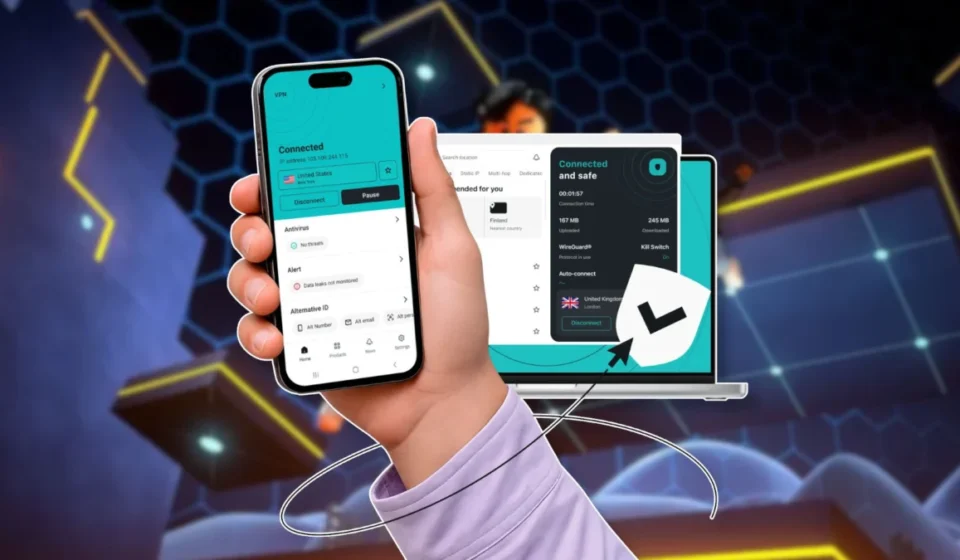
Securing Your Roblox Experience: A Comprehensive Guide to Cross-Device Protection with Surfshark VPN

The digital landscape of online gaming, particularly within vibrant and expansive platforms like Roblox, presents a growing need for robust security measures. As players increasingly engage with their Roblox accounts across a multitude of devices – from smartphones and tablets to personal computers and Macs – the imperative to safeguard these digital identities against emerging threats and malicious actors has never been more critical. In response to this escalating concern, this report delves into the essential steps for fortifying your Roblox presence, highlighting the strategic partnership with Surfshark, a leading Virtual Private Network (VPN) provider, to ensure a secure and uninterrupted gaming experience.
The Evolving Threat Landscape for Online Gamers
The popularity of Roblox, boasting over 200 million monthly active users as of its latest reported figures, makes it a prime target for cybercriminals. These threats range from account hijacking and phishing scams to the exploitation of personal data. Scammers frequently impersonate platform administrators or offer in-game currency (Robux) in exchange for login credentials, a tactic that preys on younger and less experienced users. Furthermore, the cross-platform nature of modern gaming means that a vulnerability on one device could potentially compromise accounts across all connected platforms.
Understanding the Role of VPNs in Online Security
A Virtual Private Network (VPN) acts as a crucial layer of defense by encrypting internet traffic and masking the user’s IP address. This not only shields data from potential eavesdroppers but also allows users to bypass geographical restrictions and enhance privacy. For gamers, a VPN can offer a more stable and secure connection, potentially reducing lag and protecting against Distributed Denial of Service (DDoS) attacks, which can disrupt gameplay.
Surfshark: A Strategic Partner in Digital Defense
Surfshark has emerged as a prominent VPN provider, offering a compelling blend of affordability and advanced security features. With pricing plans that can dip as low as $2.49 per month for long-term commitments, Surfshark positions itself as a cost-effective solution compared to many competitors, while still delivering a high level of encryption and a wide network of servers. This accessibility makes it a viable option for a broad spectrum of users, including the vast Roblox player base. The service provides access to thousands of servers globally, offering flexibility in connection choices and a robust infrastructure designed to maintain privacy and security.
Seamless Setup Across All Your Devices
The process of integrating Surfshark VPN into your daily digital routine, particularly for Roblox gaming, is designed for user-friendliness across all major operating systems.
-
Mobile Devices (Android and iOS): For users on Android smartphones and tablets, or Apple’s iPhone and iPad, the setup is remarkably straightforward. The initial step involves creating an account on the official Surfshark website. Once this is completed, users can navigate to their device’s respective app store – the Google Play Store for Android or the Apple App Store for iOS. A quick search for "Surfshark" will reveal the official application. Downloading and installing the app is followed by a simple login using the credentials established during account creation. From there, users can select a server location that best suits their needs, whether it’s for optimal connection speed or enhanced privacy.
-
Desktop and Laptop Computers (PC and Mac): The installation process on personal computers, whether running Windows or macOS, mirrors the ease of mobile setup. Download links for the dedicated Surfshark applications are readily available on the official Surfshark website. After downloading and installing the application, users log in with their account details. For the best gaming performance, particularly in terms of latency (ping), it is generally recommended to connect to a VPN server located within your own geographical region. This minimizes the distance data needs to travel, contributing to a smoother gameplay experience. Crucially, for users who operate their Roblox account across multiple devices, it is essential to log in to each device with the same Surfshark account to ensure unified protection.
Fortifying Your Roblox Account: Password Protection and Authentication
The cornerstone of online account security, regardless of the platform, is robust password management and multi-factor authentication. When an account is accessed across multiple devices, the integrity of the password becomes paramount.

-
Unique and Strong Passwords: The most critical advice, often reiterated by cybersecurity experts and applicable to all online services, is to use a unique password specifically for your Roblox account. This password should be complex, incorporating a mix of uppercase and lowercase letters, numbers, and symbols. It is imperative to avoid reusing passwords from other services, as a breach on one platform could expose your Roblox account if the same password is used. Furthermore, users should never share their password with anyone, especially individuals who claim to be affiliated with Roblox or offer illegitimate in-game benefits like free Robux. Such offers are almost universally scams designed to elicit account credentials.
-
Two-Factor Authentication (2FA): To provide an additional layer of security, enabling two-factor authentication (2FA) on your Roblox account is highly recommended. This process requires users to provide a second form of verification, typically a code sent to a registered phone number or email address, in addition to their password. This significantly hinders unauthorized access, even if a password is compromised.
-
Surfshark One and Alert Feature: For users seeking an even more comprehensive security suite, Surfshark offers the "Surfshark One" package. A key component of this premium offering is the Surfshark Alert feature. This advanced tool actively monitors the dark web and other online data breach repositories for any instances where a user’s email address or other personal information may have been compromised. Upon detecting a breach, Surfshark Alert immediately notifies the user, enabling them to take proactive steps, such as changing their passwords across affected services before their accounts can be exploited. This proactive approach can be invaluable in mitigating the fallout from widespread data breaches.
The Advantages of Crossplay and Unified Settings
A significant benefit of utilizing a single Roblox account across multiple devices is the seamless transfer of personalized settings. Once a player has configured their chat preferences and privacy settings within the Roblox platform, these configurations are synchronized across all devices linked to that account. This eliminates the need to repeatedly adjust these settings each time a user switches between a PC, tablet, or smartphone.
This unified approach extends to the VPN protection provided by Surfshark. A single Surfshark subscription can be used to secure multiple devices simultaneously. This means a player can transition from gaming on their PC with Surfshark active to playing on their mobile device, all while enjoying the same level of encrypted protection without the need for separate logins or configurations for each device. This convenience factor significantly enhances the overall user experience, allowing for uninterrupted and secure gameplay across the entire digital ecosystem.
Advanced Security Features: The Kill Switch
Surfshark’s commitment to user security is further underscored by the inclusion of a vital feature across all its applications: the kill switch. This functionality is present on Android, iOS, Windows, and macOS versions of the Surfshark software. The kill switch is designed to provide an additional safeguard against accidental data exposure. In the event that the VPN connection unexpectedly drops or is interrupted, the kill switch automatically severs the device’s internet connection.
While this might initially seem disruptive, especially if occurring mid-game, its purpose is to prevent the leakage of the user’s real IP address and sensitive data. By instantly disconnecting from the internet, the kill switch ensures that there is no window of opportunity for malicious actors to exploit a temporarily unsecured connection to gain access to the user’s IP address or intercept their online activity. This feature acts as a crucial fail-safe, reinforcing the overall security posture of the user’s online gaming sessions.
Broader Implications and the Future of Online Gaming Security
The integration of VPN services like Surfshark into the gaming ecosystem reflects a broader trend towards enhanced digital security awareness among users. As online platforms become increasingly central to entertainment and social interaction, the need for comprehensive protection against cyber threats will continue to grow. The affordability and user-friendly nature of services like Surfshark are democratizing access to advanced security tools, empowering a wider audience to safeguard their digital lives.
The proactive measures discussed – strong password hygiene, multi-factor authentication, and the utilization of VPNs with features like kill switches – are not merely recommendations for Roblox players but represent best practices for anyone engaging with online services. As gaming continues to evolve with immersive technologies and interconnected experiences, the focus on cybersecurity will remain a critical component of ensuring a safe, enjoyable, and trustworthy digital environment for all participants. The partnership between gaming platforms and security providers is likely to deepen, leading to more integrated and intuitive security solutions for the future of online play.
For those seeking further details on Surfshark’s comprehensive offerings, including specific pricing tiers and subscription plans, visiting the official Surfshark website is the recommended course of action. This will provide access to the most up-to-date information and allow users to make informed decisions about their online security needs.