





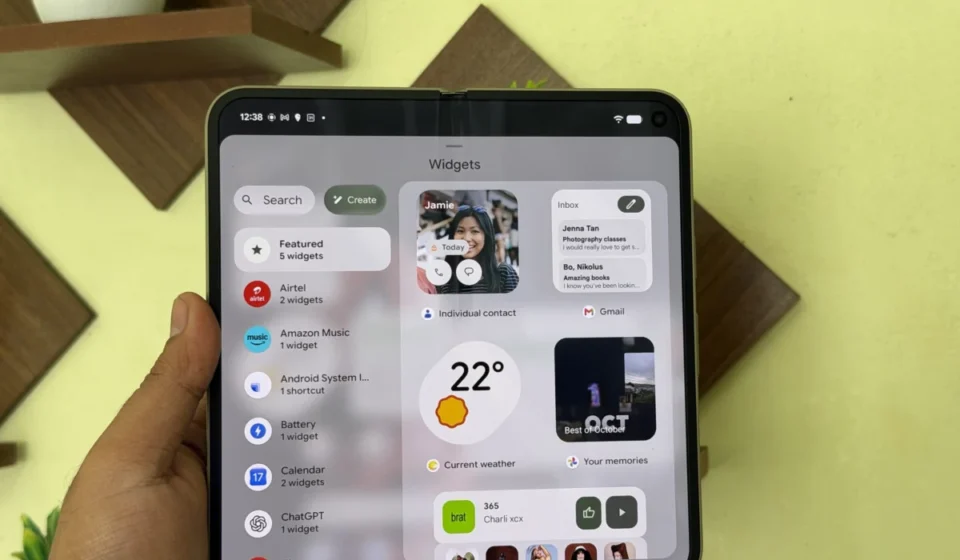
The world is your oyster, don’t let pre-made widgets hold you back with Google’s latest offering

In a significant move towards user-driven customization and AI integration on mobile devices, Google has opened early beta access to its "Create My Widget" feature, powered by its advanced Gemini AI. This innovative tool, initially slated for inclusion in the November Pixel Drop alongside Android 17 QPR2, has been released separately as a public beta program through the Google Play Store. The decision to decouple the feature from the larger update appears to stem from a desire to provide early adopters with access while ironing out any remaining bugs, a common practice for features undergoing staggered rollouts. This proactive approach underscores Google’s commitment to refining its AI capabilities before a wider, more stable release.
Unleashing Creativity: The Power of "Create My Widget"

The core functionality of "Create My Widget" is its ability to transform simple, natural language prompts into personalized widgets for users’ home screens. This empowers individuals to move beyond the limitations of pre-designed widgets and craft experiences tailored precisely to their needs and preferences. Whether it’s a countdown to a highly anticipated vacation, a reminder for a loved one’s birthday, or a real-time tracker for favorite sports team scores, the feature leverages the power of Gemini to interpret user intent and generate a functional widget.
This capability is further amplified by its integration with Google Workspace. By connecting to services like Gmail, Calendar, Drive, and other essential productivity apps, "Create My Widget" can pull and display contextually relevant personal data. Imagine a widget that not only shows your next meeting but also includes a brief summary from a related email, or a tracker that displays upcoming tasks directly from your to-do list, all generated from a simple descriptive request. This deep integration promises to make the Pixel device a more dynamic and personalized hub for information and productivity.

A Phased Rollout: Availability and Target Devices
Currently, "Create My Widget" is accessible to a specific segment of Google’s Pixel device ecosystem. The feature is available for Pixel 10 and newer devices, with a notable exclusion of the Pixel 10a. This targeted release strategy allows Google to gather feedback from a dedicated user base on newer hardware, ensuring the feature is robust and optimized before a broader rollout. The exclusion of the Pixel 10a, while potentially disappointing for some, is likely a technical decision based on the device’s hardware capabilities or software architecture, common during early beta phases.

The current roster of eligible devices includes, but is not limited to, the Pixel 10, Pixel 10 Pro, Pixel 11, Pixel 11 Pro, Pixel 11 Pro Fold, and Pixel 11 Pro Tablet. This selection of premium and recent models indicates Google’s focus on providing this advanced AI-powered feature to its flagship and most capable devices first. As the beta progresses and the feature matures, it is anticipated that Google will expand compatibility to a wider range of Pixel devices, potentially including older models and more budget-friendly variants.
The Genesis of "Create My Widget": A Timeline of Development

The journey of "Create My Widget" began with Google’s ongoing efforts to embed artificial intelligence more deeply into the user experience of its hardware. The concept likely emerged from observations of user behavior and the growing desire for greater personalization on mobile devices. The development was accelerated by advancements in Google’s Gemini AI model, which provides the underlying intelligence for understanding natural language prompts and generating complex outputs.
- Early 2026: Initial conceptualization and development of AI-powered widget creation tools. Focus on leveraging large language models for user input interpretation.
- Mid-2026: Internal testing and refinement of Gemini’s ability to generate diverse widget types, including countdowns, trackers, and data-driven displays. Integration with core Google services begins.
- September 2026: "Create My Widget" is identified as a key feature for the upcoming Android 17 QPR2 update and the November Pixel Drop. Preparations for broader integration commence.
- October 2026: During internal quality assurance and beta testing phases for Android 17 QPR2, specific bugs or performance issues are identified within the "Create My Widget" feature. A decision is made to delay its inclusion in the main Pixel Drop to ensure a polished user experience.
- November 17, 2026: Google officially launches the "Create My Widget" Public Beta Program via the Google Play Store. This allows early access for eligible users in specific regions. The release is accompanied by official announcements and detailed instructions on how to participate.
This timeline highlights Google’s iterative approach to feature development, prioritizing quality and user satisfaction over strict adherence to initial release schedules. The decision to launch as a public beta is a strategic move to leverage a wider testing pool and gather diverse feedback, which is invaluable for refining the feature before its stable, widespread release.

Joining the Beta: Eligibility and Access
For users eager to explore the frontiers of AI-driven widget customization, participation in the public beta program is straightforward. Currently, English speakers residing in the United States, Australia, Canada, India, and the United Kingdom are eligible to sign up. This geographical limitation is typical for beta programs, allowing Google to manage testing efforts and gather feedback from diverse linguistic and cultural contexts within a controlled environment.

To join the beta, users can navigate to the Google Play Store and search for the "Create My Widget" application. From the app’s listing page, they will find an option to join the Public Beta program. Direct links to the beta enrollment page are also available through Google’s developer channels and associated online forums. This accessibility through the familiar Play Store interface ensures a seamless onboarding process for interested users.
Broader Implications: The Future of Mobile Personalization and AI Integration

The introduction of "Create My Widget" signals a pivotal shift in how users interact with their mobile devices. It moves beyond static app icons and pre-defined widgets towards a dynamic, user-generated interface. This empowers individuals to curate their digital environment with unparalleled specificity, turning their home screens into truly personal command centers.
The integration of Gemini AI not only facilitates this customization but also hints at Google’s broader strategy of embedding advanced AI capabilities across its product ecosystem. As AI models become more sophisticated and accessible, features like "Create My Widget" are likely to become standard, enabling users to interact with their devices in more intuitive and efficient ways.

From a developer’s perspective, this opens new avenues for creating dynamic and context-aware experiences. While "Create My Widget" focuses on user-generated content, it lays the groundwork for future tools that might allow developers to create even more sophisticated and personalized widget components, further enriching the Android ecosystem.
The move also reflects a growing trend in the tech industry towards generative AI applications that can perform complex tasks based on simple natural language instructions. This democratization of powerful functionality, moving it from the realm of developers to the fingertips of everyday users, is a hallmark of the current AI revolution. The success of "Create My Widget" could pave the way for similar AI-powered customization tools across other platforms and applications, fundamentally changing how we interact with technology.

As the beta program progresses, the data and user feedback collected will be crucial for Google in refining the feature’s capabilities, expanding its compatibility, and ultimately preparing it for a stable release. The "Create My Widget" feature is more than just a new way to personalize a phone; it’s a tangible demonstration of how AI is actively reshaping our digital lives, making them more intuitive, efficient, and uniquely our own. The world, indeed, is becoming more customizable, one AI-generated widget at a time.