






The latest developer beta of macOS 27.3, version 27.3, introduces a suite of significant upgrades, including anticipated enhancements to Safari such as Vertical Tabs and Adaptive Dark Mode, advancements in Siri AI capabilities, and a fresh toolkit for developers. However, a more subtle, yet potentially impactful, addition has emerged that is poised to greatly benefit a specific segment of users: writers and content creators. This feature, a notable enhancement to the Quick Look functionality, now provides native Markdown preview support, a development that promises to streamline workflows for those who rely on this ubiquitous plain-text formatting syntax.
A Quiet Revolution for Markdown Users
For individuals who exclusively utilize Markdown for their writing endeavors, the integration of a formatted preview directly within Quick Look is a significant quality-of-life improvement. Previously, encountering a Markdown file (.md) in Finder would present the raw text, complete with its characteristic syntax of hashtags, asterisks, and other special characters. To visualize the intended formatting—the rendered headings, bolded text, lists, and links—users were compelled to open the file in a dedicated application, such as a text editor or a specialized Markdown previewer. This often meant a multi-step process, interrupting the flow of work and demanding additional computational resources.

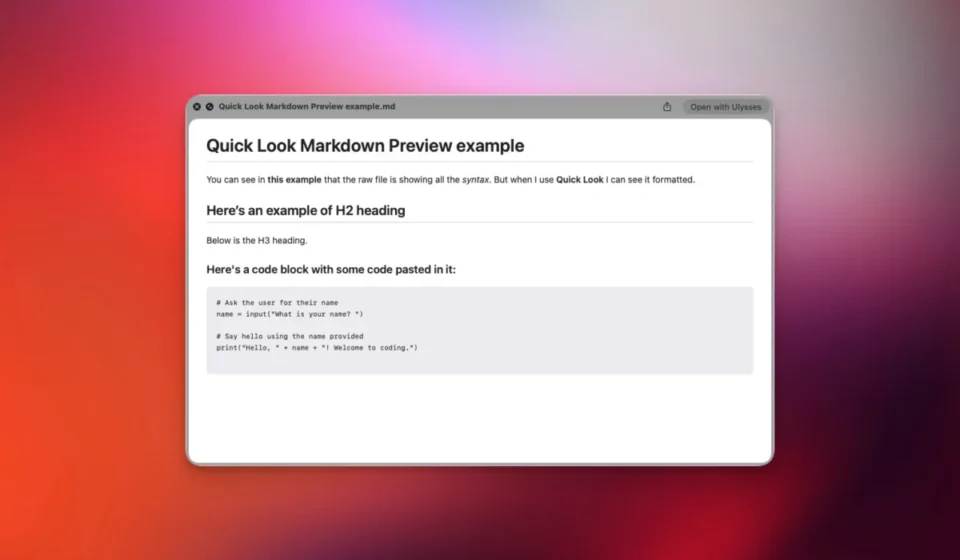
With the advent of macOS 27.3 beta 1, this friction point has been effectively removed. A simple press of the Space bar when a Markdown file is selected in Finder now invokes Quick Look, displaying not just the plain text, but a beautifully rendered, formatted preview of the document as it would appear when converted to HTML or displayed in a compliant application. This immediate visual feedback allows users to quickly check their work, verify formatting accuracy, and make minor adjustments without ever leaving the Finder environment.
Understanding Markdown: The Language of the Web’s Foundation
Markdown, a lightweight markup language, was first introduced by John Gruber in 2004. Its design philosophy centered on simplicity and readability, allowing users to format plain text using an intuitive set of punctuation characters. The goal was to enable individuals to write easily readable and writable plain text documents that could then be converted to structurally valid XHTML (or HTML). The syntax is intentionally sparse, relying on common conventions like the hash symbol (#) for headings, asterisks () or underscores (_) for emphasis (bold and italics), and hyphens (-) or asterisks () for lists.

Gruber’s initial vision for Markdown was to facilitate web content creation by bridging the gap between the ease of plain text writing and the structured requirements of web publishing. Over the years, Markdown has transcended its initial purpose and become a de facto standard across a vast array of digital platforms and applications. Its adoption spans:
- Software Development: README files, documentation, and issue tracking systems commonly employ Markdown for clarity and ease of contribution.
- Content Management Systems (CMS): Many blogging platforms and website builders support or exclusively use Markdown for post creation.
- Note-Taking Applications: A plethora of popular note-taking apps, including Apple Notes, Obsidian, and Bear, leverage Markdown for their formatting capabilities.
- Communication Platforms: Certain chat and collaboration tools incorporate Markdown support for richer message formatting.
- Artificial Intelligence (AI) Workflows: The simplicity and structured nature of Markdown files make them ideal for providing instructions, context, and data to AI models, often referred to as "prompt engineering." The use of
.mdfiles for this purpose has seen a significant surge with the proliferation of advanced AI agents.
The widespread adoption of Markdown underscores its utility in streamlining content creation and communication in a digital-first world. Its integration into macOS’s native Quick Look functionality reflects this pervasive influence and Apple’s ongoing commitment to supporting efficient user workflows.

The Evolution of Quick Look and Markdown Support
Prior to macOS 27.3, Quick Look’s interaction with Markdown files was rudimentary. Selecting a .md file and pressing the Space bar would reveal the file’s content as plain text, with all Markdown syntax characters visible. This meant that a heading like # My Important Title would appear exactly as written, rather than as a prominent, styled heading. Similarly, **bold text** would show the asterisks, not the emphasized text.
The transition brought about by macOS 27.3 is profound. The operating system now includes a built-in Markdown renderer that interprets the syntax within Quick Look. When a Markdown file is previewed, the system processes these simple text characters and translates them into their intended visual representation. This means that # My Important Title is now displayed as a large, bold heading, and **bold text** appears as genuinely bold text. This transformation is not merely cosmetic; it offers a functional preview that closely mirrors the final output, significantly enhancing the user experience for Markdown writers.

The timing of this enhancement aligns with Apple’s broader embrace of Markdown across its ecosystem. Apple Notes, for instance, has been steadily improving its Markdown capabilities, offering robust import and export options. Furthermore, as highlighted by Federico Viticci, a prominent tech journalist and commentator on Apple products, the recent advancements in Siri AI’s app skills feature leverage Markdown-based SKILL.md files. These files are instrumental in defining the complex tasks that Siri can perform within third-party applications, demonstrating Apple’s strategic integration of Markdown into its core technologies. This suggests a deliberate effort by Apple to standardize and enhance the use of Markdown across its platforms, recognizing its growing importance in both user-facing features and developer tools.
Implications and Future Outlook
The introduction of native Markdown preview support in macOS Quick Look represents a significant, albeit understated, advancement for content creators and anyone who regularly works with plain-text formatting. The immediate benefits are clear:

- Increased Efficiency: Eliminating the need to open separate applications for previewing Markdown files saves time and reduces workflow interruptions. This is particularly valuable for professionals who handle a high volume of Markdown documents.
- Improved Accuracy: The ability to quickly see how Markdown will render allows for immediate identification and correction of formatting errors, leading to more polished and professional output.
- Enhanced Accessibility: For users who may find complex writing software intimidating, the simplicity of Quick Look provides an accessible way to interact with and preview Markdown content.
This development also signals a potential trend towards deeper integration of plain-text workflows within operating systems. As Markdown continues to grow in popularity, particularly with the rise of AI-driven content generation and management, its native support in core system utilities becomes increasingly crucial.
From a broader perspective, this feature underscores Apple’s strategy of refining the user experience through subtle yet impactful enhancements. While headline-grabbing features often dominate tech news cycles, it is often these "smallest" additions that have the most profound effect on the daily productivity of specific user groups. For writers, developers documenting projects, and anyone utilizing Markdown for structured data or communication, the macOS 27.3 update offers a welcome and long-awaited improvement that streamlines a fundamental aspect of their digital lives. The ease with which users can now glance at the intended formatting of their Markdown documents without launching a dedicated application is precisely the kind of user-centric improvement that fosters loyalty and enhances the overall computing experience. The continued evolution of macOS promises to further integrate such efficiencies, solidifying its position as a platform that caters to both power users and casual creators alike.