





Windows 11 Insider builds bring expanded Search features and new privacy controls

The overarching goal of these enhancements is to imbue Windows Search with greater utility, moving beyond its traditional role of simply indexing files and applications. The revamped search experience aims to enable users to perform a variety of tasks directly from the search results panel, eliminating the need to navigate through multiple menus or open separate applications. This proactive approach to user interaction promises to streamline workflows and reduce the cognitive load associated with managing system settings and communications.
From File Finder to Action Hub: The Evolution of Windows Search
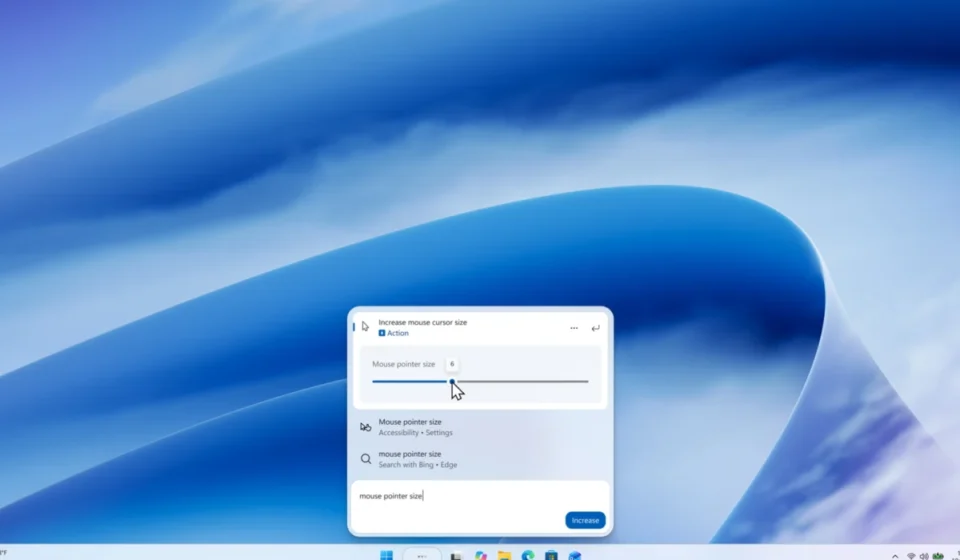
Historically, Windows Search has been a powerful tool for locating files, folders, and installed applications. However, its interaction model was largely passive, presenting users with a list of results that required further clicks to initiate an action. The latest developments are poised to change this paradigm. According to Microsoft’s recent announcements, Search can now facilitate direct adjustments to system settings, such as screen brightness and cursor size, directly within the search interface. This move towards "action-oriented" search means that users can accomplish common tasks with unprecedented speed and convenience.

The immediate impact of this change will be felt by users who frequently adjust display settings or customize their user interface. Instead of embarking on a journey through the Windows Settings app, users can now achieve these adjustments through simple sliders presented within the search results. This offers a more fluid and integrated user experience, a hallmark of modern operating system design.
Bridging the Gap: Enhanced Phone Integration
One of the most significant expansions of Windows Search functionality lies in its enhanced integration with smartphones. For users who leverage Microsoft’s Phone Link application to connect their PC and mobile devices, Search can now act as a conduit for phone-based actions. This includes the ability to initiate phone calls, send text messages, and manage phone states like "Do Not Disturb" directly from the Windows Search bar.
This feature is particularly valuable for individuals who balance their work and personal lives across multiple devices. The seamless transition between desktop and mobile actions, facilitated by an integrated search experience, can significantly boost productivity and reduce the friction of context switching. While Android support is currently available, Microsoft has indicated that support for iPhones is anticipated in early next year, further broadening the reach of this integrated functionality. The development timeline suggests a phased rollout, prioritizing the most widely adopted mobile platform first before extending to others.

Richer Results and User Control
Beyond direct actions, Windows Search is also becoming more informative. The search results are being enriched with previews of files, offering details such as the last modified date, file location, and author. This deeper level of metadata surfacing allows users to quickly assess the relevance of a search result without necessarily opening the file itself.
Furthermore, Search will now incorporate web-based answers for common queries, providing real-time information on weather forecasts, stock market fluctuations, and general factual inquiries. Integration with the Microsoft Store is also being enhanced, with the ability to surface applications and games directly within search results. Recognizing that not all users may desire these integrations, Microsoft has implemented granular control over Store app results, allowing users to enable or disable them through the "Privacy & security" section of Settings, under the "Search" subsection.
To further refine the user experience, Microsoft is introducing filters for different result categories, such as files and folders, settings, and actions. This allows users to narrow down their searches more effectively. Additionally, users will have the ability to provide direct feedback on individual search results through a thumbs-up or thumbs-down mechanism. This feedback loop is crucial for Microsoft to understand user preferences and continuously improve the search algorithm. Users can also remove specific suggestions from their initial search view, granting them greater personalization over their search experience.

Strengthening Business Privacy: Feedback Hub Enhancements
Beyond the consumer-facing improvements to Windows Search, Microsoft’s recent announcement also addresses a critical concern for commercial customers: the privacy of feedback submitted through the Feedback Hub. A new Intune policy has been introduced, empowering organizations to maintain the privacy of their feedback data within their corporate boundaries.
When this policy is activated, any feedback submitted by users within an organization through the Feedback Hub will be restricted from public dissemination. This means that feedback cannot be published to the broader Feedback Hub community or shared with individuals outside of the organization’s designated tenant. The data will remain accessible to Microsoft for diagnostic and improvement purposes, as well as to users within that specific organization. This measure is a significant step towards addressing enterprise-level data governance and privacy requirements, ensuring that sensitive organizational insights remain confidential.
A Glimpse into the Future: Insider Builds and Testing Phases
The aforementioned features are currently being tested through various Windows Insider builds. These include Beta Build 26220.9836 and Experimental Build 26340.9843, as well as separate builds designated for the 26H1 development cycle and future platform iterations. The deployment through Insider channels signifies that these enhancements are in a pre-release state and subject to further refinement and potential modification before a general availability rollout.

This approach to development allows Microsoft to gather extensive real-world feedback from a diverse user base, identify any bugs or usability issues, and iterate on the features before they reach all Windows 11 users. The staggered release through Insider channels is a common practice for major operating system updates, ensuring a more stable and polished final product.
Implications and Future Outlook
For the average Windows 11 user, the most significant implication of these updates is the potential for Windows Search to evolve into a central command center for system interaction. Instead of being a mere utility for finding files, it could become a proactive assistant, capable of executing tasks and providing information directly. This transformation holds the promise of a more efficient and user-friendly computing experience.
The success of this evolution hinges on Microsoft’s ability to deliver a consistently reliable and intuitive search experience. While the introduction of action-oriented features and deeper integrations is promising, the practical utility will depend on the accuracy of search results, the responsiveness of the interface, and the seamless execution of integrated tasks. The ongoing testing within the Insider program is crucial for validating these aspects and ensuring that the final release meets user expectations. As the tech landscape continues to evolve, with AI playing an increasingly prominent role in user interfaces, Microsoft’s efforts to make Windows Search more intelligent and interactive are a logical and forward-thinking step. The ability to perform complex actions through simple search queries represents a significant leap in user interface design, potentially setting a new standard for operating system interaction. The long-term impact will be measured by how effectively these new features are integrated into daily workflows and contribute to overall user productivity and satisfaction.