





Wondershare Filmora 16: Revolutionizing Video Editing with AI-Powered Accessibility and Advanced Features

Wondershare Filmora, a video editing software designed to bridge the gap between basic clip trimmers and complex professional suites, has launched its latest iteration, Filmora 16. Backed by Wondershare Technology’s two decades of software development since its founding in 2003, Filmora 16 aims to empower users of all skill levels to produce polished videos with a streamlined and accessible workflow. The software balances intuitive drag-and-drop mechanics with advanced controls, catering to a wide range of video production needs, from quick social media edits to comprehensive project assembly. This latest release promises reliable performance, enabling creators to transition from raw ideas to finished cuts more efficiently.
What Sets Filmora 16 Apart?
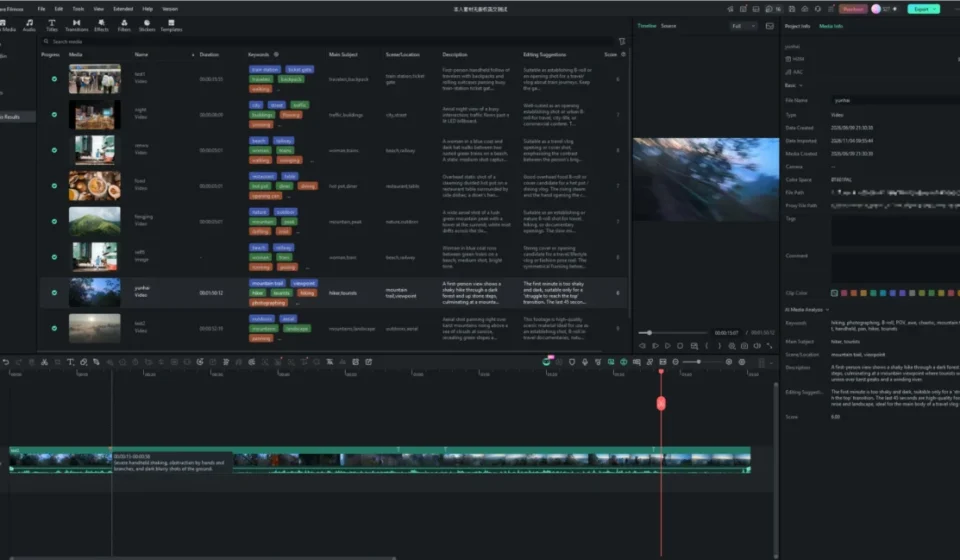
Filmora 16 is engineered to eliminate the common friction points that can detract from the creative process of video editing. A key innovation is its AI Media Analysis feature, which allows users to right-click imported media and initiate an intelligent scan. This process quickly sorts and tags footage with descriptive keywords, detailed descriptions, and quality ratings, significantly reducing the time spent on media organization. For dynamic shots featuring moving subjects, the software introduces advanced Camera Tracking capabilities. This feature automatically adjusts framing to follow a selected subject, ensuring they remain prominent within the scene. With distinct Head, Body, and Custom tracking modes, complemented by smart crop compensation, Filmora 16 aims to minimize the need for intricate manual keyframing.

Further enhancing fine-tuning capabilities, Filmora 16 incorporates localized Color Masks and Track Mattes. These tools simplify the process of selectively adjusting specific areas within a frame. A standout addition is the AI Mate copilot, integrated directly above the timeline. This virtual assistant acts as an on-demand resource, capable of explaining complex tools, suggesting shortcuts, and executing edits through simple chat prompts. When combined with cloud-based generative tools and automated score matching, Filmora 16 provides a comprehensive suite of features designed to transform static footage into engaging and polished videos with remarkable speed.
How to Edit Smarter with Filmora 16: A Practical Workflow
To evaluate the capabilities of Filmora 16, a practical test was conducted using a scenario familiar to many content creators: editing a collection of unorganized travel footage. This included phone snapshots, handheld clips, and immersive 360-degree action footage. Instead of succumbing to the daunting task of sifting through hours of raw files, the editing process was structured around three distinct creative stages to craft a fluid and cinematic narrative.
Stage 1: Unlocking Potential with AI Media Analysis
The initial challenge often involves the sheer volume and disorganization of raw footage. Dumping dozens of mixed travel clips into an empty project can quickly halt creative momentum. Filmora 16 addresses this by allowing users to right-click their imported media bin and launch AI Media Analysis. Unlike automated background processes, this user-initiated tool systematically scans selected clips, identifying and surfacing descriptive keywords, scene tags, and quality indicators. During testing, this feature accurately flagged the sharpest landscape panoramas, identified specific points of interest within scenes, and isolated unusable or redundant takes. This intelligent pre-analysis allowed for the immediate selection and placement of the strongest moments onto the timeline, transforming a potential half-hour logging session into a task completed in mere seconds. This efficiency is crucial for creators who need to rapidly assemble content, especially for fast-paced social media platforms where timeliness is paramount.

Stage 2: Dynamic Reframing Without Leaving the Edit Suite
A common limitation in editing travel footage is being confined to the original camera angle. Filmora 16 significantly expands creative possibilities, particularly with 360-degree video, through its 360 Video Reframing feature. This eliminates the need for cumbersome third-party conversion tools or separate rendering applications. Compatible 360 clips can be directly imported and placed onto the Filmora 16 timeline.
Achieving Cinematic Angles with 360 Video Reframing
Once a 360 clip is on the timeline, the reframing engine unfolds the entire spherical scene within the preview monitor. This interactive environment allows users to effortlessly adjust the horizon, rotate the camera’s perspective, or even create captivating "tiny planet" effects with simple slider controls. Whether the objective is to track a skier, pan upwards towards a mountain vista, or swing the camera to capture a personal reaction, this feature enables a single continuous take to yield multiple custom angles. These reframed perspectives can then be seamlessly integrated into a standard travel video, adding a dynamic and professional feel that would otherwise require multiple camera setups or complex post-production techniques. The ability to manipulate 360 footage directly within the editing timeline represents a significant leap in accessibility for this specialized video format.
Stage 3: Sculpting the Visual Experience
With the core edit established on the timeline, the focus shifts to refining the project’s visual identity. Filmora 16 offers tools that allow for sophisticated adjustments without demanding hours of frame-by-frame manipulation.

Subject-Centric Framing with Advanced Camera Tracking
Capturing street videography often results in chaotic compositions due to unpredictable movement of people and background elements. Filmora 16’s Camera Tracking feature automates the recomposition of the frame around a selected subject, ensuring they remain visually centered. This is achieved through the Tracking sub-tab in the inspector panel. By toggling on Camera Tracking, the software actively adjusts the framing, moving beyond simple graphic overlays.
The software offers specialized modes like "Head" tracking, which is particularly effective for keeping human subjects in focus. When paired with companion controls such as Auto Crop, Lock Subject Size, and Blur Background, Filmora 16 intelligently crops the action, maintains consistent subject scaling throughout the shot, and employs a blurred fill to obscure any black borders that might appear as the frame shifts. This sophisticated automation results in a smoothly tracked subject against a naturally flowing background, a level of polish that would traditionally require extensive manual keyframing. The implications for creators of vlogs, documentaries, and action sports footage are substantial, allowing for more professional-looking results with significantly reduced effort.
Precision Color Adjustments with Color Masks
Controlling contrast and color in challenging lighting conditions, such as bright sunlight juxtaposed with deep shadows, can be a significant hurdle. Applying a universal color grade often leads to unnatural skin tones and muddy shadows. Filmora 16’s dedicated Color Mask feature provides a solution by enabling users to isolate specific visual elements within a scene for targeted color grading.

An AI mask can outline subjects in mere seconds, granting precise control over Hue, Saturation, and Luminance. For instance, adjusting hue to -65, saturation to 100, and luminance to -58 can make a subject dramatically pop while leaving surrounding textures untouched and natural. The split-view option, which displays the original and adjusted looks side-by-side, offers immediate visual confirmation of the applied changes. This level of granular control over color grading, especially when applied selectively, allows for the creation of visually striking and consistent aesthetics across a project, significantly enhancing the storytelling potential of the footage. The ability to isolate elements like clothing, specific objects, or environmental features opens up new creative avenues for visual storytelling and branding.
Introducing Motion to Still Images with Video Animation
The abrupt transition from dynamic video clips to static photographs can disrupt the visual rhythm of an edit. Filmora 16’s Animation panel allows users to apply subtle motion to still images directly on the timeline, maintaining viewer engagement.
The software includes a comprehensive library of motion and keyframe presets that automate camera movement curves, eliminating the need for manual coordinate placement. Presets such as "Fade Slide" or gentle zoom transitions introduce cinematic drift, mimicking natural camera pans. This approach ensures that still photo interludes seamlessly blend with live footage, preserving the overall pacing and flow of the narrative. For creators relying on a mix of video and photography, this feature is invaluable for creating a cohesive and engaging viewing experience. The subtle animation can bring life to otherwise static elements, transforming them into dynamic storytelling components rather than mere placeholders.

Streamlined Export and Integrated Solutions
The final stage of video production often involves exporting multiple versions of a project. Filmora 16 introduces a batch export feature, allowing users to export multiple videos simultaneously. This process runs quietly in the background, rendering the main video, generating highlight reels, and preparing vertical cuts in a single operation. This significantly reduces the waiting time and allows creators to move on to other tasks.
Beyond its core editing functionalities, Wondershare also offers Filmora.TV, a browser-based AI creative studio specifically designed for commercial and branded content. This platform integrates an infinite canvas, multi-model AI generation, timeline editing, and collaborative tools, catering to agencies, brand teams, and commercial creators. Filmora.TV aims to unify creative development and AI video production within a single, connected workspace, facilitating idea exploration, sequence building, and collaborative content refinement for professional marketing materials.
Is Filmora 16 the Right Choice for Your Video Projects?
Transforming a chaotic collection of video clips into a compelling narrative can be a challenging endeavor. Wondershare Filmora 16 aims to make this process not only manageable but genuinely enjoyable. By abstracting away common editing complexities through features like automatic media tagging, fluid scene reframing, robust subject tracking, and precise color masking, the software empowers users to focus on the core aspects of storytelling.

Filmora 16 effectively removes technical barriers, allowing creators to concentrate on shaping their narrative and achieving a vibrant, impactful final edit. The intuitive interface and powerful AI-driven tools make it an attractive option for a broad spectrum of users, from aspiring social media influencers to seasoned independent filmmakers looking for a more efficient workflow. The software’s commitment to accessibility, coupled with its expanding advanced feature set, positions it as a significant player in the democratized video editing landscape. Its ability to streamline complex tasks means that more time can be dedicated to creative conceptualization and storytelling, ultimately leading to higher quality and more engaging video content.