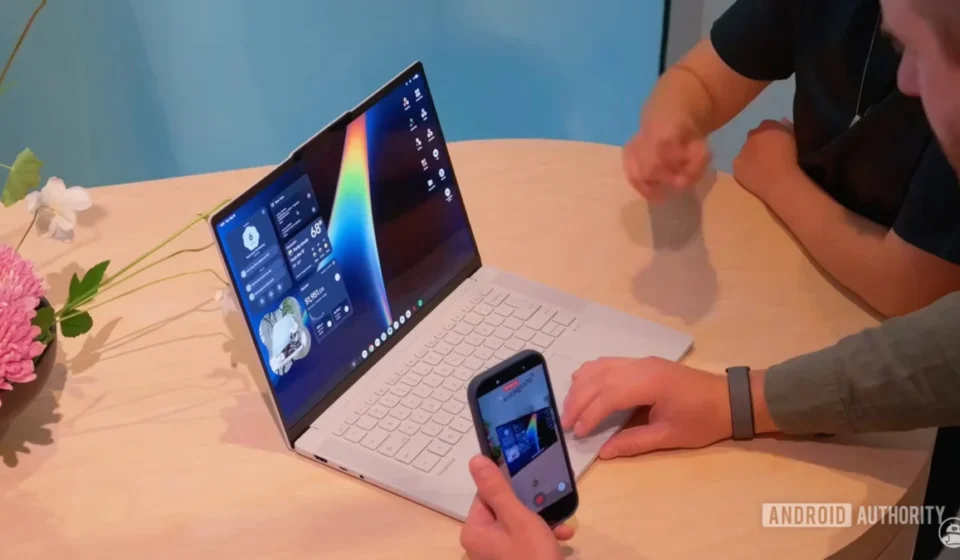
Google Bolsters Upcoming Googlebooks Launch with Feature-Rich "Viewer" App for Comprehensive Media and Document Management

The imminent arrival of the first Googlebooks, slated to begin shipping this Sunday after an enthusiastic pre-order period last month, is being significantly augmented by the release of a new foundational application: the "Viewer" app. This comprehensive media editor and document manager, now available on the Play Store, offers Googlebook users an integrated solution for handling a wide array of file types, from images and videos to audio files and PDFs, all within a unified interface. Its introduction marks a critical step in establishing the software ecosystem for Google’s nascent desktop platform, promising an experience enriched by artificial intelligence and seamless integration with Google’s expansive suite of services.
The Googlebooks Initiative: A New Frontier in Desktop Computing
Google’s foray into the desktop hardware market with "Googlebooks" represents a strategic expansion beyond its established ChromeOS ecosystem and Android’s mobile dominance. While specific details about the underlying operating system for Googlebooks remain somewhat guarded, the availability of these dedicated applications on the Play Store strongly suggests a deeply customized Android-based desktop experience or a new, yet-to-be-fully-revealed Google OS designed for larger screens. This initiative positions Google to compete directly in the premium laptop and productivity device segments, currently dominated by Apple’s macOS, Microsoft’s Windows, and to a lesser extent, its own ChromeOS. The company’s vision appears to be centered on delivering a highly integrated, AI-powered, and cloud-first computing experience that leverages its strengths in software, services, and artificial intelligence.
The target audience for Googlebooks is broad, ranging from students and creative professionals seeking an intuitive, powerful, and connected device, to business users who rely heavily on Google Workspace and cloud services. The emphasis on seamless integration with Google’s existing ecosystem, combined with robust local application capabilities, is designed to offer a compelling alternative to traditional computing platforms. Analysts have long speculated about Google’s ambition to create a more unified hardware and software experience, akin to Apple’s ecosystem, and Googlebooks appear to be the realization of this strategic imperative. The initial pre-order success, though specific numbers have not been publicly disclosed, indicates significant market curiosity and demand for what Google is bringing to the table. This new platform aims to bridge the gap between the lightweight, web-centric nature of Chromebooks and the full-fledged power of traditional desktop operating systems, potentially offering a "best of both worlds" scenario with deep cloud integration and robust local app functionality.
Chronology of Googlebook App Rollouts
The journey towards the Googlebooks’ retail availability has been meticulously orchestrated, with Google progressively unveiling key software components to build anticipation and showcase the platform’s capabilities. This systematic rollout strategy is characteristic of major tech launches, where foundational elements are introduced incrementally to generate buzz and allow for preliminary user engagement and feedback. The pre-order phase, which commenced last month, allowed early adopters to secure their devices ahead of the official shipping date scheduled for this Sunday. This staggered approach ensures that by the time users receive their Googlebooks, a core suite of essential applications is already in place and ready for use, minimizing the initial setup friction and maximizing out-of-the-box utility.
Prior to the Viewer app’s debut, Android Authority had already provided insights into two other pivotal applications developed for the Googlebooks platform. The "Desktop Camera app," uncovered earlier, showcased a refined user interface and features optimized for a larger screen environment, indicating Google’s attention to detail in adapting mobile functionalities for desktop use. This suggested a deliberate effort to move beyond simply stretching mobile apps to larger displays, opting instead for tailored experiences. Subsequently, a dedicated "text-editing tool" was revealed, signaling the platform’s commitment to core productivity functions beyond just media consumption. This basic word processing utility demonstrated that Googlebooks would support fundamental tasks required for academic and professional work. These earlier releases served as important precursors, offering glimpses into the user interface design philosophy and the foundational utility that Google aims to provide with its new desktop OS. The Viewer app now completes a crucial trio of basic, yet essential, productivity and creative tools, ensuring users have immediate access to image, video, audio, and document management capabilities from day one. This phased software introduction not only builds excitement but also allows for iterative feedback and refinement before the platform’s full public embrace, demonstrating a controlled and strategic approach to market entry.
Deep Dive: The Googlebooks Viewer App’s Comprehensive Capabilities
The newly launched "Viewer app for Googlebooks" is designed as a central hub for all media and document interactions, embodying Google’s philosophy of offering integrated solutions. Its arrival on the Play Store, despite being primarily intended for Googlebooks, offers a tangible demonstration of the platform’s software prowess even before the hardware reaches consumers’ hands. This early access allows for preliminary testing and familiarization, which is invaluable for a new product category.
All-in-One Media and Document Management
At its core, the Viewer app promises to be a singular destination for managing diverse file types. The claim of letting users "view or edit pictures, videos, audio files, and PDFs — all in one place" is a significant value proposition. In an era where users often juggle multiple applications for different media formats (e.g., a photo editor, a video player, a PDF reader, an audio player), consolidating these functions into one intuitive interface can drastically improve workflow efficiency and user convenience. This integration is particularly crucial for a new computing platform aiming to establish itself as a viable alternative for daily productivity and creative tasks. It reduces the learning curve associated with new software ecosystems and provides a familiar, centralized experience for common tasks, minimizing the need to download and manage numerous single-purpose applications. This approach contrasts sharply with the traditional desktop model where users often install multiple third-party tools for these functions.
Intelligent Assistance Powered by AI
A standout feature, and one that aligns perfectly with Google’s overarching strategy, is the deep integration of artificial intelligence. Upon first launch, users are greeted with a prompt to "enable timely suggestions with AI." This functionality is designed to proactively assist users by analyzing content and offering relevant actions. For instance, if the app detects a date within a document or image, it can automatically suggest adding it to Google Calendar, thereby streamlining scheduling and event management. Similarly, location data embedded in media could trigger suggestions to view directions using Google Maps, making travel planning or location-based organization effortless.
This AI-driven assistance goes beyond mere convenience; it represents a fundamental shift towards a more intelligent and anticipatory computing experience. By leveraging Google’s formidable AI capabilities, potentially incorporating elements of Google Assistant and Google Lens technology, the Viewer app transforms from a passive tool into an active assistant, enhancing productivity without requiring explicit user commands. This level of contextual awareness could extend to automatically categorizing media, suggesting optimal editing presets based on content, or even flagging important information within documents for quick review. The implications for productivity, especially for users deeply embedded in the Google ecosystem, are substantial. It also subtly reinforces Google’s commitment to infusing AI across all its products, establishing a key differentiator for the Googlebooks platform in a crowded market. While the privacy implications of such AI features always warrant careful consideration, Google’s established frameworks for user data management and explicit opt-in prompts are expected to guide its implementation here, offering users control over their data.
Robust Image Editing Tools
For visual content, the Viewer app provides a suite of essential image editing tools accessible via a dedicated toolbar on the main editing page. These include:
- Annotate: Allowing users to draw, highlight, or add freehand notes directly onto images. This is invaluable for collaborative work, quick feedback on designs, or personal reminders on screenshots and diagrams. Its simplicity makes it accessible for all skill levels.
- Text: Enabling the addition of text overlays, perfect for creating memes, adding informative captions to photos, or labeling diagrams for presentations and reports. Various font and styling options are expected to be available to customize the text.
- Resize: A fundamental utility for optimizing images for various uses, such as preparing files for web uploads, email attachments, or specific document layouts. This ensures images are appropriately sized without requiring external, often more complex, software, thus saving time and storage.
- Crop and Rotate: Standard yet indispensable tools for framing subjects, correcting skewed horizons, and adjusting image orientation. The precision offered by a desktop interface for these functions often surpasses what is easily achievable on touch-based mobile devices, providing greater control for fine adjustments.
The inclusion of these tools ensures that basic to intermediate image manipulation can be performed directly within the Viewer app, eliminating the need to open a separate, more complex photo editor for common adjustments. This streamlines workflows for casual users and professionals alike, providing immediate access to necessary edits for everyday tasks.
Advanced PDF Viewing and Editing
Beyond media, the Viewer app also functions as a highly capable PDF viewer and editor, addressing a critical need for many users in academic and professional settings. Its features include:
- Text and Annotation Addition: Users can add text boxes, highlight passages, underline, or strike through content, facilitating document review, collaborative markup, and note-taking directly on the PDF. This is crucial for students reviewing papers or professionals annotating reports.
- Signature Capabilities: A particularly significant feature, the ability to add digital signatures directly within the app streamlines document signing processes, a common requirement in professional and personal contexts. This can drastically reduce reliance on printing, signing manually, and scanning, moving towards a truly paperless and efficient workflow. This feature alone can be a major draw for business users.
- Useful Selection Tool: This intuitive tool allows for precise manipulation of added text or annotations, enabling users to freely move, resize, or modify elements after they have been placed, offering unparalleled flexibility and control over document markup.
- PDF Page Previews: Mirroring standard PDF viewing software like Adobe Acrobat or Foxit Reader, the app displays page thumbnails on the left side of the screen, allowing for quick navigation through multi-page documents and easy reordering of pages.
The comprehensive PDF capabilities position Googlebooks as a robust platform for document management, rivaling dedicated PDF software often found on established operating systems. This focus on practical, productivity-enhancing features underscores Google’s commitment to making Googlebooks a truly functional and versatile computing device from its inception.
Seamless Video and Audio Playback
For multimedia consumption, the Viewer app provides intuitive video and audio player interfaces. During initial testing by Android Authority, these players reportedly performed as advertised, offering reliable playback of various media formats, suggesting broad codec support. A notable integration for video is the "Edit in Photos" button located at the top right of the player. This direct link to Google Photos (or a dedicated Photos app within the Googlebooks ecosystem) suggests a seamless transition between viewing, editing, and organizing visual content, further reinforcing the integrated nature of Google’s platform. This deep linking across applications is a hallmark of a well-developed ecosystem, enhancing user experience by minimizing friction between different tasks, such as watching a video clip and then immediately trimming or enhancing it. The audio player is also expected to offer standard controls, playback speed options, and perhaps integration with Google Play Music or YouTube Music for a unified audio experience.
Cross-Platform Accessibility and Ecosystem Implications
One intriguing aspect revealed during the early exploration of the Viewer app is its unexpected compatibility beyond the confines of Googlebooks. While officially designed for Google’s new desktop platform, the app was successfully tested on Android tablets, where it reportedly functioned exactly as intended. This suggests a thoughtful design approach that prioritizes scalability across varying screen sizes. Furthermore, intrepid users managed to sideload the app onto slab-style Android smartphones, demonstrating its underlying Android compatibility, albeit with some user interface elements becoming inaccessible due to display-size limitations. This indicates that while the app’s core functionality is robust, its UI is specifically optimized for larger, desktop-like displays.
This cross-platform functionality carries significant implications. Firstly, it hints at a potential unified application strategy from Google, where core utilities are built on a flexible Android framework that can scale across different form factors – from traditional smartphones and tablets to the new Googlebooks desktop environment. This could significantly simplify development for third-party app creators, allowing them to target a broader range of devices with a single codebase, a dream for many developers. Secondly, it reinforces the notion that Googlebooks might be running a highly optimized version of Android, or an entirely new OS built upon Android’s robust foundation, rather than a completely disparate system. This would leverage the vast Android app ecosystem from day one, giving Googlebooks an immediate advantage in terms of software availability compared to a platform starting from scratch. It also signifies a potential convergence in Google’s operating system strategy, aiming for greater continuity across devices.
The Play Store’s role as the distribution channel for these desktop-oriented applications is also noteworthy. It suggests that Google is extending its successful app marketplace model to its new desktop platform, providing a familiar and trusted environment for users to discover and install software. This strategy could attract developers by offering a clear path to reach Googlebook users, potentially fostering a vibrant app ecosystem much faster than traditional desktop platforms, which often require complex porting or entirely new development efforts. This also implies that updates and new features for Googlebook apps could be delivered with the same agility and frequency as mobile apps.
Strategic Positioning and Market Impact
The introduction of the Viewer app, alongside other foundational utilities, is a calculated move by Google to strategically position Googlebooks within a highly competitive market. This demonstrates Google’s commitment not just to hardware, but to building a comprehensive and compelling software experience.
Competitive Landscape
Googlebooks are entering a landscape dominated by established players. They will face direct competition from:
- Chromebooks: Google’s own successful, lightweight, cloud-centric laptops, which primarily run web apps and Android apps. Googlebooks appear to offer a more powerful, locally capable, and perhaps premium experience, potentially