
Spotify, the world’s leading audio streaming service, has finally begun rolling out a highly anticipated feature that promises to bring much-needed order to the digital music collections of millions: playlist folders for its mobile applications on both iOS and Android. This long-awaited update, which has been a staple of Spotify’s desktop client since 2010, marks a significant shift in how users can manage their ever-growing libraries on the go. The implementation brings the mobile experience in line with its desktop counterpart, addressing a persistent point of friction for a substantial segment of its user base.

The initial reports of the feature’s availability surfaced on Reddit, a popular online forum where users frequently share early observations and discussions about software updates. A Redditor, identified by the username FN-1708, was among the first to publicly flag the appearance of playlist folders within the "Your Library" section of the Spotify app on their iOS device. This observation quickly sparked a flurry of activity within the community, with other users on the same thread confirming the feature’s presence on their Android smartphones as well. This distributed rollout, common for large-scale feature deployments by tech giants, suggests a gradual server-side activation rather than a simultaneous app update across all devices.
A Long Road to Mobile Organization
The introduction of playlist folders on mobile platforms is a watershed moment for dedicated Spotify users, many of whom have been clamoring for this functionality for over a decade. The desktop application has offered playlist organization through folders since its early days, allowing users to categorize their curated collections by genre, mood, activity, or any other preferred system. This absence on mobile, where many users interact with their music libraries most frequently, created a significant organizational disparity. The 16-year gap between the desktop and mobile availability highlights the complex development cycles and prioritization decisions that often accompany the evolution of large-scale software platforms.

The genesis of this feature’s demand can be traced back to the early days of digital music curation. As users amassed vast digital libraries, the need for effective organization became paramount. Spotify, with its immense catalog and user-generated playlists, became a prime candidate for such organizational tools. While desktop users enjoyed the benefits of folder structures, mobile users were left to navigate a single, often unwieldy list of playlists, leading to what many described as a "chaotic" or "cluttered" library experience. This has been particularly true in recent years, as Spotify has introduced new playlist generation features, such as "Prompted Playlists," which can rapidly expand a user’s library and exacerbate organizational challenges.
Functionality and User Experience on Mobile
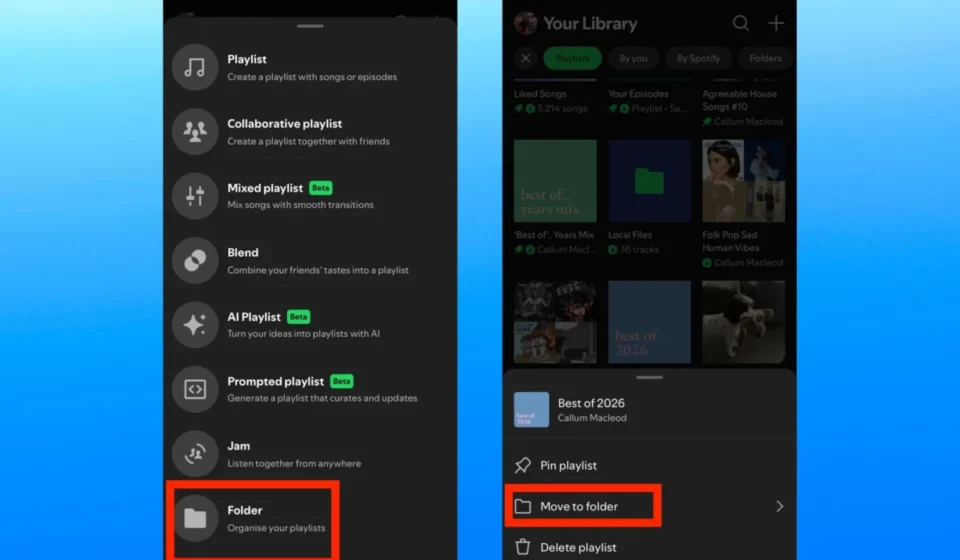
The implementation of playlist folders on Spotify’s mobile apps appears to mirror the core functionality found on the desktop. To create a new folder, users are prompted to tap the "+" icon within their "Your Library" section. This action now reveals a "Folder" option, allowing them to name their new organizational unit. Once a folder is created, users can then drag and drop existing playlists into it, effectively segmenting their music collection.

A particularly noteworthy aspect of this new mobile feature is its ability to play all the content within a folder collectively. Users have the option to play these aggregated playlists in their original order or opt for a shuffled experience. This capability is poised to be a significant boon for users engaged in activities like long commutes or gym workouts, where a varied and dynamic soundtrack is desired without the manual effort of switching between individual playlists. The ability to initiate playback of an entire curated thematic collection with a single tap significantly enhances user convenience and engagement.
The timing of this rollout is particularly astute, given Spotify’s recent emphasis on AI-driven playlist creation tools. Features like "Prompted Playlists," which generate music suggestions based on user input and listening habits, are designed to encourage deeper exploration and content creation. However, these tools, while valuable, can also contribute to a rapid proliferation of playlists. The introduction of mobile folders provides a much-needed mechanism for users to manage this influx of content, ensuring that the platform remains navigable and enjoyable as its content ecosystem expands. This proactive approach to library management demonstrates Spotify’s commitment to enhancing the user experience as its service evolves.

Limitations and Future Expectations
While the arrival of playlist folders on mobile is a cause for celebration among Spotify users, a closer examination reveals certain limitations that may temper immediate enthusiasm for some. As observed in the initial reports and community discussions, the current iteration of the feature appears to be restricted to organizing playlists only. Users cannot, at this time, place entire albums or other forms of saved content directly into these newly created folders.
Furthermore, the feature does not appear to support custom folder cover art. On the desktop version, users can often personalize their folders with unique imagery, adding another layer of visual organization and aesthetic customization. This visual personalization element is currently absent in the mobile rollout, suggesting a potential area for future development.
The most significant, albeit expected, limitation is the gradual nature of the rollout. As a server-side update, the playlist folder functionality is not being pushed out to all users simultaneously. This means that while some users may already be experiencing the benefits, others will have to wait for the feature to become available on their devices. Patience is, therefore, the primary recourse for those who have not yet seen the option appear in their app. This phased deployment strategy is a common practice for major tech companies, allowing them to monitor performance, gather feedback, and address any unforeseen issues before a full global release.
In addition to playlist folders, Spotify has been actively developing other features aimed at improving music management and playback. The platform has previously introduced functionalities such as automatic playlist reordering for smoother transitions between tracks, further underscoring its dedication to refining the user’s auditory journey. These ongoing enhancements indicate a strategic effort by Spotify to continually adapt and improve its service, catering to the evolving needs and preferences of its diverse user base. The integration of advanced organizational tools alongside sophisticated playback features positions Spotify as a comprehensive and user-centric music streaming service.
The introduction of playlist folders on mobile represents a significant step forward in Spotify’s ongoing quest to provide a seamless and highly personalized listening experience. While minor limitations exist, the core functionality addresses a long-standing user request and is expected to profoundly impact how millions interact with their music libraries on a daily basis. As the feature continues to roll out globally, users can anticipate a more organized, efficient, and enjoyable way to curate and access their favorite tunes, solidifying Spotify’s position as a leader in the digital music landscape.