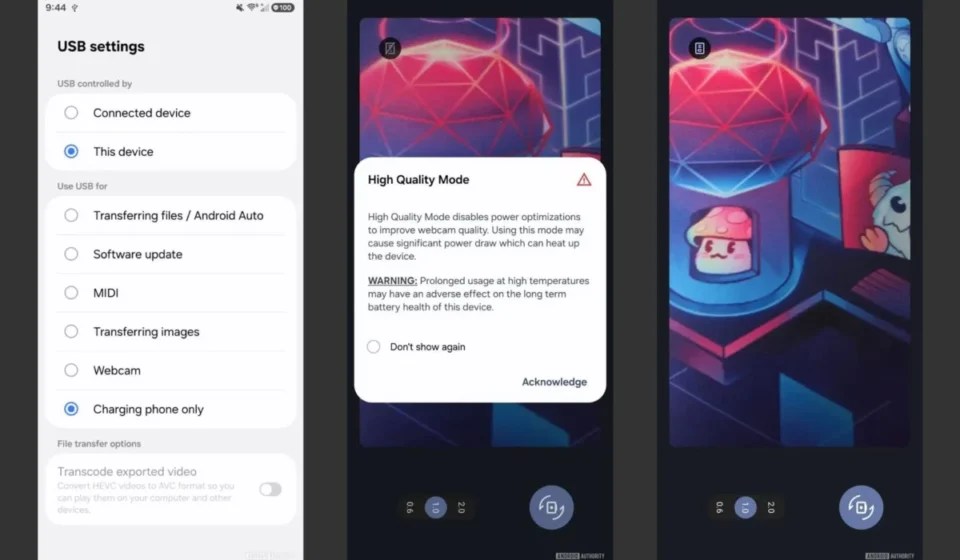

Samsung’s latest flagship, the Galaxy S26 series, has quietly integrated a long-requested feature that brings its smartphone capabilities closer to that of its competitors, particularly Google’s Pixel line. Users can now transform their Galaxy S26 into a high-quality USB webcam, a functionality that has been available on Pixel devices since the Android 14 QPR1 update. This native support eliminates the need for third-party applications and complex setup procedures, streamlining the process for users seeking to enhance their video conferencing or streaming experiences.
The introduction of this USB webcam mode marks a significant, albeit understated, enhancement to the Galaxy S26’s already robust camera system. While Samsung has consistently pushed the boundaries of mobile photography with advanced sensors, AI processing, and innovative shooting modes, the utility of the phone’s camera has often been confined to its native applications or specific third-party integrations. The ability to seamlessly leverage the superior optics and image quality of the Galaxy S26 for computer-based video calls represents a practical evolution in smartphone versatility, addressing a growing demand for high-definition visual communication.
A Feature Long in the Making: The Evolution of Smartphone Webcams
The concept of using a smartphone as a webcam is not entirely novel. For years, tech-savvy users have relied on a variety of third-party applications and software solutions to bridge the gap between their mobile devices and desktop computers. These methods, while functional, often involved cumbersome installation processes, potential security concerns with untrusted apps, and inconsistent performance. Early solutions typically required the phone and computer to be on the same Wi-Fi network, leading to potential latency issues and a dependence on network stability. Other methods involved USB connections but often required specific drivers or proprietary software that added layers of complexity.

Google’s integration of a native USB webcam mode into its Pixel devices with Android 14 QPR1 was a watershed moment. It demonstrated the potential for operating system-level support, making the feature accessible and reliable for a broader audience. This move by Google set a precedent, highlighting the inherent advantages of utilizing a smartphone’s advanced camera hardware for video communication. The Pixel’s implementation was lauded for its plug-and-play simplicity, requiring only a USB connection and a simple toggle within the phone’s settings to activate the webcam functionality.
Samsung’s adoption of this feature on the Galaxy S26 series indicates a strategic alignment with user-centric innovations and a recognition of market trends. It suggests that Samsung acknowledges the increasing importance of high-quality video communication, whether for remote work, online education, or personal connections. By bringing this functionality directly into the One UI software layer, Samsung is not only catching up to a competitor but also solidifying the Galaxy S26’s position as a powerful, all-in-one device.
Seamless Integration: How the Galaxy S26 Transforms into a Webcam
The operational elegance of the Galaxy S26’s USB webcam mode is one of its most compelling aspects. The process is remarkably straightforward, requiring no specialized technical expertise. Users simply need to connect their Galaxy S26 to a computer using a standard USB cable. Upon establishing the connection, the smartphone presents a clear prompt, offering the option to switch to "Webcam Mode." Once this option is selected, the computer’s operating system automatically recognizes the connected Galaxy S26 as a standard webcam, making it immediately available for use with any video conferencing application, streaming software, or other programs that utilize a camera input.

This native integration bypasses the need for downloading and installing any additional software or drivers on either the phone or the computer. This is a significant departure from previous workarounds, which often involved installing companion apps on both devices, managing synchronization, and troubleshooting connection issues. The simplicity of the Galaxy S26’s approach ensures that users can quickly and efficiently switch between using their phone for its primary functions and leveraging its camera for professional or personal video needs.
Furthermore, the Galaxy S26 series supports an optional "High Quality Mode" within the webcam functionality. This setting is designed to maximize the visual fidelity of the stream by utilizing the full potential of the S26’s advanced camera sensors and image processing capabilities. This feature is particularly beneficial for users who require superior video clarity, sharper details, and more accurate color reproduction. In a professional context, this translates to a more polished and engaging presence during virtual meetings, while for content creators, it offers a readily available upgrade to their production quality without the expense of dedicated webcam hardware.
A Leap in Visual Fidelity: Beyond Basic Webcams
The inherent advantage of using a flagship smartphone like the Galaxy S26 as a webcam lies in the vast disparity in camera technology. Modern smartphone cameras, particularly those found in high-end devices, boast significantly larger sensors, superior lens systems, and advanced image processing algorithms compared to the small, often low-resolution sensors found in typical laptop webcams.

For instance, the main camera on the Galaxy S26 series is likely to feature a multi-megapixel sensor, capable of capturing a wealth of detail. Coupled with sophisticated image stabilization, advanced low-light performance, and nuanced color science, the video output from the S26 will naturally surpass the grainy, washed-out images commonly produced by built-in laptop webcams. This translates to a more professional appearance, with clearer facial features, better representation of surroundings, and a more engaging visual experience for the viewer.
The "High Quality Mode" further amplifies this advantage. While standard webcam modes might compress video to ensure smooth streaming over less stable connections, the high-quality option aims to deliver the uncompromised visual fidelity that the S26’s camera is capable of. This could involve higher resolutions, higher bitrates, and more refined image processing to reduce noise and enhance dynamic range, making the S26 a formidable competitor to dedicated professional webcams that can cost hundreds of dollars.
The Broader Implications: The Smartphone as the Ultimate Hub
The integration of the USB webcam functionality into the Galaxy S26 series is more than just a new feature; it’s a testament to the evolving role of the smartphone in our digital lives. Smartphones have long been consolidating multiple device functionalities, and this latest addition reinforces their position as truly all-in-one personal devices.

Historically, individuals might have carried separate devices for photography, scanning documents, and video calls. The smartphone has already effectively replaced compact cameras for many, offering superior image quality and portability. With the advent of features like native USB webcam support, it is increasingly encroaching on the territory of dedicated peripherals. This trend suggests a future where the smartphone acts as the central hub for an array of digital tasks, minimizing the need for specialized hardware.
This consolidation offers several benefits:
- Cost Savings: Users can potentially save money by not having to purchase separate webcams, scanners, or even basic digital cameras, as their smartphone can perform these functions adequately, if not exceptionally.
- Portability and Convenience: The ability to perform multiple tasks with a single, highly portable device simplifies workflows and reduces the number of items to carry.
- Simplified Ecosystem: A unified device simplifies software management, updates, and interoperability.
However, this trend also raises questions about the future of dedicated hardware. As smartphones become more capable, the market for certain types of peripherals may shrink, forcing manufacturers to innovate or pivot. For instance, while the S26 can now function as a webcam, it may not fully replace the specialized features and ergonomic designs of high-end, dedicated webcams tailored for professional streamers or content creators who require advanced controls and specific form factors.
Limitations and Future Outlook

Despite the significant advancement, the USB webcam feature on the Galaxy S26 series is not without its limitations. Currently, the functionality is exclusive to the S26 lineup, meaning users with older Samsung devices or other Android phones will not have access to this native capability. This exclusivity, while common for new flagship features, may lead to frustration for users who do not own the latest models.
Furthermore, the feature relies on a wired USB connection. While this ensures a stable and high-quality video stream, it does limit mobility compared to wireless webcam solutions. Users will need to remain tethered to their computer while using the phone as a webcam, which might not be ideal for all scenarios. The convenience of a wireless connection, despite potential compromises in quality or latency, remains a desirable option for many.
Looking ahead, it is reasonable to anticipate that Samsung will expand this functionality to its broader range of devices in future software updates or hardware iterations. The inclusion of wireless webcam capabilities is also a logical next step, aligning with the industry’s push towards seamless wireless connectivity. As mobile technology continues to advance, the lines between smartphones and traditional computing peripherals will likely continue to blur, further cementing the smartphone’s role as the ultimate personal technology hub. The Galaxy S26’s new webcam feature is a clear indicator of this trajectory, offering a glimpse into a more integrated and versatile future for our mobile devices.