
For years, the promise of a truly functional desktop experience powered by a smartphone has lingered on the horizon of the Android ecosystem. This long-awaited vision has now taken a significant step towards reality with the integration of a robust desktop mode into Android 16, specifically for supported Pixel devices. However, while this marks a pivotal moment for stock Android, it also brings into sharp focus the years of dedicated development and refinement already invested by Samsung with its DeX platform. The arrival of Google’s native solution prompts a crucial comparison: has Android finally caught up, or is it still playing catch-up to a rival that has already mastered the art of transforming a pocket-sized device into a capable desktop computer?
The aspiration to leverage the ever-increasing power of smartphones for a desktop-like computing experience is not new. As far back as 2019, early adopters were experimenting with nascent desktop modes, such as the one found on the OnePlus 7 Pro. The logic was, and remains, compelling: why carry a separate laptop when a device already boasting immense processing power resides in your pocket? The potential for a unified computing platform, accessible through a simple connection to an external display, keyboard, and mouse, represented a paradigm shift in personal technology. Yet, for a considerable period, this vision remained largely theoretical, with developers and manufacturers oscillating between half-baked implementations and outright abandonment of the concept.
The intervening years saw innovations in portable computing that underscored the viability of this approach. Devices like the Steam Deck, a handheld gaming PC, demonstrated how compact hardware could seamlessly transition into a more traditional desktop setup when docked. Meanwhile, Google, the steward of the Android operating system, appeared to languish in its development of a truly compelling desktop mode. This perceived inertia left many users, including seasoned tech enthusiasts, feeling a sense of protracted anticipation.

Amidst this period of waiting, Samsung quietly and consistently advanced its own proprietary solution: Samsung DeX. Operating in plain sight, DeX transformed compatible Galaxy smartphones and tablets into desktop environments. Enthusiasts flocked to online communities, such as the r/SamsungDex subreddit, sharing elaborate desktop setups powered by their Samsung devices. This vibrant community showcased the practical applications and the genuine utility of DeX, while simultaneously highlighting the growing disparity between Samsung’s mature offering and the more experimental or less refined attempts from other manufacturers. For those who preferred a pure Android experience, the reliance on Samsung’s ecosystem for a truly functional desktop mode presented an inconvenient choice.
The introduction of a connected-display desktop session in Android 16, available on supported Pixel phones, signifies a critical turning point. It represents Google’s formal acknowledgment that desktop mode is no longer a fringe experiment or a niche hobby but a core component of Android’s future. This integration into stock Android, particularly on Pixel devices, elevates the concept from an OEM-specific feature to a platform-level capability, potentially influencing the entire Android ecosystem.
Stock Android’s Desktop Evolution
Android 16’s desktop mode, now a built-in feature for compatible Pixel phones, marks a significant maturation for the "stock" Android experience. When a device like the Pixel 8 or newer is connected to an external display, users are no longer greeted with a simple screen mirror. Instead, a dedicated desktop-style workspace emerges, complete with a taskbar, resizable windows, application snapping capabilities, and a suite of keyboard shortcuts. This fundamental shift from mirroring to a distinct desktop interface is the clearest indication yet of Google’s intent to fully embrace the potential of Android as more than just a mobile operating system.

This advancement is undeniably a cause for celebration among Android users who have long championed the concept of a unified device. The ability to plug a Pixel into a monitor and transition to a productive desktop environment offers a glimpse into a future where a single device can cater to both mobile and stationary computing needs. However, this progress is accompanied by a somewhat awkward realization: Samsung has been offering a comparable, and arguably more refined, experience for years.
Samsung DeX: The Established Benchmark
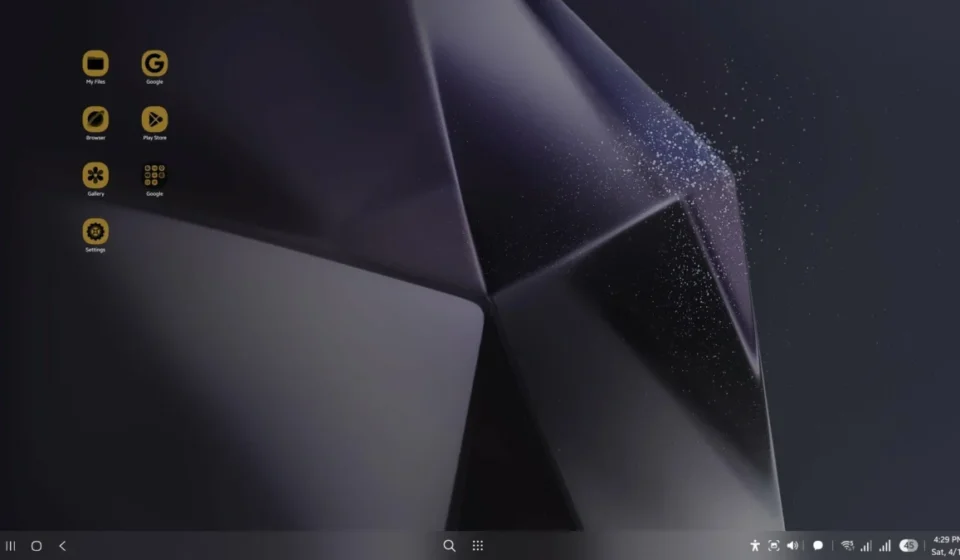
Samsung DeX has consistently been lauded for its depth of integration and user-centric design. It’s not merely an Android interface stretched across a larger screen; rather, it presents as a distinct desktop layer, meticulously optimized for productivity. This layered approach offers a level of polish and convenience that goes beyond the initial novelty. Key features, such as the ability to use the phone itself as a touchpad, demonstrate Samsung’s early understanding of the practicalities involved in transforming a smartphone into a functional computer. This intuitive control scheme significantly reduces the friction typically associated with navigating a desktop environment without a dedicated mouse.
The contrast between the two approaches becomes more apparent when considering the long-term usability. While Google’s desktop session in Android 16 boasts the necessary visual elements of a desktop interface, it often feels intrinsically linked to the phone’s mobile interface. It can feel like Android adapting to a desktop environment rather than a fully realized desktop experience in its own right. DeX, conversely, feels more self-contained and deliberate. Its development has focused on smoothing out the rough edges of using a phone as a primary computing device, fostering a sense of independence from the phone’s native mobile interface.

The Nuances of Implementation: Shipping vs. Sanding
The difference between Google’s approach and Samsung’s lies in what can be described as "shipping" versus "sanding." Google has successfully shipped a functional desktop mode, fulfilling a long-standing demand. However, Samsung’s approach has involved a continuous process of "sanding" – meticulously refining the user experience by addressing the less glamorous, yet crucial, aspects of desktop computing.
This distinction is evident in the customization and integration of settings. In Google’s Android 16 desktop mode, there isn’t a separate layer for desktop-specific settings. Consequently, basic adjustments, such as changing the DPI for improved text readability on a monitor, also affect the phone’s display. Similarly, altering the desktop wallpaper inadvertently changes the phone’s wallpaper, reinforcing the perception of the desktop as a mere projection rather than an independent workspace. This lack of separation can make the entire setup feel less like a dedicated workstation and more like an extension of the phone’s existing persona.
Furthermore, while Android 16’s desktop mode can handle demanding tasks, such as running games, indicating that the underlying hardware is more than capable, subtle imperfections persist. Issues like an incorrect camera preview aspect ratio, though seemingly minor, can break the illusion of a seamless desktop experience. These small details, while not hindering core functionality, contribute to a feeling of an early build rather than a fully polished product.

Samsung DeX, on the other hand, has evolved to incorporate a suite of features that genuinely enhance its usability as a daily driver. These additions are not merely cosmetic; they are designed to mitigate the inherent challenges of repurposing a phone for desktop tasks. With DeX, the phone feels like the powerful engine driving a dedicated desktop environment. In contrast, Google’s implementation, while functional, still often leaves the phone feeling like the primary focus, with the desktop experience serving as a secondary overlay.
Where the Seams Begin to Show
The limitations of Google’s current desktop implementation become most apparent when users attempt to personalize their setup. The absence of a distinct desktop-only settings layer means that any modifications made to display settings, such as DPI scaling, are mirrored on the phone’s screen. This lack of independent customization can lead to a feeling that the desktop environment is not truly its own entity, but rather a borrowed interface.
For example, adjusting the font size or display density for optimal readability on a large monitor will simultaneously alter these settings on the phone itself. This can be particularly disruptive if the user has carefully calibrated their phone’s display for mobile use. Similarly, changing the wallpaper on the desktop without the option for a separate desktop-specific background can make the entire experience feel less personalized and more like a direct reflection of the phone’s current state.

Beyond settings, subtle user interface inconsistencies can also detract from the desktop experience. While many applications function as expected, some exhibit minor graphical glitches or display anomalies. For instance, the camera preview within certain applications might display with an incorrect aspect ratio, even though the actual photos captured are of normal proportions. These types of imperfections, while not preventing task completion, can undermine the perceived polish and maturity of the desktop mode.
Samsung DeX, by contrast, has demonstrated a more consistent and refined approach to these issues. Its ability to maintain independent settings for the desktop environment and the phone itself offers a more seamless and less intrusive user experience. The platform has been engineered to minimize the friction points associated with using a phone as a desktop computer, providing a more integrated and professional feel. The extra features in DeX are not simply decorative; they serve a practical purpose in sanding down the rough edges that can make or break a desktop mode.
The Novelty Factor: A Persistent Challenge
Despite the advancements made by both Google and Samsung, a lingering sense of novelty remains a challenge for the category as a whole. The ideal future of computing is one that feels seamless and effortless, not one that relies on a collection of compromises facilitated by accessories like USB-C hubs. While the technology is demonstrably present, the effortless integration and intuitive user experience are still works in progress.

Broader Implications for the Android Ecosystem
Google’s official embrace of desktop mode in Android 16 carries significant weight beyond its impact on Pixel devices. This move transforms desktop mode from an OEM curiosity into a platform-level feature. By integrating it into stock Android, Google makes it considerably more difficult for other Android manufacturers and app developers to ignore its potential.
Historically, many manufacturers treated phone-powered desktop computing as a niche capability, often implemented with varying degrees of success. Google’s endorsement, however, lends legitimacy to the concept and provides a unified foundation for future development. This could lead to increased investment from accessory makers designing hardware specifically for Android desktop setups and encourage app developers to optimize their applications for a desktop-like environment.
Samsung’s pioneering efforts with DeX have proven the viability of this technology. Google’s current contribution, while perhaps less polished than Samsung’s established offering, has the power to catalyze wider adoption and innovation across the entire Android landscape. The potential exists for Google to drive a more standardized and robust desktop experience throughout the Android ecosystem, much like it has done with other core Android functionalities.

The Irony of Progress
There is an undeniable irony in Google validating a vision that Samsung has meticulously tested and refined in public for years, only to arrive with a solution that currently appears less complete. Samsung DeX continues to stand out as the more polished and feature-rich system, a testament to the time and effort invested in smoothing out the less glamorous but critical aspects that define the success or failure of a desktop mode.
Despite this, it is difficult to be overly critical of Android 16’s desktop mode finally making its debut. After years of anticipation, numerous demonstrations, and countless user workarounds, its official arrival is a significant step forward. Progress in technology, particularly in nascent fields, is not always perfectly polished. Sometimes, it manifests as a platform finally acknowledging the insights and demands of its most dedicated users – the "nerds" who saw the potential long before it was widely embraced. The journey of Android desktop mode, from a whispered promise to a tangible reality, is a compelling narrative of technological evolution and the persistent pursuit of a more integrated computing future.