




Windows 11 will let apps check your PC’s security, and they can shut you out if it fails.

Microsoft is ushering in a new era of proactive cybersecurity within Windows 11, with a forthcoming feature designed to provide applications with a verifiable security status of a user’s system. This initiative, dubbed "Windows baseline protection," aims to empower developers to make informed decisions about application deployment, potentially barring access for users whose devices do not meet a fundamental security threshold. The feature is currently in preview through the Windows Insider Program, with a general availability slated for 2027.
The core of Windows baseline protection lies in its ability to consolidate a suite of existing security defenses into a single, easily digestible metric that applications can query. This "yes or no" answer, or a more detailed report of deficiencies, allows software to dynamically adapt its behavior based on the user’s security posture. This could range from a simple warning to a complete lockout of the application.
Evolution of Windows Security and the Need for Baseline Protection
Microsoft’s commitment to enhancing Windows security has been a recurring theme, particularly in recent years. The company has consistently introduced new features and refined existing ones to combat the ever-evolving landscape of cyber threats. Features like Secure Boot, virtualization-based security (VBS), and memory integrity have become standard components of modern Windows installations, designed to create a more resilient operating system from the ground up.

However, the effectiveness of these features often hinges on user configuration and awareness. Many users, especially those focused on performance-sensitive tasks like gaming, have historically opted to disable certain security measures, such as Memory Integrity, to eke out marginal performance gains. While this might offer a slight boost in specific scenarios, it leaves their systems vulnerable to a range of attacks, including kernel-level malware.
Windows baseline protection represents a significant shift from a user-centric opt-in security model to a developer-empowered, baseline-enforced approach. By providing a standardized security attestation, Microsoft is essentially creating a floor for acceptable system security, enabling application developers to build with greater confidence and to protect their users from compromised environments. This initiative aligns with Microsoft’s broader strategy to build a more secure computing ecosystem, reducing the attack surface for both individuals and enterprises.
Unpacking the Security Checks
The initial iteration of Windows baseline protection scrutinizes a set of eight critical security features. These include the presence and proper functioning of:
- Security Processor (TPM 2.0): A dedicated microcontroller designed to secure hardware through integrated cryptographic keys.
- Secure Boot: A security standard that ensures a device boots using only software that is trusted by the Original Equipment Manufacturer (OEM).
- Virtualization-Based Security (VBS): A set of hardware security features that isolates critical system processes from the operating system, making them more resistant to attack.
- Memory Integrity: A VBS-enabled feature that uses hardware virtualization to isolate a protected memory region, preventing malicious code from altering critical operating system code.
- Signed and Windows-Certified Drivers: Ensuring that all drivers loaded onto the system have been verified by Microsoft, reducing the risk of using malicious or compromised drivers.
- Protection Against Kernel Debuggers: Preventing unauthorized access and manipulation of the operating system’s kernel, a common target for advanced malware.
- Protection Against Known Vulnerable Drivers: Proactively identifying and blocking the use of drivers with known security flaws.
These checks are performed at boot time. Any modification or disabling of these features necessitates a system restart to take effect, reinforcing the commitment to a secure boot process. The system then generates a report that applications can access. This report can be as simple as a binary "pass" or "fail" or a more granular list of missing or non-compliant security measures. For an added layer of security, applications can also request a hardware-backed token, which is inherently more resistant to spoofing than software-based indicators.

Microsoft has explicitly stated that this initial set of protections represents the "floor." Future updates are expected to introduce more stringent requirements, gradually raising the security bar for all Windows 11 users. This phased approach allows for broader adoption and user adaptation while steadily enhancing the overall security posture of the Windows ecosystem.
Industry Collaboration and Early Adopters
Microsoft is actively engaging with a diverse range of software developers and companies across various sectors to integrate Windows baseline protection. Early partners include prominent names in education, gaming, and productivity software.
Adobe, a leader in creative software, sees this feature as a significant step towards combating counterfeit and malicious software. By verifying the security integrity of a user’s system, Adobe can potentially identify and block the execution of unauthorized or tampered versions of its applications, protecting both its intellectual property and its user base from malware.
Battle.net, Blizzard Entertainment’s digital distribution platform, has also expressed interest in leveraging this new security measure. For a platform that hosts competitive online games, ensuring a fair and secure environment is paramount. Baseline protection can help Battle.net maintain a higher security standard while minimizing friction for legitimate players, potentially by identifying systems that might be compromised and susceptible to cheating or account hacking.

Other early collaborators include 1Password, a popular password manager that relies heavily on system security to protect user credentials; Raycast, a productivity tool that integrates various workflows; and Schoolyear, an educational platform used in academic institutions.
While these partners are actively testing the integration, none have yet committed to implementing a strict lockout policy for PCs that fail the baseline check. Microsoft has deliberately left the decision of how to act upon a failed security check to the developers themselves. This flexibility allows companies to tailor their response based on their specific risk tolerance and application criticality. Options could include informational messages, disabling non-essential features, or outright blocking access, providing a nuanced approach to security enforcement.
User Experience and Future Implications
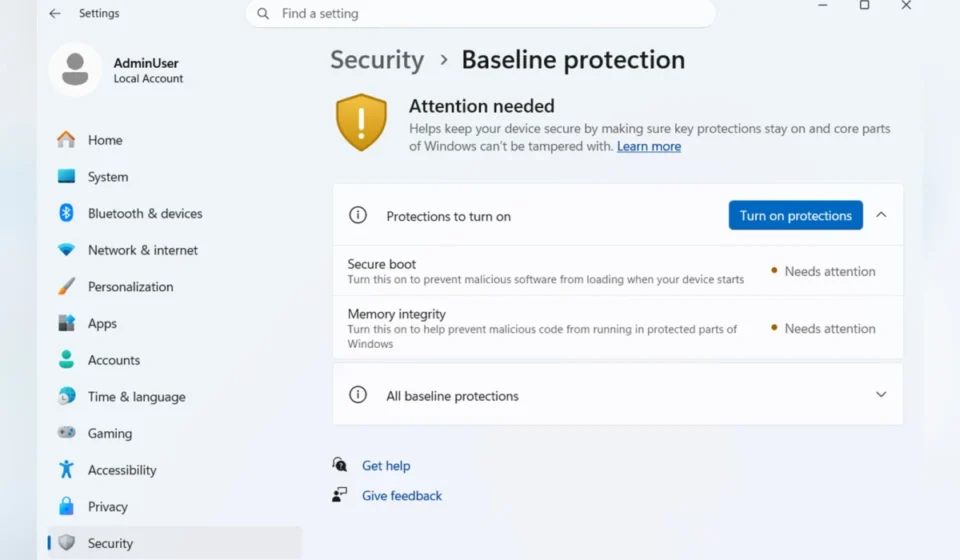
For end-users, the impact of Windows baseline protection will be visible within the "Security" section of Windows Settings. This area will provide a clear overview of the system’s security status and highlight any deficiencies. A straightforward interface will guide users through enabling the protections that Windows can manage directly, often requiring a restart. For security measures that necessitate firmware-level adjustments, such as enabling Secure Boot or configuring the security processor, Windows will provide step-by-step instructions to guide users through the process.
The implications of this feature are far-reaching. For consumers, it means a more secure computing experience by default, as applications they rely on will be less likely to run on compromised systems. This could significantly reduce the prevalence of malware infections and data breaches originating from insecure user environments.

For businesses, Windows baseline protection offers an added layer of assurance. By requiring a minimum security standard for applications to run, organizations can reduce their overall attack surface and mitigate risks associated with employee-owned devices or BYOD (Bring Your Own Device) policies. This feature could also streamline compliance efforts, as it provides a verifiable mechanism for meeting certain security mandates.
However, the rollout also presents potential challenges. Users who previously disabled security features for performance reasons might face difficulties running certain applications. Microsoft’s commitment to providing clear guidance and easy-to-use tools will be crucial in mitigating user frustration and ensuring a smooth transition. The potential for developers to implement strict lockout policies also raises questions about accessibility and the impact on users with older hardware or specific system configurations that may not fully support all baseline requirements.
The long-term success of Windows baseline protection will depend on its seamless integration into the Windows ecosystem, the willingness of developers to adopt it, and Microsoft’s continued commitment to evolving the security standards in response to emerging threats. As general availability approaches in 2027, the computing landscape will likely see a tangible shift towards a more secure and resilient digital environment.